


Inbox Zero for Reviewers: Managing Approval in Confluence
April 27, 2026
There is a particular kind of Monday morning panic that anyone responsible for reviewing Confluence content will recognize. You open your laptop, glance at your inbox, and see a backlog of email notifications, Slack pings, and "@" mentions from colleagues who all need your sign-off on something. A policy update. A release note. A vendor security review. A new customer-facing page. Some are blocking other people's work. Some have been waiting for days. And nowhere can you quickly answer the only question that actually matters: which of these still needs me, and in what order?
When approvals live in scattered notifications, reviewers default to two coping strategies, both bad. The first is to triage every channel from scratch each morning, which wastes time and lets things slip. The second is to ignore the queue until someone chases, which slows the entire team. Neither is sustainable when you are reviewing dozens of pages a week.
This is the gap Capable Approval closes for reviewers with a feature that is sometimes overlooked next to its more visible cousin, the dashboard: the Approval Inbox. The dashboard is the panoramic, organization-wide view of everything in flight. The inbox is something different. It is your personal, opinionated, action-first queue of approvals that need a decision from you, right now.
What the Inbox actually is
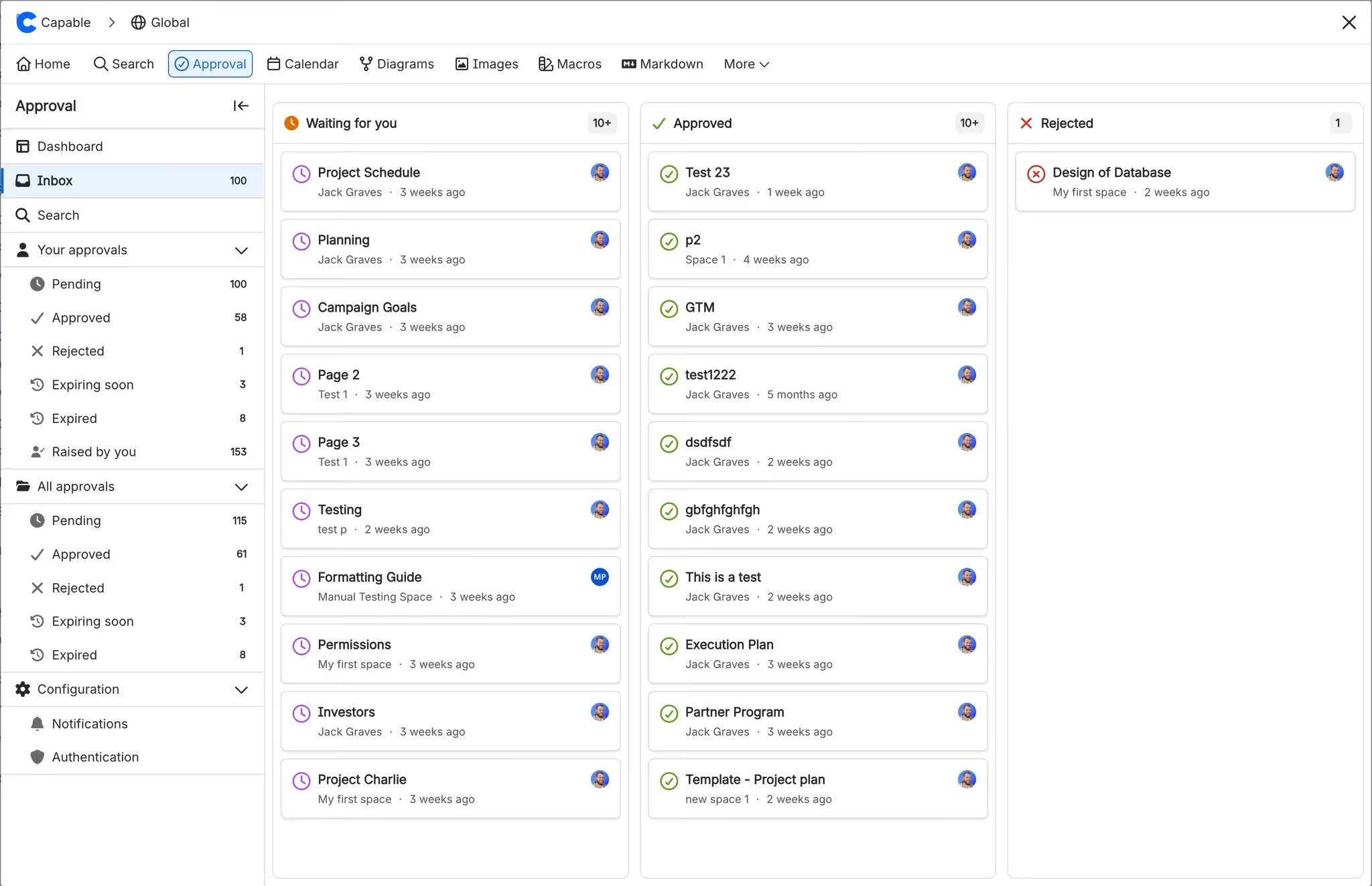
The Approval Inbox is a focused workspace inside Capable Approval that surfaces only the pages most relevant to you as an individual reviewer. It splits your workload into three column
The structure matters. A traditional notification stream tells you everything that happened, in chronological order, with no sense of priority. The inbox flips that: it tells you what is still open and unresolved, organized by the action it requires. The mental load drops significantly.
Drag, drop, done
The most underappreciated detail of the Inbox is that you do not have to open every page to act on it. You can drag a page from "Waiting for you" directly onto the "Approved" or "Rejected" column to record your decision. For routine approvals, things like minor doc edits, role changes you have already discussed in a meeting, or templated release notes, this turns a multi-step review into a single gesture.
For pages that genuinely need careful reading, you click in, review the content, and respond with an optional comment from the page itself. The two flows live side by side: speed for the obvious calls, depth for the ones that warrant it. (For a refresher on the in-page response flow, see Respond to an approval request.)
This combination is what makes "inbox zero" actually feasible for a busy reviewer. The decisions that should be cheap stay cheap.
How the Inbox fits into the rest of Capable Approval
The Inbox is intentionally narrow. It answers one question: what do I need to act on? Capable Approval pairs it with surfaces that answer the other questions a team eventually has.
The Approval Dashboard is the organizational view. Managers, content leads, and admins use it to see all pending and completed approvals across spaces, spot bottlenecks, and rebalance workloads. If the inbox is your desk, the dashboard is the floor plan.
Email and Slack notifications are how Capable nudges reviewers when something arrives. They are the doorbell. The inbox is where you decide what to do with whoever rang it.
The approval audit log is the long-term record, the file cabinet that compliance teams open during audits. The inbox flushes items into the log as you act on them.
Used together, the four surfaces give a reviewer a clean mental model: the doorbell tells me something happened, the inbox tells me what I owe, the page tells me what to read, and the audit log remembers what I decided.
Best practices for inbox-zero reviewing
Capable Approval supplies the surface; the habits make it work. A few practices we have seen high-performing review teams adopt:
Pick one daily review window. Treat the inbox like email triage. Fifteen focused minutes once or twice a day will clear a typical reviewer's queue faster than reacting to every Slack ping in real time. Notifications can keep flowing, but the inbox is where they come to be processed.
Use predefined teams to spread the load. If you are the only person on every "Waiting for you" list, the bottleneck is upstream of the inbox, not inside it. Set up predefined approval teams so that requesters can route to a team rather than a single person, and reviewers can claim items from a shared pool.
Decide your "draft drag" rule. Many teams agree that drag-and-drop is fine for routine, repeating page types (e.g. weekly status updates), and that anything customer-facing, contractual, or compliance-bearing must be opened and read. Write that rule down in your space-level review playbook so new reviewers inherit it.
Pair the inbox with approval thresholds. If your most important content requires more than one approver, set the threshold explicitly. The inbox will continue to show the page as "Waiting for you" until your decision is recorded, regardless of what other reviewers have done. No one falls through the cracks because they assumed someone else handled it.
Close the loop on rejections. A rejected page in your inbox is information, not failure. It tells you exactly which pages need rework before they can move forward. Pair it with the audit log so the rationale is preserved.
The actionable takeaway
If you do one thing this week as a reviewer, do this: stop using your email and Slack as the source of truth for "what do I owe?" Open the Approval Inbox, block fifteen minutes on your calendar, and clear the "Waiting for you" column. Drag the obvious approvals through, open the ones that need a careful read, and reject the ones that need rework with a comment that tells the author what to fix. By the end, you will have three things: a clear queue, a clear paper trail, and a much clearer Monday morning next week.
.avif)






%20(800%20x%20200%20px).avif)
