


Approval requests now route themselves
June 5, 2026
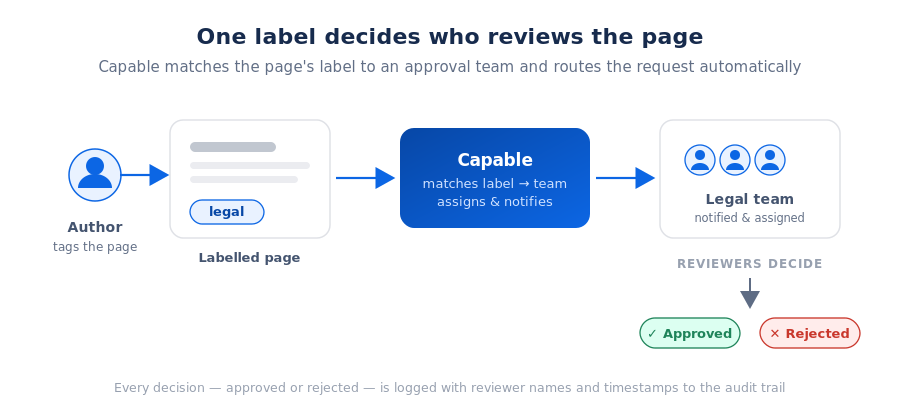
Tag a page with a label, and Capable sends the approval to exactly the right reviewers. No more guessing who signs off on what. You can now map Confluence labels to approval teams. Add the legal label and the legal team gets the request automatically. Add security and it goes to security. Set it up once per space; every page that carries the label routes itself from then on.
Approvals only work when the right people see them at the right time. The hard part was never the click to approve - it was knowing who that "right person" is for any given page, and remembering to add them every single time.
Today we're closing that gap. Label-based routing connects the labels you already use to organize Confluence with the approval teams who review your content. Once an admin draws the map, Capable does the routing for you - quietly, consistently, and on every matching page. This post walks through the problem it solves, exactly how it works, how to set it up, the situations where it pays off most, and the questions teams ask before they switch it on.
The problem with picking reviewers by hand
Most teams know, roughly, who should review what. Legal pages go to legal. Security policies go to security. Customer-facing help docs need a writer and a product owner. Engineering design docs need a tech lead. The knowledge is real - but it lives in people's heads, and in the moments when everyone's busy, it leaks out.
That leak shows up as friction every Confluence team will recognize:
- A policy page sits untouched for a week because the request went to someone on leave, and nobody noticed until the deadline.
- A release note ships without product sign-off because the author was moving fast and simply forgot to add the right reviewer.
- An audit turns up a document that skipped review entirely - not out of negligence, but because one page in fifty fell through a manual step.
- A new joiner requests approval from the people they know, who aren't actually the people responsible for that kind of content.
None of these are failures of intent. They're failures of memory and consistency - the predictable cost of asking a human to make the same routing decision, correctly, every single time. Manual selection works fine on a good day. It's the busy days, the handoffs, and the edge cases that quietly erode trust in the process.
Capable already gave you two of the three pieces needed to fix this. You could automate approvals at the space level so reviews trigger on page creation or edit, and you could define reusable approval teams so you weren't naming individuals one at a time. What was missing was the connective tissue: a way to send the right request to the right team based on what a page actually is - not merely which space it happens to live in. Label-based routing is that missing piece.
How label-based routing works
The idea is deliberately simple, which is the point. An admin creates a mapping between a Confluence label and an approval team. From then on, whenever a page carries that label, Capable automatically routes the approval request to that team - assigning the reviewers, notifying them, and tracking the outcome exactly like any other approval.
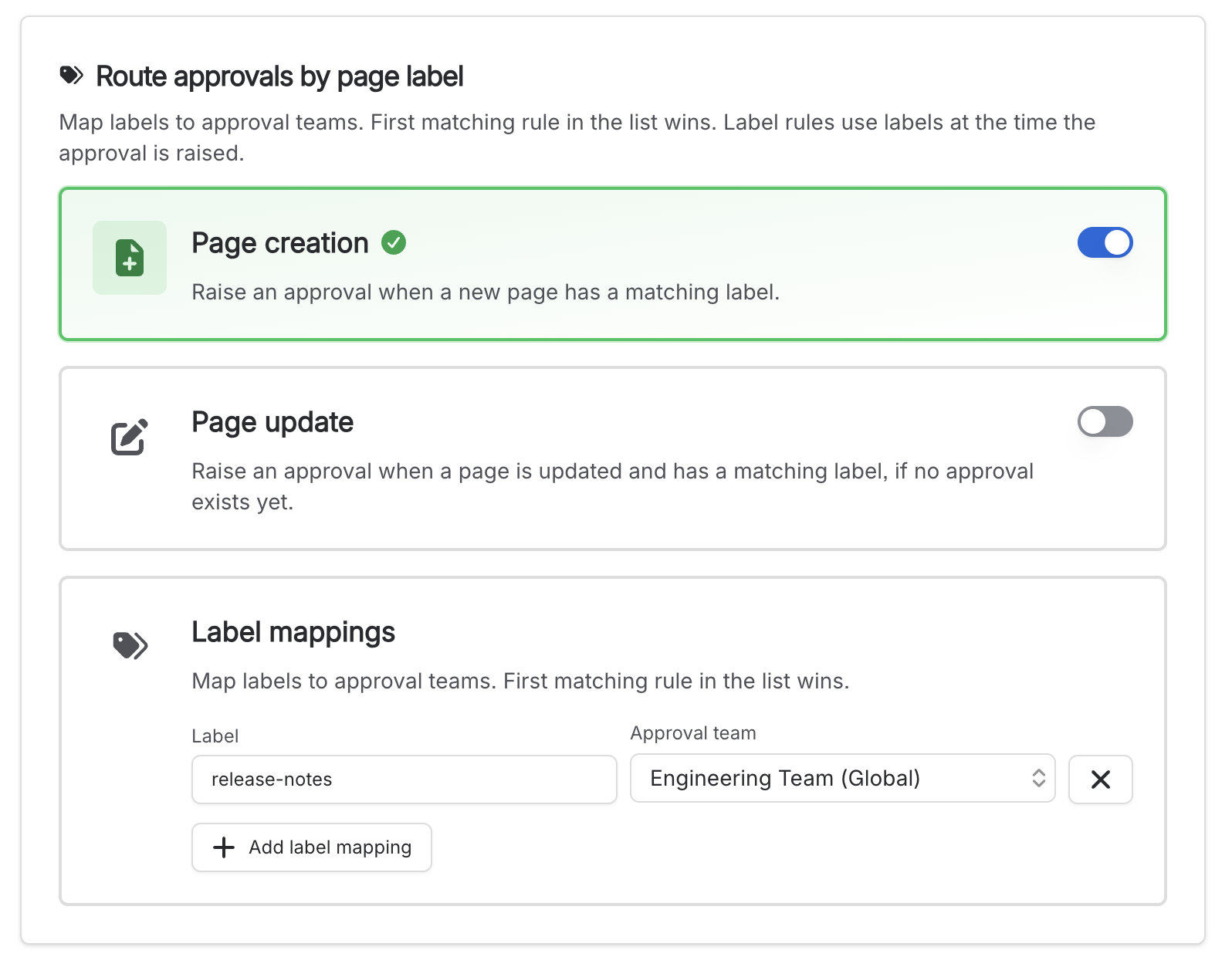
A few properties of this design are worth calling out, because they're what make the feature reliable rather than just convenient:
Nothing about the underlying approval changes. A routed request is a normal Capable approval. It respects your thresholds, your expiry rules, your audit logging, and your notification channels. Label-based routing decides who gets the request - everything downstream behaves exactly as your team already expects.
Built on the teams you already trust. Routing assigns your existing approval teams. If a team is connected to a Confluence group and its membership changes, the assignees update automatically - so the people on the hook are always current, even months after the rule was written. You set the rule once; the membership keeps itself honest.
Setting it up
Label-based routing lives alongside the rest of your approval configuration, in space settings. If you've configured automated approvals before, this will feel familiar - it's the same screen, with routing layered on top.
- Open your space's approval settings. Go to
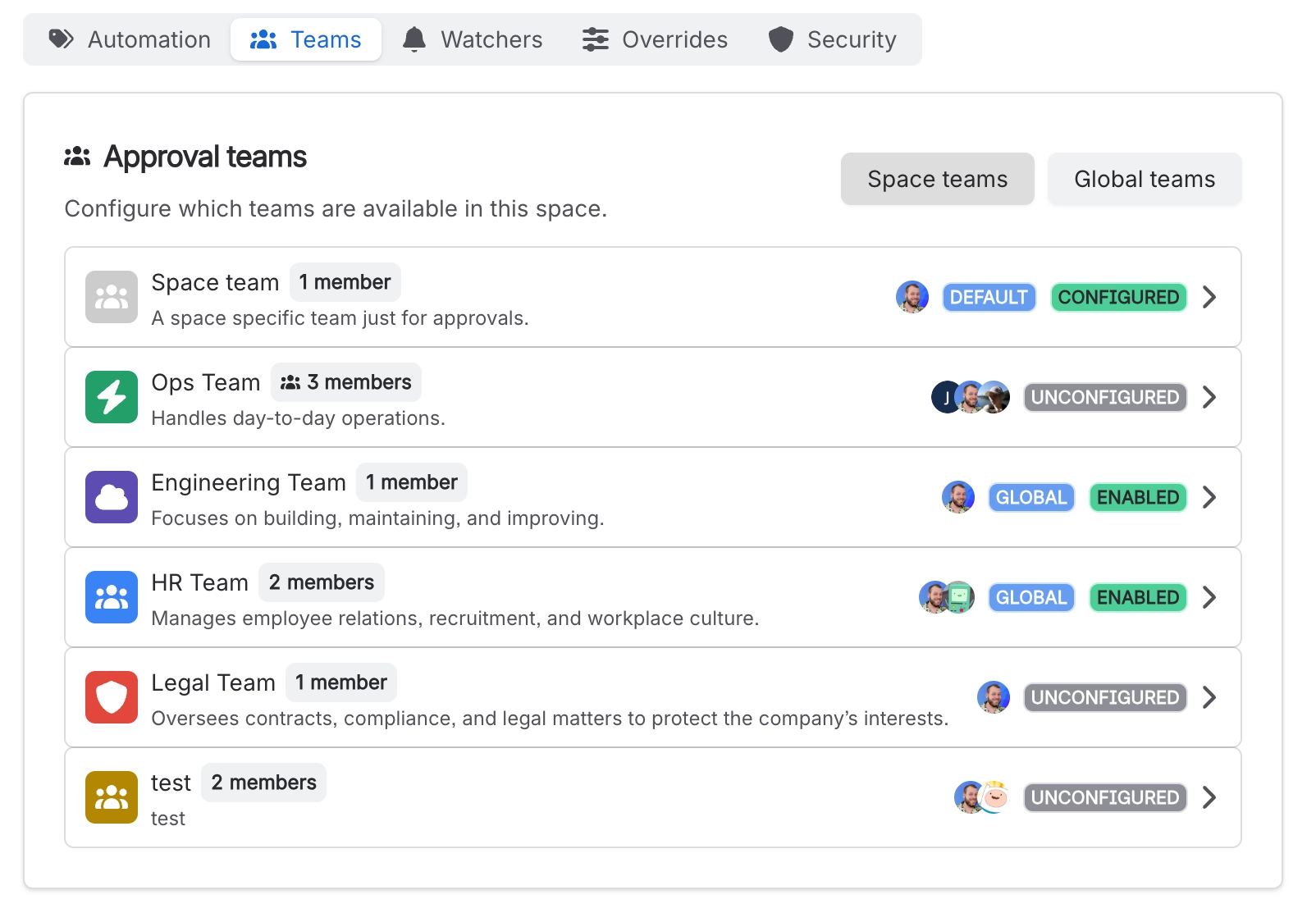
Space Settings → Integrations → Capable → Approval. This is the same place you manage automatic approvals, default teams, and thresholds, so everything stays in one view. - Define the teams that should review. Set up space or global approval teams - for example a Legal team, a Security team, and a Docs team. Connect a team to a Confluence group if you want its membership to stay in sync automatically as people join and leave.
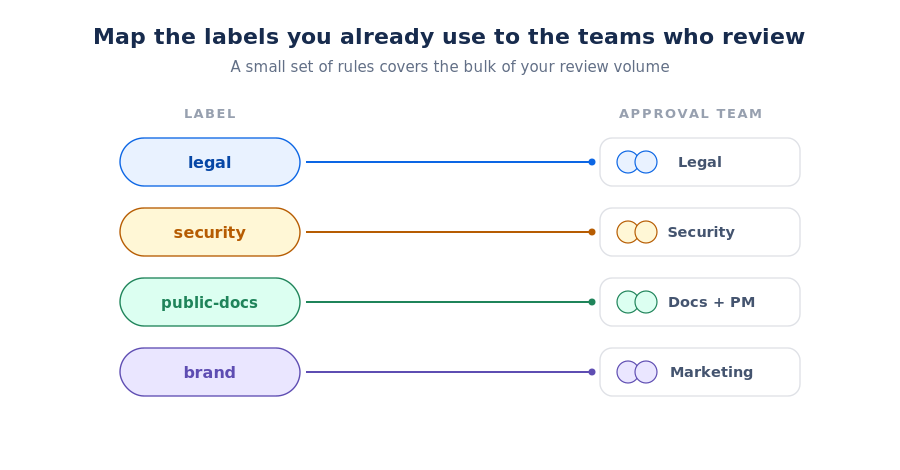
- Map labels to teams. Pair each label with the team that should handle it:
legal→ Legal,security→ Security,public-docs→ Docs. Use the labels your teams already apply where you can - routing works best when it rides on habits people already have, rather than asking them to learn a new tagging scheme. - Set thresholds and expiry to match policy. Decide how many approvals a page needs to pass, how many rejections stop it, and whether approvals expire on update or after a fixed date. This is what keeps routed approvals aligned to your governance requirements rather than just "someone clicked yes."
- Decide who can edit approvals, and whether to publish on approval. Optionally restrict edits to admins so routing rules can't be quietly altered, and turn on Publish on Approval if you want passing pages to go live automatically.
- Let it run. From here, any page carrying a mapped label triggers a routed approval automatically - notifying reviewers over Slack and email and logging every decision to the audit trail - when the applicable page is either published or updated and does not have an existing approval.
Routing rules live in the same space settings you already use for approvals.
A good rollout doesn't try to map everything at once. Start with the one review type you care about most - usually the highest-stakes or most frequently-missed one - map its label to a team, and confirm a real page routes the way you expect. Once that's proven, add the next label. Within a few rules you'll typically have covered the bulk of your review volume, and the long tail can stay manual.
What it looks like in practice
The clearest way to see the value is by content type. Here are mappings teams commonly set up on day one, with the kind of page each one catches:
-
legal- Contracts and policy pages. Anything taggedlegalroutes straight to counsel before it can be approved. This is the classic case for regulated teams: under controls like SOC 2 or ISO 27001, every change to a policy needs a documented sign-off from the right authority, and a label makes that automatic rather than aspirational. A contributor edits the data-retention policy, tags itlegal, and counsel is on it without a single Slack message asking "can you take a look?" security- Security standards and runbooks. Incident runbooks, access policies, and hardening standards reach the security team automatically. These are exactly the pages where an accidental skip is most costly - a runbook that publishes with the wrong steps, or a standard that changes without review. Routing makes sure sensitive procedures never go out without the right eyes on them, even when they're edited in a hurry mid-incident.public-docs- Customer-facing help content. Help-center and knowledge-base pages route to a writer and a product owner for a combined brand-and-accuracy check before they go live to customers. The label captures something a space alone can't: this page is external, so it carries reputational weight and deserves a second reader, regardless of which team's space it was drafted in.brand- Marketing and external copy. Web copy, campaign pages, and announcement drafts pull in marketing and, where needed, legal for a fast sign-off. For teams that publish straight from Confluence, this closes the gap between "draft looks done" and "draft is actually cleared to ship."
Notice what's common across all of these: nobody has to remember the rule. The label is the rule. Authors tag pages the way they always have, and the right review simply happens. The cognitive load of "who should look at this?" moves out of every author's head and into one configuration an admin maintains.
Putting it to work: labels as a routing primitive
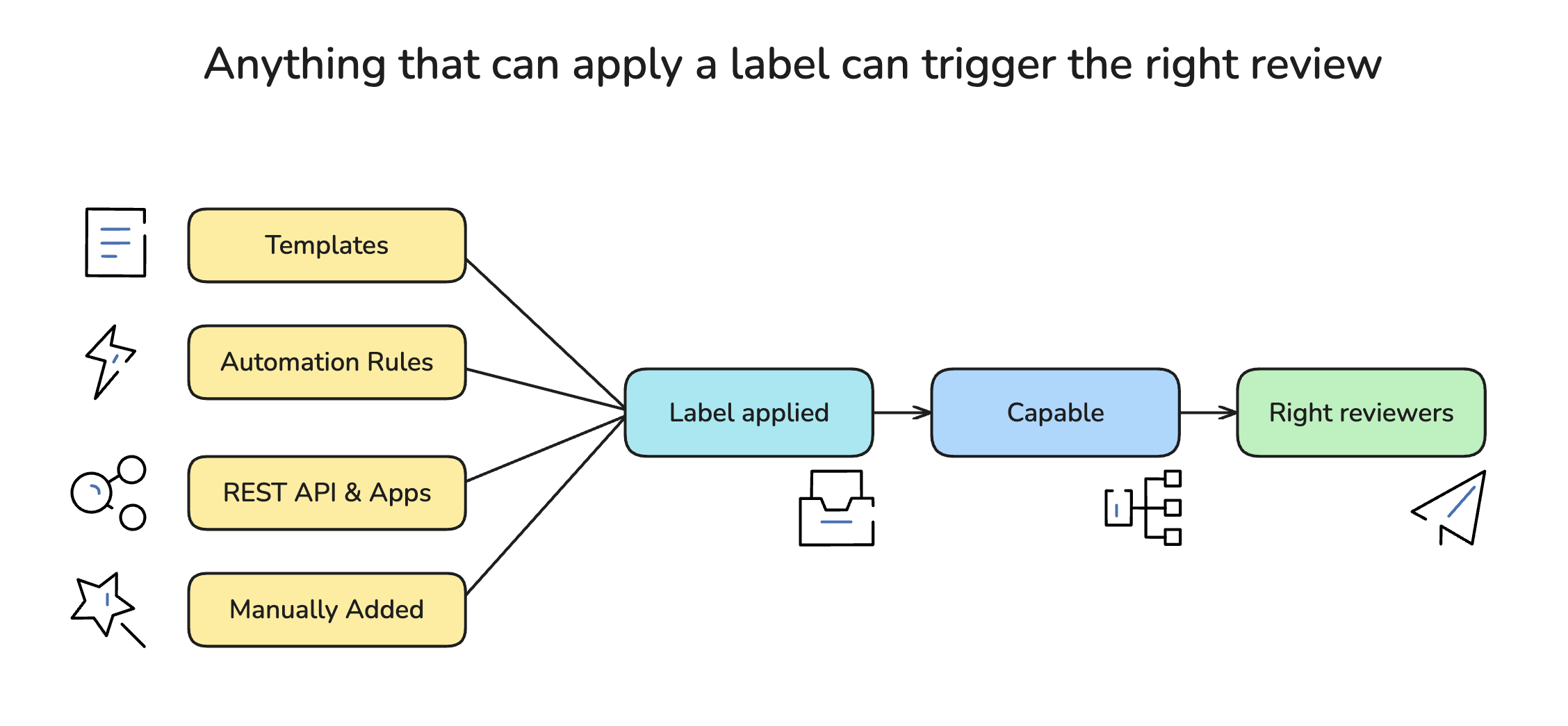
The real leverage comes from the fact that label-based routing turns a single label into a trigger. Anything in Confluence that can apply a label can now, indirectly, kick off the right approval - which means you can wire review into the way your team already creates content. Here are the patterns teams reach for first.
Templates that route themselves
Add a label to a Confluence page template, and every page created from that template arrives pre-tagged - and therefore pre-routed.
Build a "Policy" template with the legal label baked in, and the moment someone spins up a new policy page, it's already destined for counsel. Do the same with an "Incident Runbook" template carrying security, or a "Help Article" template carrying public-docs. The author starts from the template, fills in the content, and the approval routes to the right team with zero extra steps. This is the cleanest way to guarantee a whole class of document is always reviewed correctly: you encode the review path into the starting point, not into a habit you hope people follow.
It also makes onboarding trivial. A new joiner who picks the "Policy" template gets the legal review for free, without ever needing to know who legal is or that an approval step exists.
Confluence Automation rules
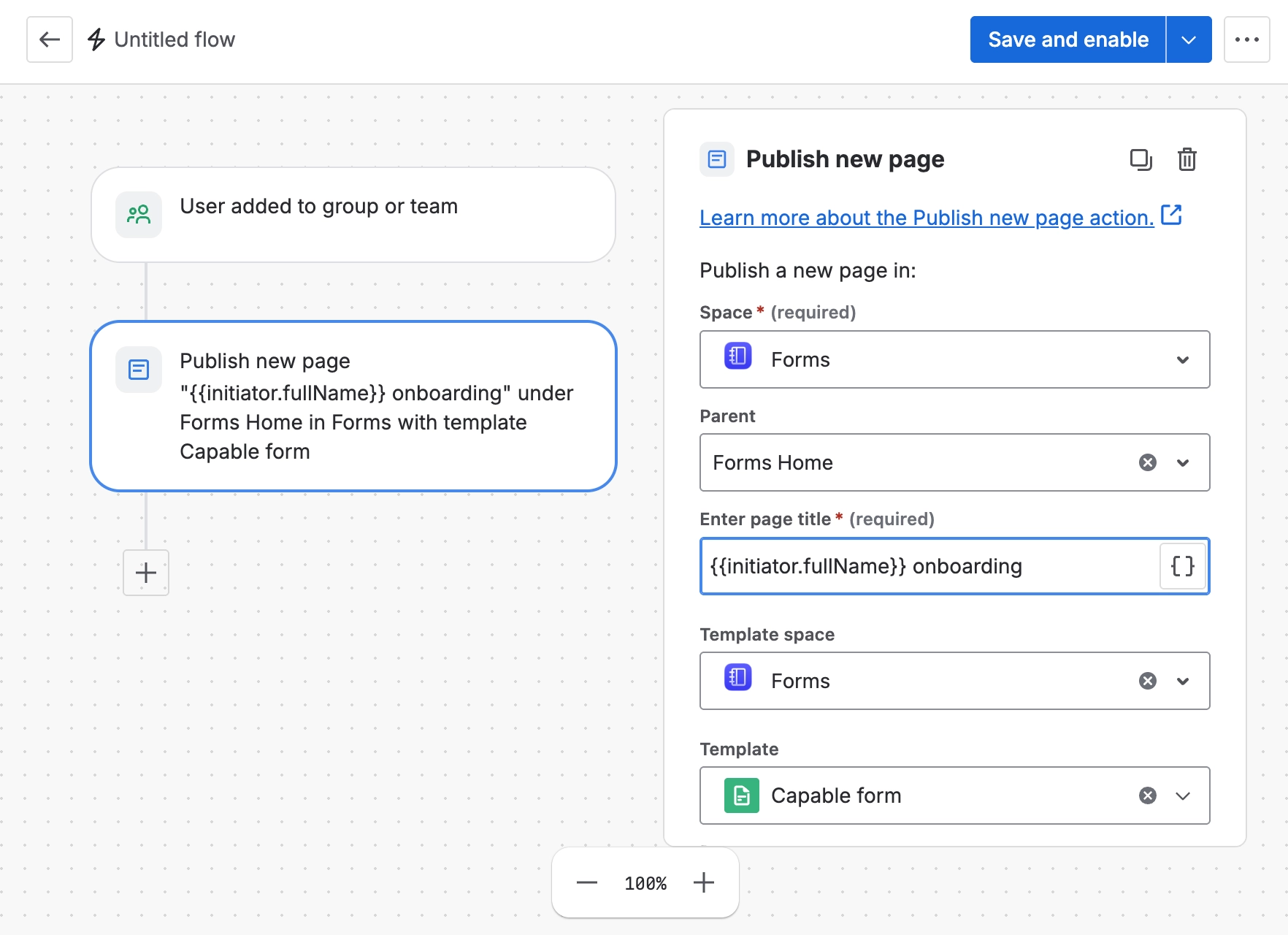
Confluence's own Automation rules can add labels in response to events - and because Capable routes on labels, those rules effectively become approval triggers. A few examples:
- Route by location. When a page is created or moved into the "Policies" space → add the
legallabel. Now anything that lands in that space is automatically sent to counsel, even if the author never thought about review. - Route by lifecycle. When a page's status changes to "Ready for review" → add the
public-docslabel. Authors keep drafting freely; the review only fires once they flag the page as done. - Route on a schedule. On the first of each quarter, add the
securitylabel to every runbook → forcing a periodic re-review of sensitive procedures so they never silently go stale. Pair this with approval expiry for a complete recurring-review loop. - Route by content signal. When a page title contains "DPA" or "contract" → add
legal→ catching sensitive documents even when the author forgets to tag them.
In each case Confluence handles the when and Capable handles the who - the label is the handshake between them.
Other label-driven triggers
Because the trigger is just "a label appeared," the same mechanism plugs into anything else that can label a page:
- The REST API and apps. A script, integration, or another Marketplace app that applies a label will route the page exactly the same way - useful for migrations, bulk-tagging legacy content for review, or pulling Confluence into a larger workflow tool.
- Bulk labelling for a catch-up review. Need every page in a knowledge base reviewed before an audit? Apply the mapped label across them and each one enters the right approval queue, logged and tracked, instead of being chased by hand, when its updated or created.
- Author-applied labels as a deliberate "send for review" gesture. Even with nothing automated, simply adding the label is the request - a lightweight, memorable action that replaces hunting for the right reviewer in a picker.
The throughline: you don't have to choose one way to trigger reviews. Templates cover new content, Automation rules cover events and schedules, the API covers integrations, and manual labelling covers the one-offs - all feeding the same routing map, all producing the same audited, consistent result.
Why this matters beyond convenience
Saving a few clicks is the surface benefit. Two deeper things change once routing is automatic.
Consistency becomes provable. When the system routes every matching page, "who reviewed this?" stops being a question you hope someone answered and becomes something you can demonstrate on demand. Every routed approval is logged with reviewer names and timestamps - which is precisely the evidence auditors ask for under frameworks like SOC 2, ISO 27001, and FDA 21 CFR Part 11. You're not assembling a paper trail after the fact; the trail builds itself as a byproduct of normal work.
The process scales the way your content does. Manual reviewer selection gets harder as you add spaces, teams, and content types - more places to remember the right rule, more chances to get it wrong. A label map gets easier: you define the rules once, and they apply to every new page that fits, no matter where or by whom it's created. The larger and more active your Confluence instance, the more a small set of routing rules earns its keep. What would otherwise be a growing coordination tax becomes a fixed, one-time setup.
Frequently asked
Do authors have to do anything differently?
No. Authors keep labelling pages the way they already do. If a page carries a mapped label, the approval routes itself - there's nothing extra to learn or remember. That's the whole point: the change lives in configuration, not in everyone's daily habits.
Can I still request approvals manually?
Yes. Label-based routing handles the predictable, repeatable cases automatically; you can always request approval on a page by hand for one-off reviews or to add an extra reviewer on top of the routed team.
What if a team's membership changes after I set up the rule?
Teams connected to a Confluence group stay in sync automatically. When the group changes, the assignees update too - so routing always reaches the current members without anyone revisiting the rule. New joiners are covered the day they're added to the group; leavers drop off the same way.
Does this work with publishing?
It does. Combine routing with Publish on Approval so that a labelled page is reviewed by the right team and then published automatically once it passes - review and release in one unbroken flow.
Where do I configure all of this?
Everything lives under Space Settings → Integrations → Capable → Approval, alongside your existing automated-approval settings. There's no separate area to learn.
Label-based routing is available now as part of the Approval capability in Capable for Confluence and Capable Approval for Confluence. If you already use automated approvals, the fastest way to start is to add one rule - pick your most common review type, map its label to a team, and watch the next matching page route itself.
Set up your first label-to-team rule in a couple of minutes.
.avif)






%20(800%20x%20200%20px).avif)
