

The Right Reviewer, Every Time: Content Sign-Off in Confluence
April 7, 2026
You've just finished a policy update in Confluence. You know it needs sign-off before it's considered current, but you're not entirely sure who the right approvers are. Is it the Legal team? The Security lead? The department head? Both? You make your best guess, tag a few people in the comments, and wait.
Two days later, someone replies: "This doesn't need my sign-off - you want Sarah." Sarah is out of office. Someone suggests a colleague who might cover for her. That person approves it, but then a week later Legal comes back and says they should have been consulted. The page gets updated, the informal approval is already buried in a comment thread, and you're back to square one.
If this scenario feels familiar, you're not alone. It's one of the most common friction points in Confluence-based approval processes - not a lack of willingness to review content, but a lack of structure around who is responsible for reviewing what. Without a clear, consistent answer to that question, every approval cycle becomes its own small negotiation.
This is precisely the problem that Capable Approval's predefined approval teams are designed to solve.

Why "Just Tag Someone" Doesn't Scale
In small teams, informal reviewer selection works well enough. Everyone knows who owns what, the right people are easy to reach, and the cost of occasionally looping in the wrong person is low. As organisations grow, this model breaks down quickly.
Several things tend to happen simultaneously. The organisation becomes more specialised, so content requires review from multiple distinct domains - Legal for risk language, Security for anything touching data handling, Finance for anything with budget implications. The roster of who holds each of those roles starts changing: people leave, responsibilities shift, new hires join. And the volume of content that needs review increases, meaning that any inefficiency in the reviewer selection process gets multiplied across dozens or hundreds of page approval requests every month.
The result is a fragmented, inconsistent approval process where the quality of a review depends heavily on whether the author happened to know the right person to tag. That's not governance - it's luck.
Structured approval teams replace luck with policy.
How Predefined Approval Teams Work in Capable Approval
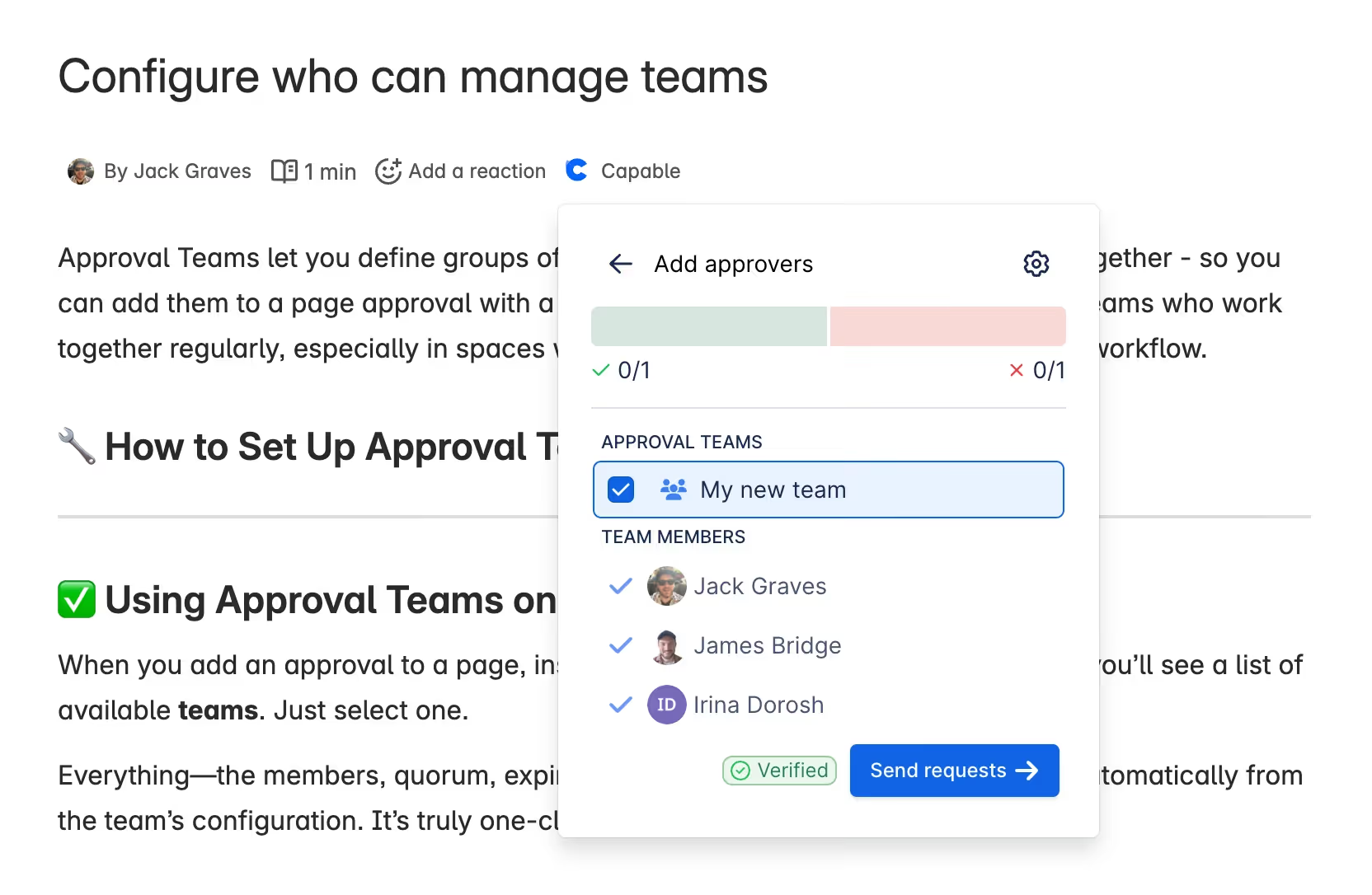
Capable Approval allows Confluence administrators to define named teams of reviewers that can be assigned to approval requests in a single action. Rather than searching for individual users each time a page needs review, authors select the appropriate team - "Legal Review," "Security Sign-Off," "Product Leadership" - and Capable handles routing notifications to every current member of that team.
The setup is managed at two levels, giving organisations the flexibility to match their governance structure:
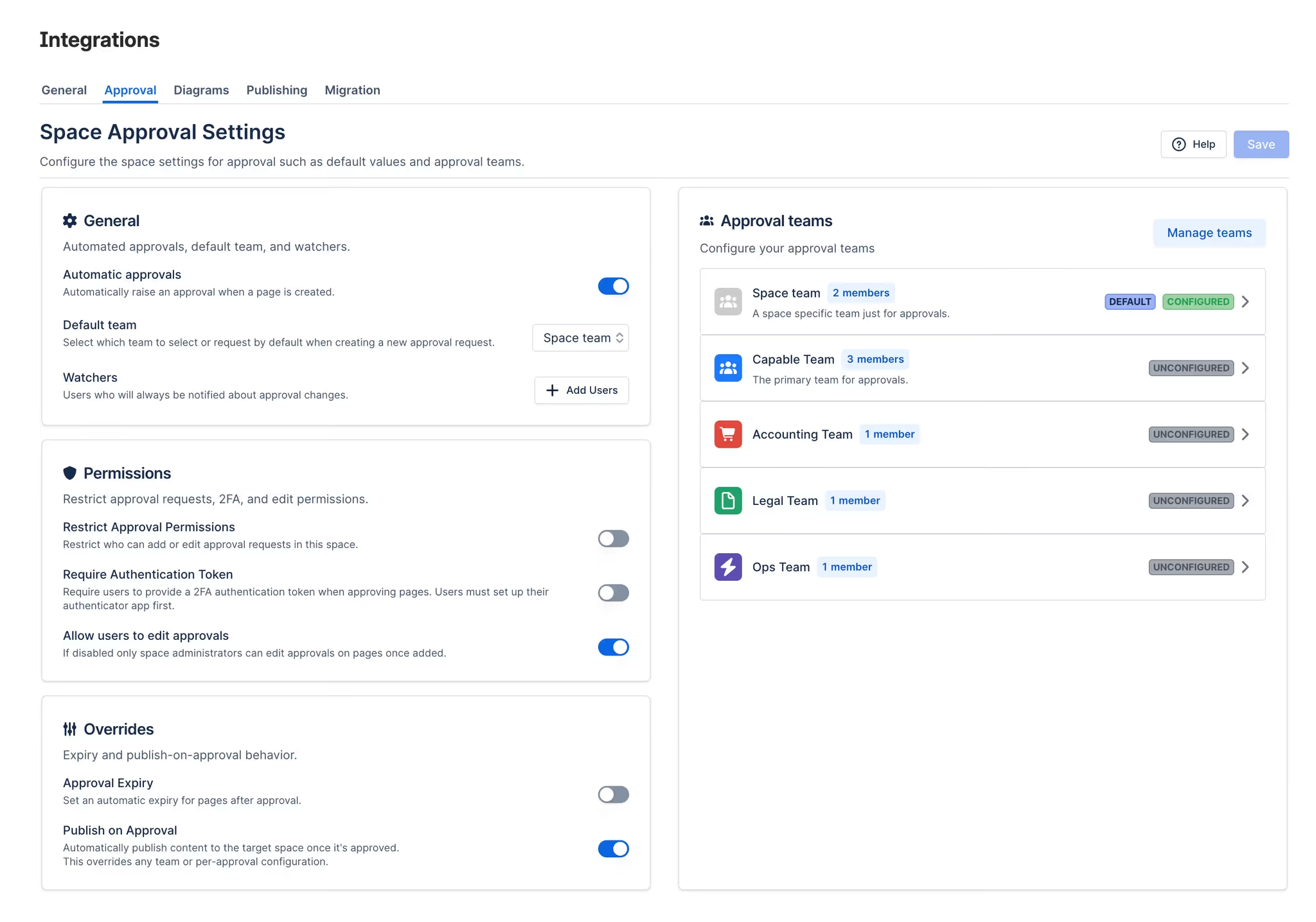
Global teams are configured by Confluence instance administrators and are available across all spaces. These are well-suited for cross-functional review bodies - an executive approval group, a central compliance team, or a cross-departmental policy review committee. Any space can add a global team to an approval request, ensuring consistent access to organisation-wide reviewers wherever they're needed.
Space-level teams are configured by space administrators and apply within a specific space. This is the right model for domain-specific review bodies: a documentation team's editorial board, a product space's design review group, or an HR space's HR leadership panel. Space-level teams can be tailored to the specific content types and review requirements of that space without affecting how other spaces work.
Both types of teams integrate cleanly with approval threshold settings, so you can define not just who reviews content, but how many approvals are needed before a page is considered approved. A three-person Legal team might require two out of three approvals. A five-person Security team might require unanimous sign-off for certain content categories. The threshold configuration lets you encode your actual review policy rather than leaving it implicit.
Keeping Teams Current: Dynamic Membership
One of the less obvious advantages of predefined approval teams is how they handle membership changes. In a manually maintained reviewer list, when someone leaves the organisation or changes roles, every page that references them as an approver becomes stale. Authors who don't know the team has changed continue routing requests to the wrong people, and the review process quietly degrades.
Capable Approval teams can be connected to Confluence groups, which means membership is maintained centrally rather than duplicated across every individual approval configuration. When the Legal team gains a new member or loses one, the change propagates automatically: every future approval request sent to the Legal team goes to the right people without any manual intervention from space administrators or content authors.
For organisations with high staff turnover or frequent role changes, this is a meaningful operational benefit. It means the approval process remains accurate without requiring someone to audit and update reviewer lists across dozens of spaces every time the org chart changes.

Consistency as a Compliance Asset
There's a compliance dimension to this that's worth making explicit. Many regulatory frameworks - SOC 2, ISO 27001, ISO 9001 - require not just that content is reviewed, but that it is reviewed by appropriately qualified individuals. An approval from an intern doesn't carry the same weight as an approval from a qualified security professional, and auditors making this distinction will look for evidence that the right people were involved.
Predefined approval teams create a documented, repeatable mapping between content types and review authorities. The organisation's security policy is always reviewed by the Security Review team. HR policies are always reviewed by the HR Leadership team. This consistency is itself audit evidence: it demonstrates that review responsibilities have been formally assigned, not informally improvised.
The approval audit log captures which team was assigned to each review, who within that team responded, and what decision they made - giving auditors a complete, timestamped chain of custody for every piece of approved content.
From Setup to Operation: What Authors Actually Experience
For content authors, the practical impact of predefined approval teams is straightforward: less friction and more confidence in the approval request process.
When requesting approval, authors can search for predefined teams by name rather than hunting for individual users. The team name itself carries semantic meaning - "Legal Review" is self-explanatory in a way that a list of four Confluence usernames is not. Authors know immediately whether they're sending the request to the right body, and they don't need to maintain their own mental model of who belongs to which review group.
Once the request is submitted, team members are notified automatically - via Confluence notifications and, if Slack integration is configured, via Slack as well. Reviewers can respond directly from the page, approving or rejecting with an optional explanatory comment. The author tracks progress through the approval dashboard, where they can see at a glance how many team members have responded and whether the configured threshold has been met.
If a review is taking too long, the dashboard makes it easy to identify who hasn't yet responded - without requiring the author to message each reviewer individually.
Your Actionable Takeaway
If your Confluence approval process is currently informal - authors tagging people in comments, Slack messages to "the usual suspects," or ad hoc reviewer selection on a page-by-page basis - the single highest-leverage change you can make is to define your first set of predefined approval teams.
Start by identifying the two or three types of content in your organisation that most commonly need review from the same group of people. Policy documents reviewed by Legal. Security-sensitive pages reviewed by the Security team. Customer-facing documentation reviewed by a content or comms team. For each of these, create a named approval team in Capable Approval's space or global settings, populate it with the right current members, and connect it to the relevant Confluence group if one exists.
Then, for your next approval request in each of those categories, use the team instead of tagging individuals manually. You'll immediately notice that the process is faster to initiate, easier for reviewers to understand, and more consistent in who gets notified. Over time, as your approval teams become the standard mechanism for review routing, you'll find that the quality and reliability of your approval process improves - not because your team became more disciplined, but because the process itself stopped requiring discipline to work correctly.
Capable Approval is part of the Capable suite of apps for Confluence. To learn more about setting up approval teams and streamlining your review workflows, visit the Capable Approval Help Center.
.avif)






%20(800%20x%20200%20px).avif)