

Stop Chasing Approvals: How to Put Confluence Content Review on Autopilot
February 27, 2026
Every team has that one Confluence space where documentation goes to quietly age. Pages get updated, then... nothing. The updated policy sits in limbo, unreviewed and technically unapproved, while the team carries on assuming everything is current. Meanwhile, the person responsible for approval never knew a review was needed in the first place.
This is not a people problem. It is a process problem. And it is surprisingly easy to fix.
The Approval Gap in Confluence
Confluence is excellent at storing information. Teams use it for SOPs, runbooks, policy documents, onboarding guides, technical specifications, and more. But the platform's native capabilities stop well short of ensuring that any of that content has been formally reviewed and approved.
Most teams work around this with a patchwork of reminders: a Slack message here, a Jira ticket there, maybe a calendar event that someone remembers to set. The result is an inconsistent, manual process that falls apart whenever the team is busy, understaffed, or simply distracted.
The consequence? Content that is stale, outdated, or in regulatory terms, non-compliant. For teams operating under SOC 2, ISO 27001, ISO 9001, or FDA 21 CFR Part 11 frameworks, that gap carries real risk.
What Automated Approvals Actually Do
Capable Approval includes a feature specifically designed to close this gap: automated approvals. Rather than relying on someone to manually trigger a review every time a page is created or edited, the system does it for them.
Here is how it works in practice. A Confluence space administrator configures automated approvals at the space level. They define a default set of reviewers, set an approval threshold (how many approvals are needed for the page to be considered approved), and configure what happens when a page is updated. From that point forward, any new page created in that space, or any existing page that gets edited, automatically kicks off an approval request to the designated reviewers.
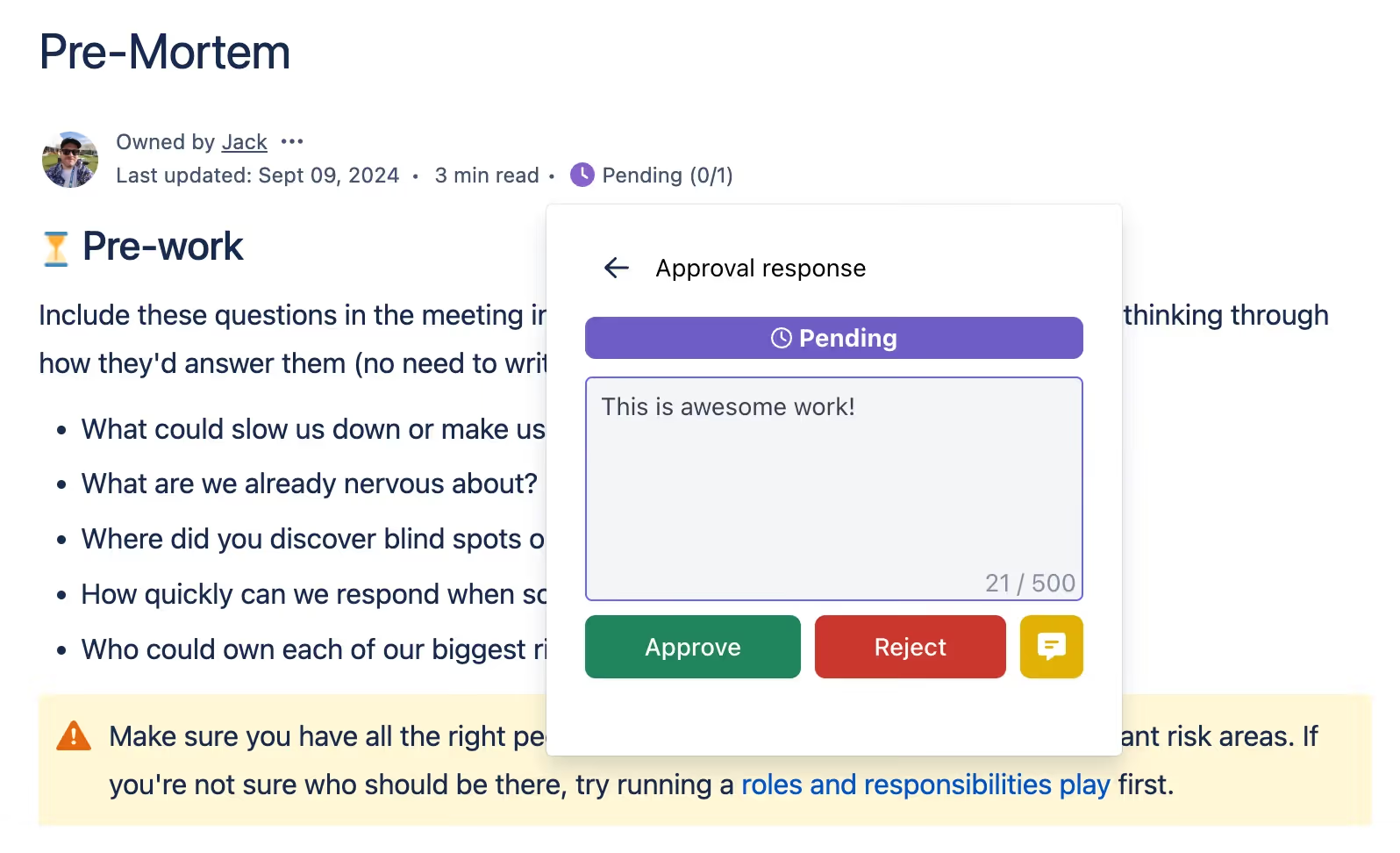
The reviewers are notified by email or Slack, they see the request in their approval dashboard, and they can respond directly from the Confluence page. No manual setup required. No one needs to remember to request a review.
The Configuration Options That Make It Flexible
One of the things that makes automated approvals genuinely useful rather than just theoretically appealing is the level of configurability on offer.
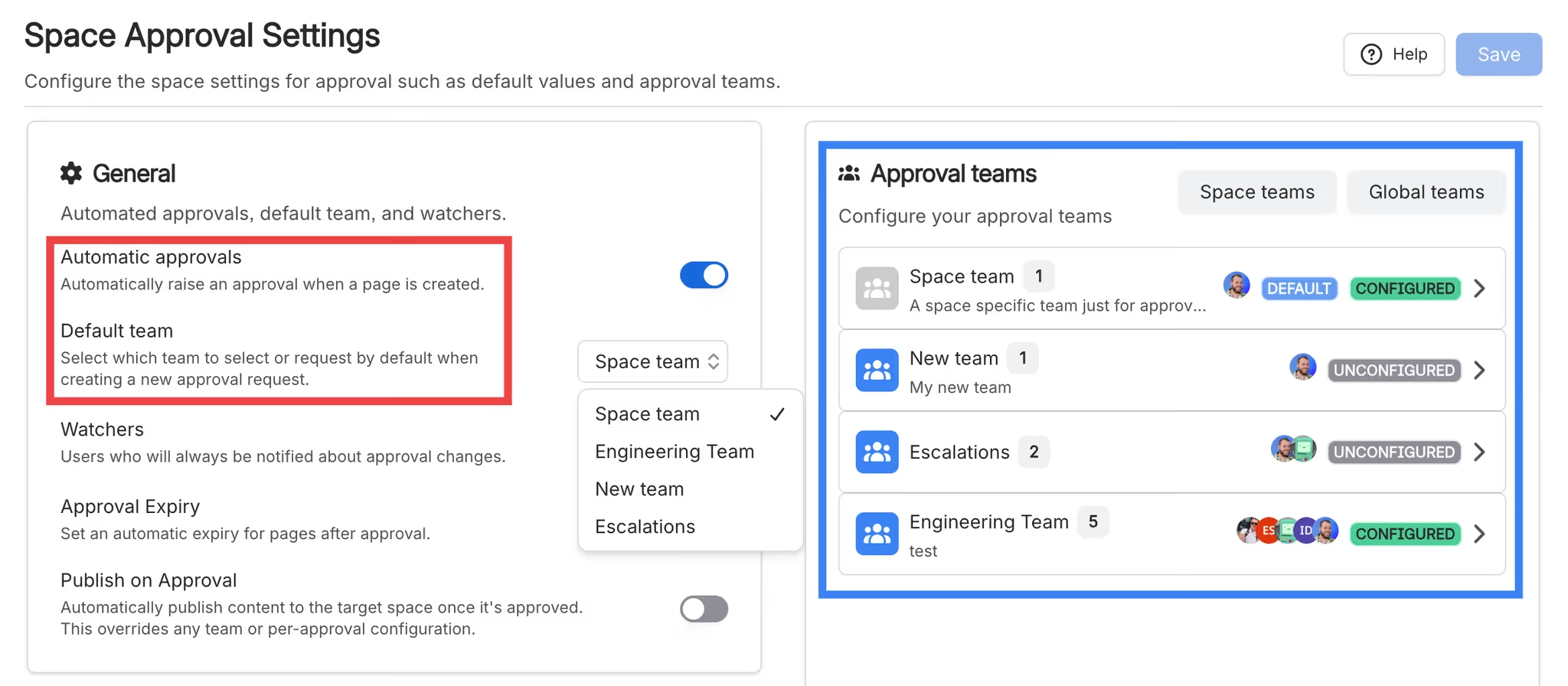
Default reviewers can be individual team members or a predefined team, a named group of people configured in advance for exactly these recurring scenarios. If your legal team always reviews policy documents, you configure them once as a team and select them as the default reviewer for your policy space. Done.
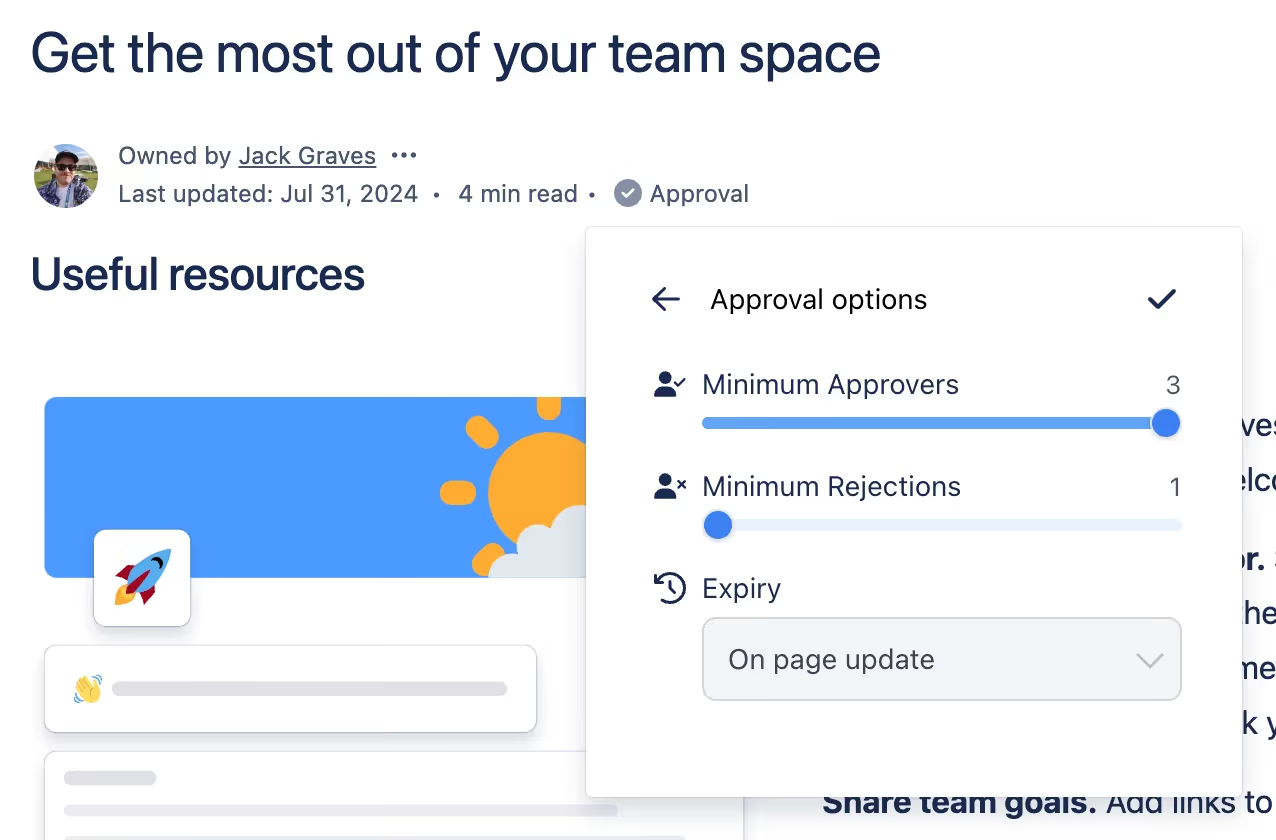
Approval thresholds let you decide how many reviewers need to approve before content is considered approved. You can set a percentage (for example, at least 75% of reviewers must approve) or a fixed number. You can also configure how many rejections it takes to formally reject a document. This is particularly valuable for teams that want lightweight sign-off on routine updates but require higher consensus for significant changes.
Expiry settings control what happens over time. You can configure approvals to expire when a page is updated, which means every substantive edit triggers a fresh review cycle automatically. Or you can set time-based expiry: monthly for fast-moving content, quarterly or annually for more stable documentation. This pairs directly with Capable's page expiry feature to ensure nothing slips through indefinitely.
Edit controls determine who is allowed to change the automated approval configuration. This prevents individual contributors from disabling review requirements without authorization, which matters a great deal in regulated environments.
Real-World Scenarios Where This Pays Off
IT documentation and runbooks: Infrastructure procedures change frequently. With automated approvals, every update to a runbook goes back through the senior engineer or team lead for sign-off. The approval history becomes a built-in change log, giving teams an auditable record of who reviewed what and when.
Knowledge management and support content: Support documentation needs to stay accurate. Automated approvals for support spaces mean that when a product changes and documentation is updated, a review is automatically triggered before the revised content is relied upon by the team.
Marketing and legal review: Compliance-sensitive content like privacy policies, terms of service, or marketing claims often requires legal sign-off before publishing. Automated approvals enforce that review at the Confluence level, before content ever reaches a publishing workflow.
Onboarding and HR documentation: Employee-facing documentation has to be accurate and current. With automated approvals and time-based expiry, HR teams get a regular prompt to review onboarding materials, safety policies, and benefits information without needing a manual reminder system.
The Compliance Angle
For teams operating under formal compliance requirements, automated approvals do more than save time. They provide the infrastructure for a defensible audit trail. Every approval event in Capable is logged with a timestamp, the identity of the reviewer, the approval status, and any comments provided. Because approval is triggered automatically rather than manually, there is no gap where a page could be updated and reviewed without being logged.
This is the difference between a documentation governance policy that exists on paper and one that is actually enforced at the platform level.
Getting Started
If you manage a Confluence space with content that should be reviewed on a regular cadence, automated approvals are one of the highest-leverage settings you can configure. The setup takes a few minutes and the ongoing maintenance is minimal.
Start with one space: ideally one with compliance requirements or frequent updates. Configure a default reviewer (or use a predefined team), set a threshold that reflects your team's decision-making culture, and choose an expiry rule that matches how often the content actually changes. Then let the system do the work.
The full setup guide is available in the Capable Approval documentation. Once you have seen how much quieter the "has this been reviewed?" conversation becomes, you will want to roll it out to every space.
Actionable takeaway: Pick one high-traffic or compliance-sensitive Confluence space this week and configure automated approvals with a predefined team as the default reviewer. Set expiry to trigger on page updates so that every edit automatically resets the review cycle. That single change will do more for your documentation governance than a dozen manual reminders ever could.
.avif)






%20(800%20x%20200%20px).avif)