

Stop the Rot: Content Quality for Confluence, on Autopilot
July 20, 2026
Every Confluence site is quietly decaying right now, including yours. Not because your team is careless - because entropy is the default. Nobody notices any single symptom. Everybody notices the cumulative effect: the day a colleague shrugs and says “I don’t trust the wiki, I just ask in Slack.”
- Empty stubs. Placeholder pages someone meant to finish - six months ago.
- Stale truth. The policy changed. The page didn’t. Readers can’t tell.
- Zombie macros. Leftovers from apps you removed, still breaking pages.
- The trust cliff. The day people stop reading and just ask in Slack instead.
That last one is the real cost. Content rot isn’t messy pages - it’s lost trust, and once readers stop trusting the wiki, every hour your team spent writing it starts depreciating. The scale sneaks up on you, too:
Lint your content - don’t audit it
The usual answer is a heroic quarterly clean-up: a knowledge manager, a spreadsheet, and a lost afternoon. It works for about three weeks, because a manual audit is a snapshot and your content is a stream. Engineering teams solved this for code years ago - don’t audit by hand, put a linter on it and let the checks run continuously.
That’s exactly what Capable Quality is: a rules engine for your Confluence content, built into Capable for Confluence Advanced Edition. You define the standards once. It checks every page, after every change, and tells you - and your authors - exactly what to fix.
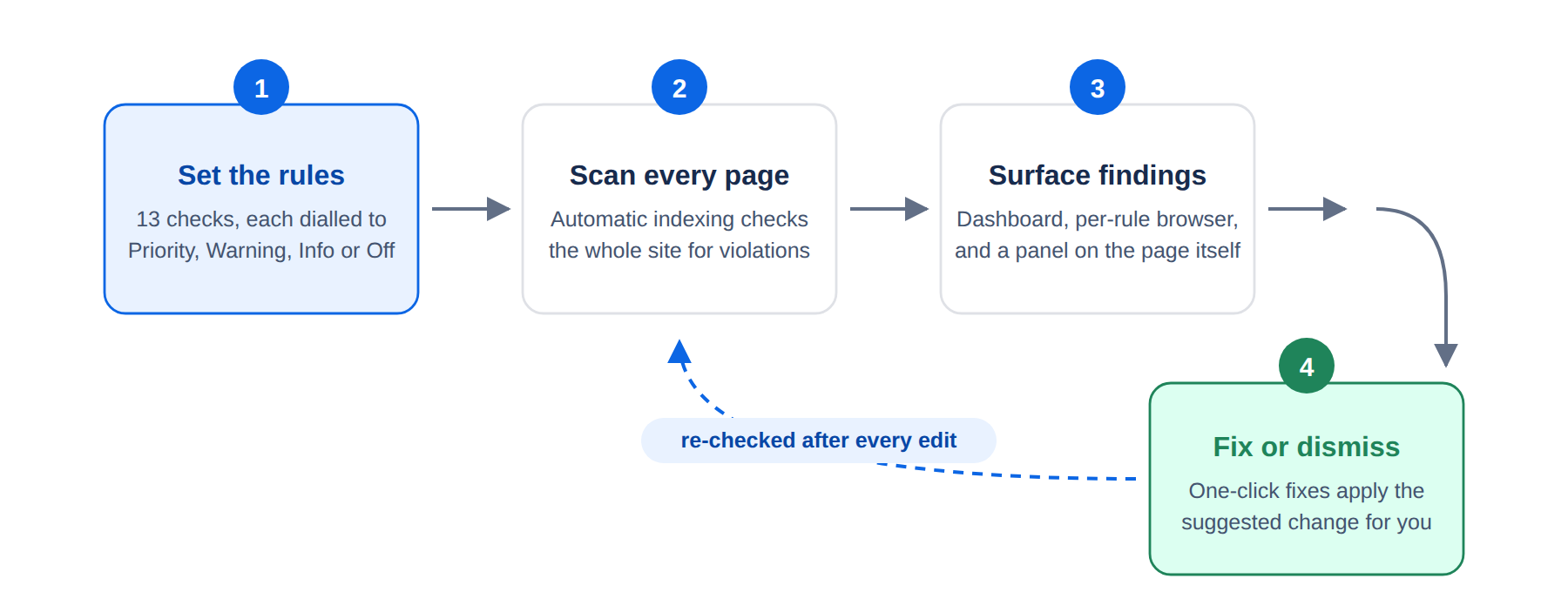
A rules engine for your content
Quality ships with thirteen configurable checks spanning structure, accessibility, language, and compliance. They run continuously across every space - no scheduled clean-ups to remember - and the findings surface where people already are: a site-wide dashboard, the content browser, and the page itself. Because it’s part of the suite you may already run for approvals, diagrams, and publishing, there’s no new app to buy, review, or govern.
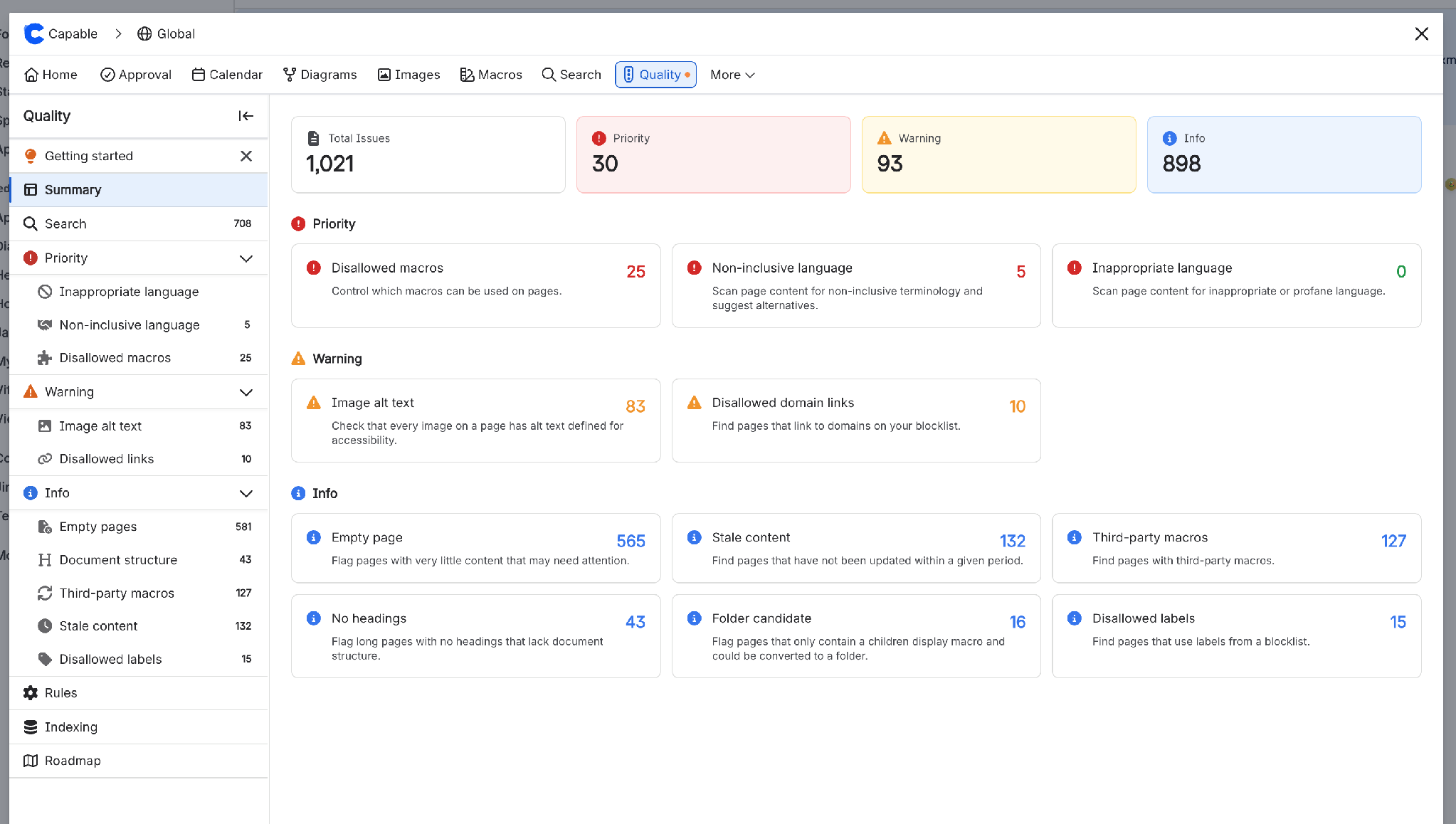
Thirteen rules, four families
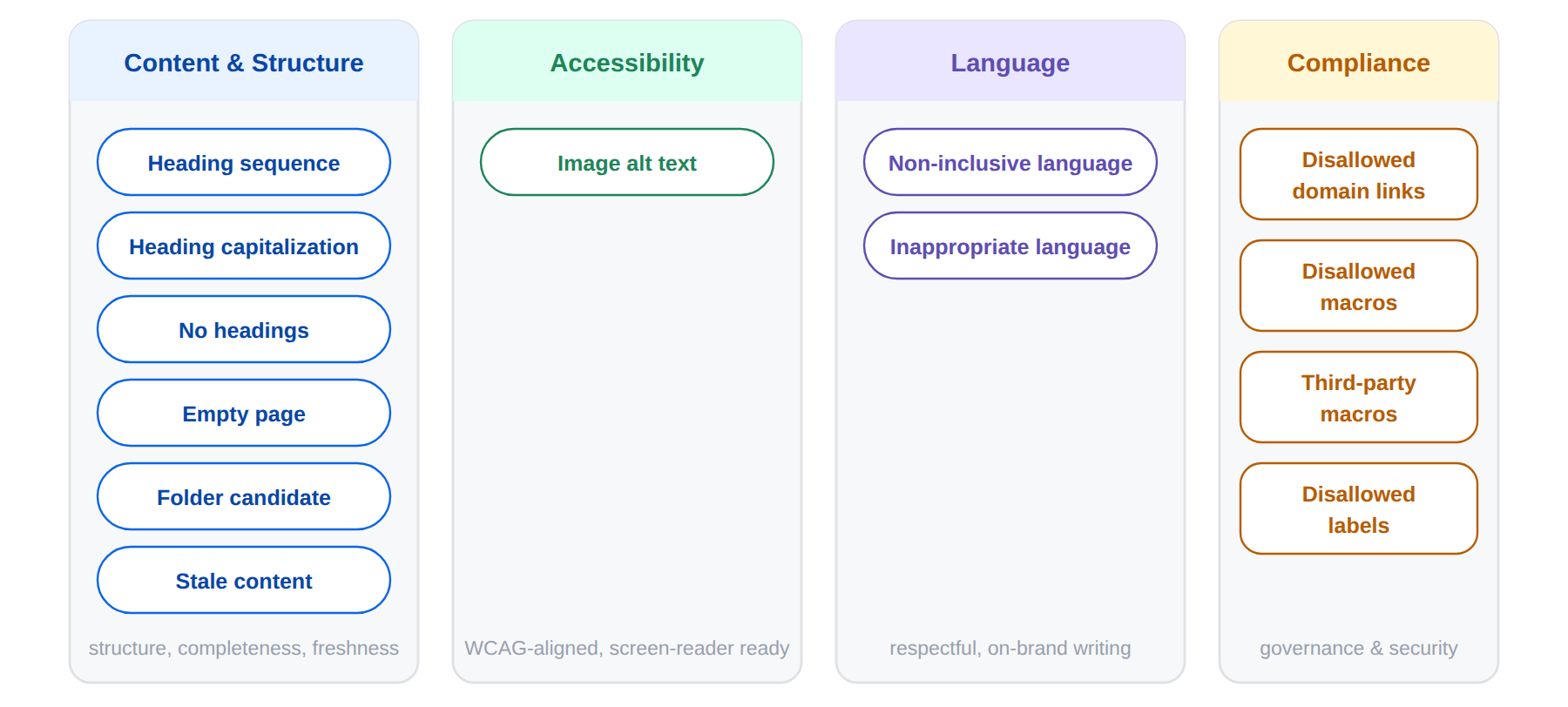
Content & Structure rules catch the everyday decay: empty pages, stale content (with a freshness window you define), heading sequence, heading capitalization, long pages with no headings, and folder candidates - pages that are really just lists of children.
Accessibility is where many teams have an obligation they can’t currently measure. The image alt text rule checks that every image carries alternative text - the difference between documentation a screen reader can navigate and documentation that silently excludes people. If WCAG or ADA alignment is on your roadmap, this turns “we should audit for that” into a live number.
Language rules scan the words themselves: non-inclusive language detects outdated terminology and suggests modern alternatives, and inappropriate language catches profanity before a customer-facing page does it for you.
Compliance rules are the governance backstop: disallowed domain links, disallowed macros, third-party macros, and disallowed labels keep links, apps, and taxonomy inside policy.
Dial every rule to your reality
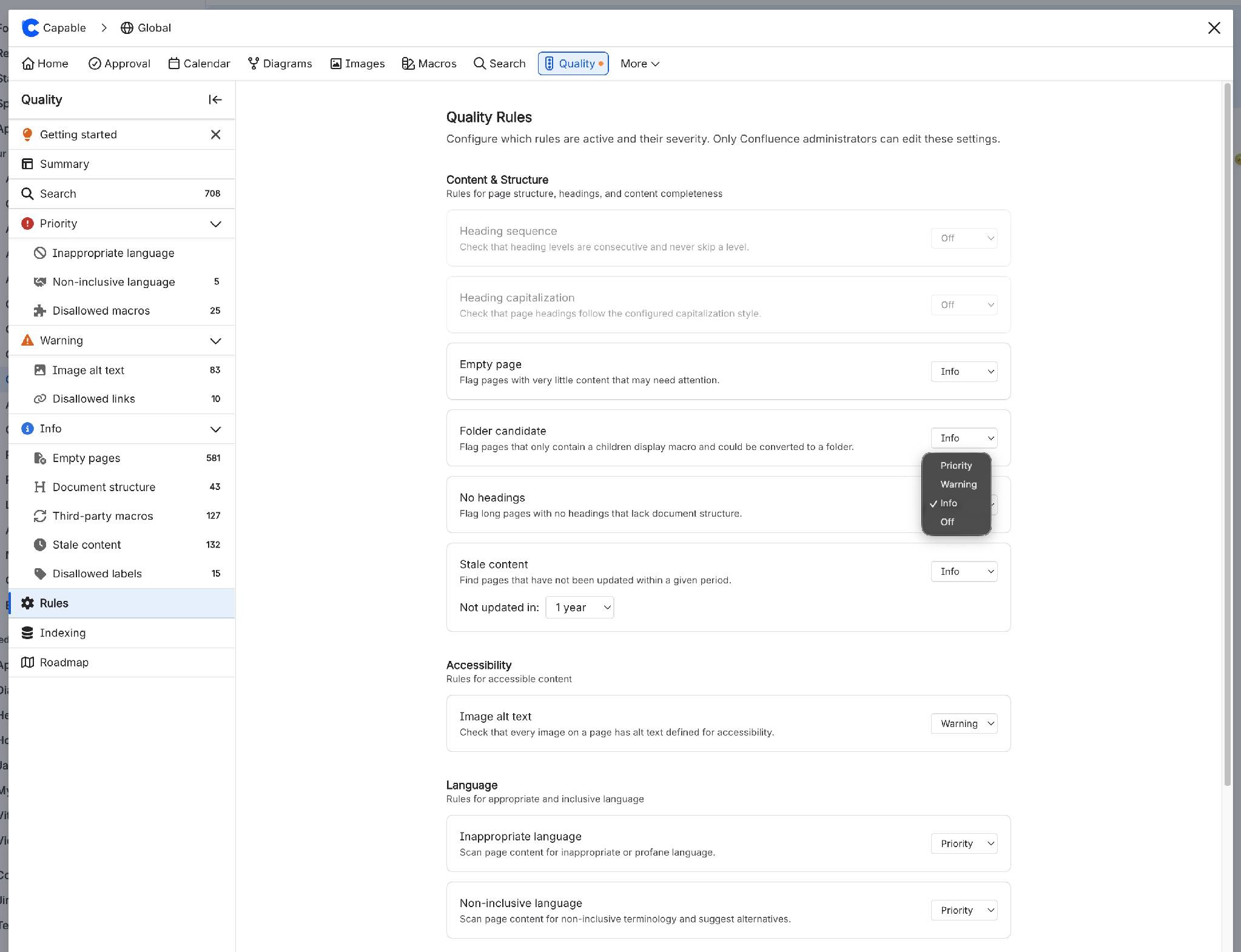
A linter is only useful if it enforces your style. On the Rules page, every rule is dialled independently to Priority, Warning, Info, or Off. A regulated team makes stale content a priority; a brand team cares about heading style. Both are right. Rules with parameters expose them - stale content lets you choose the window, such as “not updated in a year.” Capable enables a minimal default set from day one, and only Confluence administrators can change the configuration, so your standards stay standards.
Every offender, one query
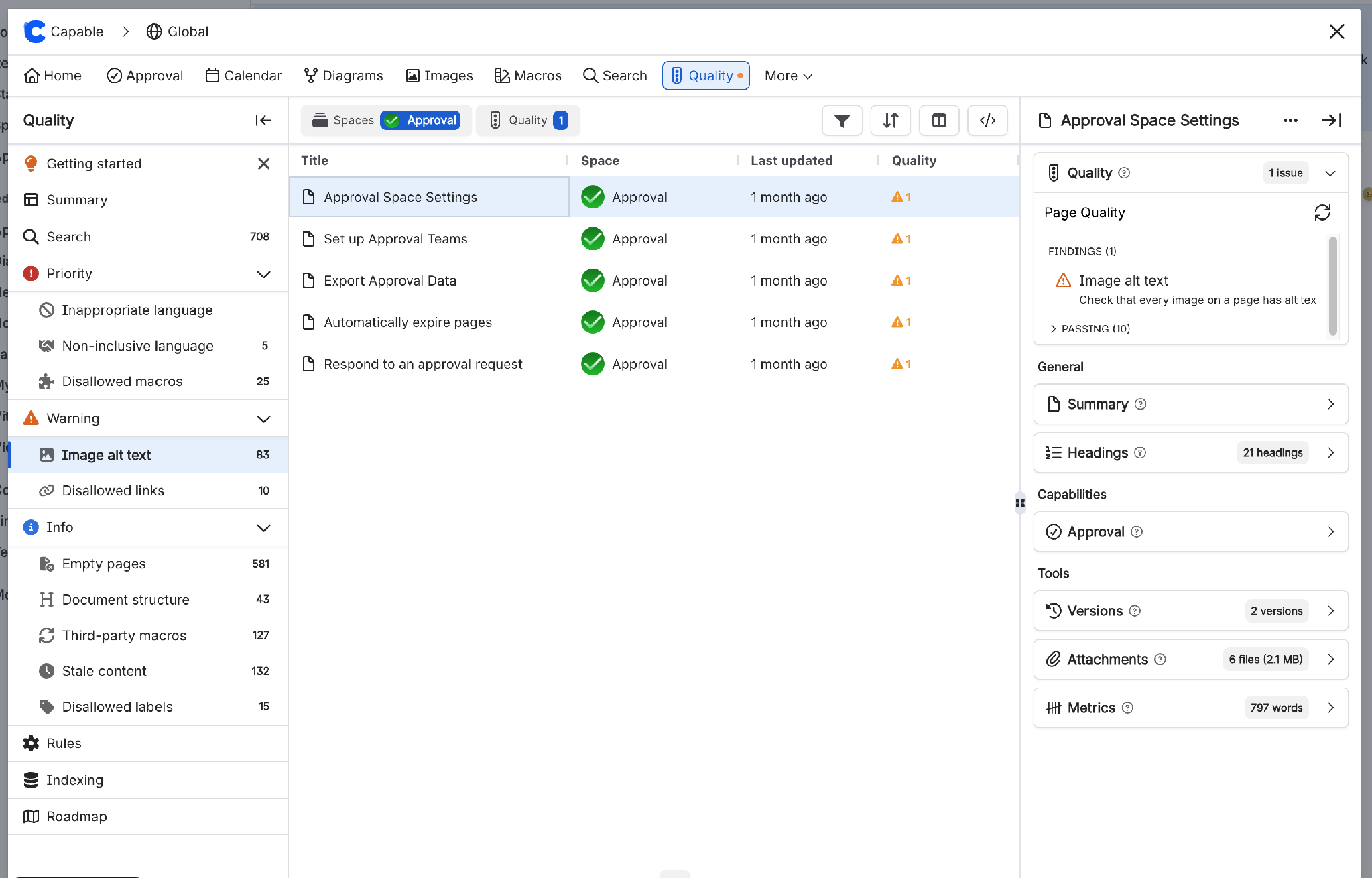
Detection is worthless if findings live somewhere nobody looks. One level below the dashboard, the navigation grows a page for every rule you enable, plus a central search that combines Capable’s content browser with quality filters. Space, rule, and last-updated in a single view; bulk triage becomes working a filtered list rather than a treasure hunt, with each page’s findings sitting beside its versions, attachments, and metrics.
Quality where authors live
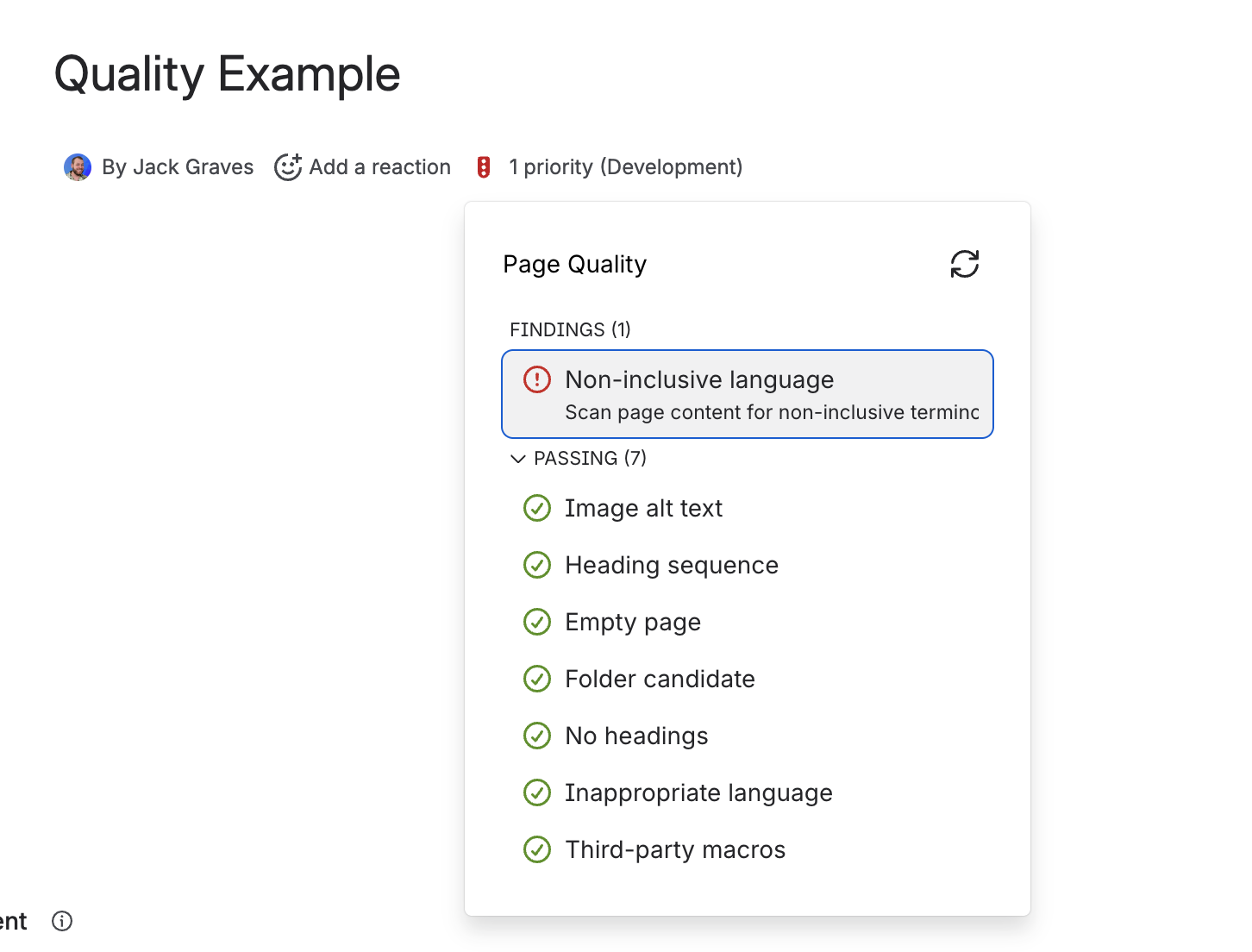
Crucially, findings also appear on the page itself. Authors see a quality indicator in the byline - right where the page owner is, not buried in a report - listing the checks that pass alongside the ones that don’t. Seven green ticks and one thing to fix beats a wall of red. Quality stops being a task someone else runs afterwards and becomes ambient feedback while people write.
See it. Fix it. One click.
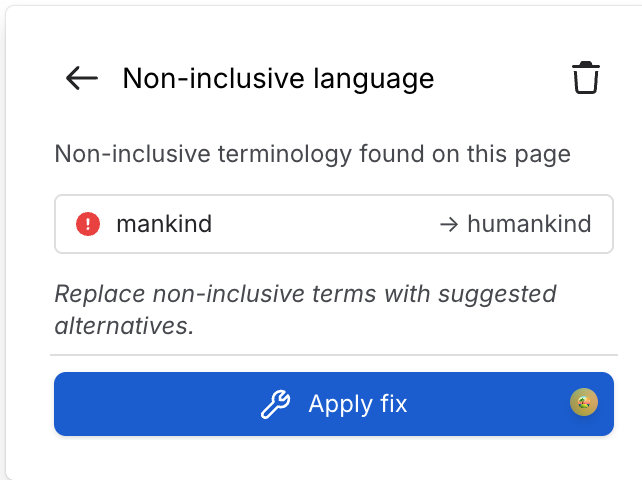
This is what separates a scanner from a tool people thank you for. For findings with an obvious remedy, Quality shows the suggested change and a Fix button that applies it in one click - mankind → humankind, done. False positive? Dismiss the finding and it stays dismissed - no re-litigating the same page every scan. Cleanup at the speed of reading.
Four ways in
You don’t need a grand governance programme to get value on day one. The patterns we see most:
- Migration & app clean-up. The third-party and disallowed macro rules inventory every page that depends on an app you’re consolidating away - the perfect companion to a DC-to-Cloud move or an app-sprawl clean-up.
- Public docs hygiene. Domain and language rules sweep a space before it ships to a public site - nothing internal leaks, nothing embarrassing ships.
- Accessibility commitments. The alt-text rule turns a WCAG audit obligation into a live, tracked, falling number.
- Trusted knowledge bases. Stale and empty-page rules keep KCS article bases fresh enough that agents keep using them.
Ten minutes of decisions
Getting to a healthier wiki takes about ten minutes of decisions - the getting started guide has the full walkthrough:
- Dial your rules. Enable the checks that match your standards; set severities and the stale-content window.
- Let indexing sweep. It runs automatically after install. On large sites, allow up to 15 minutes for pages to appear - and you can trigger a re-index manually any time.
- Work the dashboard. Priorities first, by space. Let the Fix button do the easy half of the backlog.
Quality is available separately, or included in Capable for Confluence Advanced Edition - the same app as approvals, publishing, diagrams, and search. No new vendor, no extra security review.
Your wiki is either being maintained by a system, or it’s rotting. Pick the system.
Try Capable for Confluence free on the Atlassian Marketplace →
.avif)




%20(800%20x%20200%20px).avif)
