Comparison

draw.io vs Capable Diagrams

Capable Diagrams is a complete diagramming workspace for Confluence Cloud, not just a macro. Here it is beside draw.io, every claim checked against each vendor's own documentation.

  • Last checked 29 October 2026
  • 32 cited sources

Works insideCloud

The short answer

Capable Diagrams gives Confluence teams every way to draw in one app. It has six editors (a draw.io-compatible canvas, Excalidraw, BPMN, DMN, a text editor and a visual Mermaid editor) and about 30 diagram languages. Around them sit a catalogue in every space, collections that gather diagrams from any page, team and global templates, and a version history for every diagram.

If your team knows draw.io, it already knows Capable's canvas. Diagrams are stored as ordinary draw.io XML, so skills and files carry over, and existing draw.io diagrams convert in place with a dry run first and nothing deleted.

draw.io is a strong canvas, and it is the better pick in two cases. One is Confluence Data Center. The other is several people editing the same diagram live. Capable leaves live co-editing out on purpose to keep editing simple, and if two people do save at once, both sets of changes can be recovered.

More than a diagram macro

Capable Diagrams is a whole diagramming workspace inside Confluence. It covers every way your team draws, and gives you a place to find, organise and reuse what it has drawn.

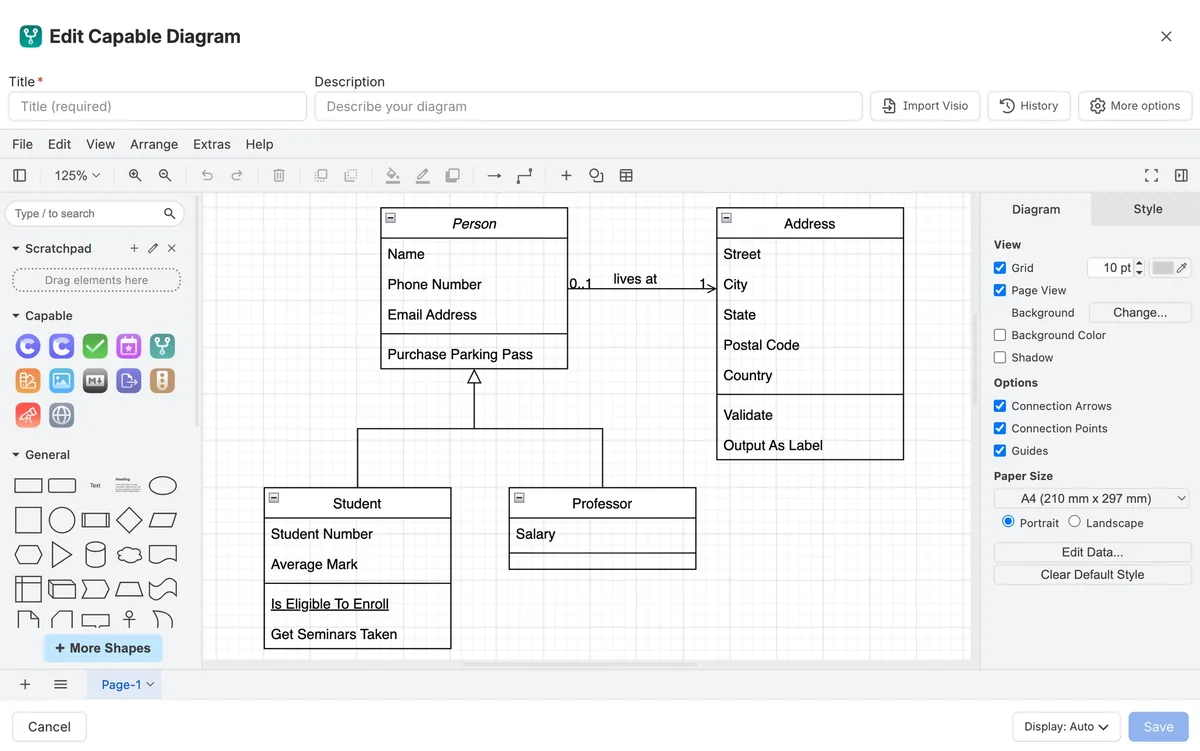
The Capable diagram editor with a UML class diagram on a draw.io canvas, the shape palette on the left and the style panel on the right.

Six editors in one app

A draw.io-compatible canvas for precise work, Excalidraw for sketches, BPMN and DMN modellers, a text editor and a visual Mermaid editor. Choose the editor that suits the diagram.

  • Stores draw.io XML, so files carry over
  • BPMN with token simulation
  • DMN decision tables

Which one fits your team?

For most teams on Confluence Cloud, Capable Diagrams does more. Here is why, and the few cases where we would point you at draw.io instead.

Choose Capable Diagrams if…

  • You want one app for every kind of diagram, with draw.io-style canvas work, Excalidraw sketches, BPMN, DMN and Mermaid side by side.7
  • Your team writes diagrams as text as well as drawing them, in Mermaid, PlantUML, C4, D2, DBML and about 25 more.8
  • You want diagrams to be easy to find again. Each space gets a catalogue, and collections and templates work across spaces.242526
  • You want AI drafts you can actually edit, written as diagram source in Diagram Studio.28
  • You want to switch without redrawing. draw.io diagrams convert in place, with a dry run first and nothing deleted.16
  • You also want approvals, Markdown, calendars, search and published sites, which come with diagrams in Capable for Confluence.14

Choose draw.io if…

  • You run Confluence Data Center, or need the same app on Data Center and Cloud.2
  • Several people need to edit the same diagram live, at the same moment.18

Feature by feature

Each cell cites its source: draw.io's own listing or documentation, or Capable's. A cross against draw.io means the feature is in neither its listing nor its documentation. Checked 29 October 2026.

  • Available
  • With limits
  • Not available
  • For context
  • Kept simple, on purpose
Making diagrams
Featuredraw.ioCapable Diagrams
draw.io canvasAvailable:The original draw.io editor, with shape libraries for UML, AWS, Azure, Cisco, GCP and more.1Available:draw.io-compatible editor. Files are ordinary draw.io XML and open in other draw.io-compatible tools.9
Whiteboard and sketchingAvailable:Diagramming and whiteboarding in one app.1Available:Excalidraw editor for hand-drawn sketches.7
MermaidAvailable:Create diagrams from Mermaid code.1Available:Mermaid kept as source, with a text editor and a visual editor that writes ordinary Mermaid.7
Other text languagesWith limits:Mermaid, and PlantUML until draw.io removes it in 2028.123Available:About 30 languages, including PlantUML, C4, GraphViz, D2, DBML and Structurizr.8
BPMNAvailable:BPMN 2.0 among the diagram types it lists.1Available:Dedicated BPMN 2.0 modeller, with token simulation to walk a process through its gateways.729
DMN decision tablesNot available:Not available.118Available:DMN editor for decision requirements diagrams and decision tables.7
AIAvailable:AI Generate turns text prompts into diagrams.1Available:Diagram Studio drafts editable diagram source to refine in place; a Rovo agent finds, drafts and places diagrams.2810
Finding and reusing diagrams
Featuredraw.ioCapable Diagrams
Browse every diagramAvailable:A draw.io Diagrams page in the Confluence sidebar, searchable across one space or all spaces.19Available:A catalogue in every space with your diagrams, all diagrams, collections, templates and examples, as a grid, list or table.24
Search inside diagramsAvailable:File names and label text are indexed.19Available:Titles and shape text are indexed. Capable Search can filter to pages that contain diagrams.2430
CollectionsNot available:Not available.18Available:Space and global collections gather diagrams from any page or space without moving them.25
TemplatesAvailable:Admins add custom template libraries, kept in a draw.io Configurations space, alongside draw.io's default templates.20Available:Space templates for a team, global templates for every space, and built-in starters in every language.26
One diagram on many pagesAvailable:Edit once and every embedded copy updates.1Available:Reference one diagram from several pages and update it once.12
Version historyAvailable:Revision History in the editor restores an older version of a diagram.21Available:Every diagram keeps its own history, separate from page history. Restoring adds a version, so it can be undone.27
Working in Confluence
Featuredraw.ioCapable Diagrams
Editing togetherAvailable:Real-time collaboration, with each other's cursors and changes shown live.118Kept simple, on purpose:One person edits a diagram at a time, so there is no live session to manage. If two people save at once, both sets of changes can be recovered.11
Admin controlAvailable:Admins configure the editor in JSON, including default libraries, styles, colours, fonts and theme.22Available:Admins choose which diagram languages are offered, starting from Minimal, Standard or Complete presets.31
Page and space mapsNot available:Not available.18Available:Link graph and space graph macros map how pages connect and find orphaned pages.32
Beyond diagramsNot available:Diagramming and whiteboarding only.1Available:Included in Capable for Confluence, with published sites, search inside diagrams, Markdown, forms, calendars and more.14
Hosting and trust
Featuredraw.ioCapable Diagrams
PlatformAvailable:Listing describes it as one of the first major apps on Forge.1Available:Built on Atlassian Forge.13
Confluence Data CenterAvailable:Data Center version on the Marketplace.2Kept simple, on purpose:Cloud only. Capable builds for Confluence Cloud and does not sell Data Center or Server apps.15
Where diagram content goesFor context:The separate Zero Egress edition is stored and processed on Atlassian infrastructure, per its listing.4For context:Stored in your Confluence site. draw.io and Excalidraw render in the browser; text languages are drawn by our hosted rendering service by default.13

How pricing works

Both apps are bought through the Atlassian Marketplace and priced by your Confluence user tier. List prices change, so the savings calculator reads them live from each listing for the team size you set.

How much could you save?

Open the savings calculator with draw.io already added, add any other apps you pay for, set your team size and compare the total with Capable.

Work out your saving
  1. Both are billed through Atlassian and priced by your Confluence user tier, not per diagram.314

  2. On 28 October 2026 the Marketplace pricing data showed draw.io, draw.io Zero Egress and Capable Diagrams all free for up to 10 users on Cloud.356

  3. Capable Diagrams is also included in Capable for Confluence (All-in-One), which adds published sites, search inside diagrams, Markdown, forms, calendars and the rest.14

Moving from draw.io

Capable has a dedicated draw.io migrator, for both the standard and the Zero Egress apps. Because the source is the same draw.io XML, nothing needs redrawing.

  1. Run a dry run on one space first. Nothing is written, and the results explain every failure.

    Source 16: Capable Diagrams docs, Migrate from draw.io for Confluence
  2. Nothing is deleted. The original macros and attachments stay until you decide to remove them.

    Source 16: Capable Diagrams docs, Migrate from draw.io for Confluence
  3. Diagrams stored as PNG or SVG exports migrate too, because the draw.io XML travels inside the image.

    Source 16: Capable Diagrams docs, Migrate from draw.io for Confluence
  4. draw.io diagram templates are not migrated, so plan to recreate the ones you use in Capable's diagram library.

    Source 17: Capable, draw.io for Confluence migrator

Questions people ask

About moving from draw.io to Capable Diagrams.

Is Capable Diagrams a draw.io alternative?

For Confluence Cloud, yes. Its draw.io-compatible editor stores ordinary draw.io XML, and the same app adds Excalidraw, BPMN, DMN, about 30 diagram languages, a catalogue, collections and templates. It is not available for Data Center.
Source: Capable Diagrams docs, draw.io

Can I move my draw.io diagrams to Capable?

Yes. The draw.io migrator converts diagrams in place, supports a dry run, and deletes nothing.
Source: Capable Diagrams docs, Migrate from draw.io for Confluence

Will my draw.io files still open in draw.io afterwards?

Yes. Capable's draw.io editor saves ordinary draw.io XML, and PNG or SVG exports keep the XML inside so they can be re-opened.
Source: Capable Diagrams docs, draw.io

Can I see every diagram in a space?

Yes. The Capable Diagrams catalogue lists every indexed diagram in the space, with who made it and the page it sits on, and groups diagrams into collections and templates.
Source: Capable Diagrams docs, Find diagrams on your pages

Do people who only read diagrams need a Capable licence?

They need a Confluence licence, as they do to read the page. There is no separate diagram seat.
Source: Capable Diagrams docs, Plans and pricing

Can two people edit the same Capable diagram at once?

Not live, and that is deliberate, because it keeps editing simple. If two people save the same diagram, Capable treats it as a save conflict and shows you how to get both changes back.
Source: Capable Diagrams docs, Edit and update

See the whole workspace on your own pages

Installing starts a free trial with every editor, language, the catalogue and templates switched on.

Sources

Last checked

Claims about draw.io come from its vendor's own documentation and its Atlassian Marketplace listing. Claims about Capable come from our documentation at help.gocapable.com. Products change; if something here is out of date, tell us and we will correct it.

  1. draw.io Diagrams | UML, BPMN, AWS, ERD, & Flowcharts, Atlassian Marketplace listing (Cloud)Atlassian Marketplace · marketplace.atlassian.com/apps/1210933/draw-io-diagrams-uml-bpmn-aws-erd-flowcharts · checked 28 October 2026
  2. draw.io Diagrams, Atlassian Marketplace listing (Data Center)Atlassian Marketplace · marketplace.atlassian.com/apps/1210933/draw-io-diagrams-uml-bpmn-aws-erd-flowcharts · checked 28 October 2026
  3. draw.io Diagrams, Marketplace pricing (Cloud)Atlassian Marketplace · marketplace.atlassian.com/apps/1210933/draw-io-diagrams-uml-bpmn-aws-erd-flowcharts · checked 28 October 2026
  4. draw.io Zero Egress | Diagramming Secured on Forge, Atlassian Marketplace listingAtlassian Marketplace · marketplace.atlassian.com/apps/1235446/draw-io-zero-egress-diagramming-secured-on-forge · checked 28 October 2026
  5. draw.io Zero Egress, Marketplace pricing (Cloud)Atlassian Marketplace · marketplace.atlassian.com/apps/1235446/draw-io-zero-egress-diagramming-secured-on-forge · checked 28 October 2026
  6. Capable Diagrams for Confluence, Marketplace pricing (Cloud)Atlassian Marketplace · marketplace.atlassian.com/apps/1235439/capable-diagrams-for-confluence-mermaid-plantuml-draw · checked 28 October 2026
  7. Capable Diagrams docs, EditorsCapable · help.gocapable.com/diagrams/editors · checked 28 October 2026
  8. Capable Diagrams docs, Diagram languagesCapable · help.gocapable.com/diagrams/diagram-languages · checked 28 October 2026
  9. Capable Diagrams docs, draw.ioCapable · help.gocapable.com/diagrams/draw-io · checked 28 October 2026
  10. Capable Diagrams docs, Rovo agentCapable · help.gocapable.com/diagrams/rovo-agent · checked 28 October 2026
  11. Capable Diagrams docs, Edit and updateCapable · help.gocapable.com/diagrams/edit-and-update · checked 28 October 2026
  12. Capable Diagrams docs, Find and reuseCapable · help.gocapable.com/diagrams/find-and-reuse · checked 28 October 2026
  13. Capable Diagrams docs, Security overviewCapable · help.gocapable.com/diagrams/security-overview · checked 28 October 2026
  14. Capable Diagrams docs, Plans and pricingCapable · help.gocapable.com/diagrams/plans-and-pricing · checked 28 October 2026
  15. Capable, About us (FAQ on Cloud, Data Center and Server)Capable · gocapable.com/about/about-us · checked 28 October 2026
  16. Capable Diagrams docs, Migrate from draw.io for ConfluenceCapable · help.gocapable.com/diagrams/migrate-from-draw-io-for-confluence · checked 28 October 2026
  17. Capable, draw.io for Confluence migratorCapable · gocapable.com/migrator/draw-io-for-confluence · checked 28 October 2026
  18. draw.io docs, draw.io for Confluence CloudVendor documentation · drawio.com/docs/integrations/atlassian/confluence/ · checked 29 October 2026
  19. draw.io docs, Search for diagrams in Confluence CloudVendor documentation · drawio.com/docs/integrations/atlassian/confluence/confluence-diagram-search/ · checked 29 October 2026
  20. draw.io docs, Custom templates in Confluence CloudVendor documentation · drawio.com/docs/integrations/atlassian/confluence/customise/custom-templates-confluence-cloud/ · checked 29 October 2026
  21. draw.io docs, Restore an older version of a diagramVendor documentation · drawio.com/docs/integrations/atlassian/confluence/confluence-cloud-restore-version/ · checked 29 October 2026
  22. draw.io docs, Customise draw.io in Confluence CloudVendor documentation · drawio.com/docs/integrations/atlassian/confluence/customise/ · checked 29 October 2026
  23. draw.io blog, Migrate diagrams from PlantUML to Mermaid and draw.io (5 June 2025)Vendor documentation · drawio.com/blog/plantuml-to-mermaid · checked 29 October 2026
  24. Capable Diagrams docs, Find diagrams on your pagesCapable · help.gocapable.com/diagrams/find-diagrams-on-your-pages · checked 29 October 2026
  25. Capable Diagrams docs, Diagram collectionsCapable · help.gocapable.com/diagrams/diagram-collections · checked 29 October 2026
  26. Capable Diagrams docs, Diagram templatesCapable · help.gocapable.com/diagrams/diagram-templates · checked 29 October 2026
  27. Capable Diagrams docs, Diagram version historyCapable · help.gocapable.com/diagrams/diagram-version-history · checked 29 October 2026
  28. Capable Diagrams docs, Diagram StudioCapable · help.gocapable.com/diagrams/diagram-studio · checked 29 October 2026
  29. Capable Diagrams docs, BPMN token simulationCapable · help.gocapable.com/diagrams/bpmn-token-simulation · checked 29 October 2026
  30. Capable Diagrams docs, Capable SearchCapable · help.gocapable.com/diagrams/capable-search · checked 29 October 2026
  31. Capable Diagrams docs, Language presetsCapable · help.gocapable.com/diagrams/language-presets · checked 29 October 2026
  32. Capable Diagrams docs, Page and space graphsCapable · help.gocapable.com/diagrams/page-and-space-graphs · checked 29 October 2026

Cookie Settings

We take good care of you and your data. You can read more about how we use cookies, the third parties who set cookies and update your cookie settings here.