
Diagrams for Confluence
Write diagrams as text in Mermaid and PlantUML, or draw them in draw.io and Excalidraw, right on the Confluence page.
- Built on Forge
Works inside Cloud
Built on Atlassian Forge
A Confluence Cloud app on Atlassian’s own app platform.
How Capable apps are builtStored in your Confluence site
Diagram source follows the page’s permissions, and goes with the page when it’s copied or migrated. PDF and Word exports carry the rendered picture.
Where diagrams are stored
Used by teams at




Live Mermaid playground
Write Mermaid, see the diagram
This is the split view you get in the Diagram macro’s text editor: source on the left, diagram on the right. Pick a sample or type your own.
Edit the text: the diagram redraws as you type. Tab moves on to the next control.

In Confluence, type /diagram, choose Mermaid and paste this in. The source is saved with the macro.
Try it in Confluence, freeWhat teams say
Excerpts from public reviews on the Atlassian Marketplace.
This diagram tool is a game changer. … Confluence integration and UX are brilliantly designed, with large choice of presets. …
Brice HogrelReview of Capable for Confluence, Oct 2025 (opens in a new tab) …This app makes it easy to manage diagramming, while providing best practices and tons of diagram types. Can recommend…
Szakál BalázsReview of Capable Diagrams for Confluence, Feb 2026 (opens in a new tab) This is honestly one of the best apps for diagramming in Confluence I have used. C4 Modelers take note of this fantastic app!
William KennedyReview of Capable for Confluence, Mar 2025 (opens in a new tab)
Every way teams draw, in one app
Text for the diagrams engineers keep in review, a canvas for the ones where position matters.

Mermaid, PlantUML and about thirty more
Write the diagram as source and it lays itself out. The text editor shows the source and the drawing side by side, redraws as you type and names the line when something is wrong.
- Mermaid, PlantUML, C4, D2, Graphviz, DBML
- Visual editor for people who won’t write Mermaid
- Text diffs show exactly what changed
Draw precisely on a draw.io canvas
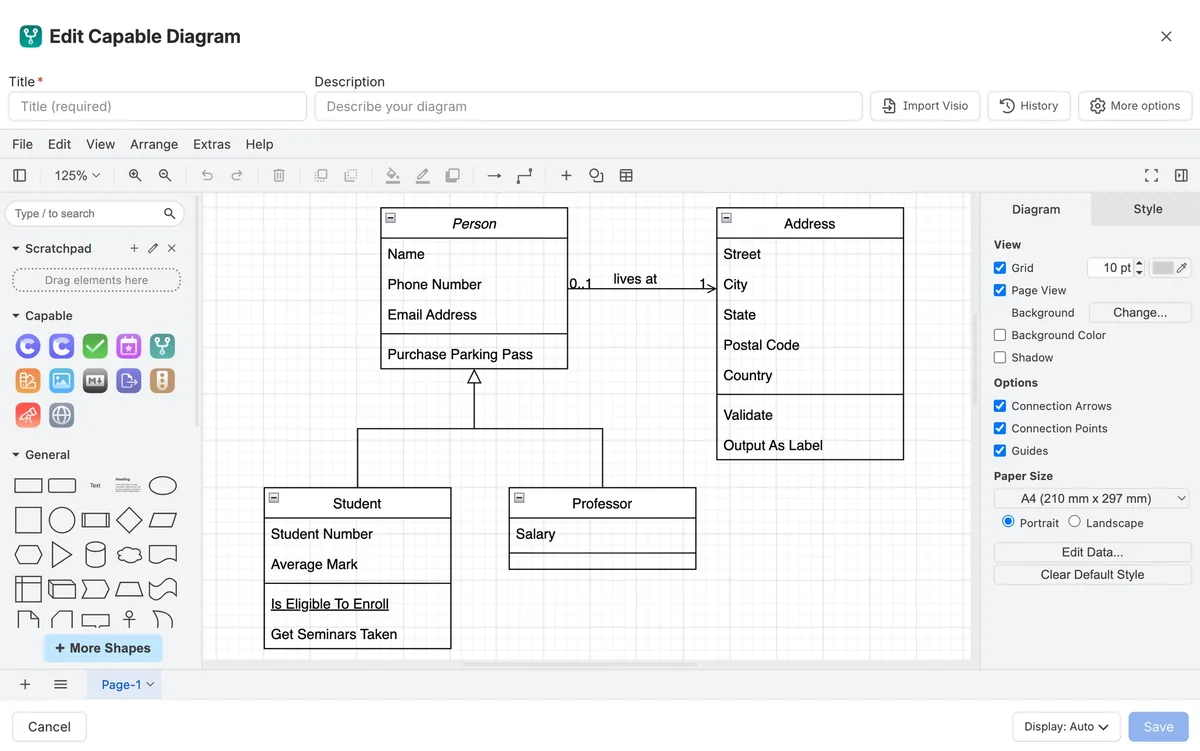
For architecture, network maps and anything where position carries meaning. The editor is draw.io compatible, with shape libraries, and imports Visio files saved as .vsdx.
- draw.io compatible
- Shape libraries
- Visio import
Sketch it rough with Excalidraw
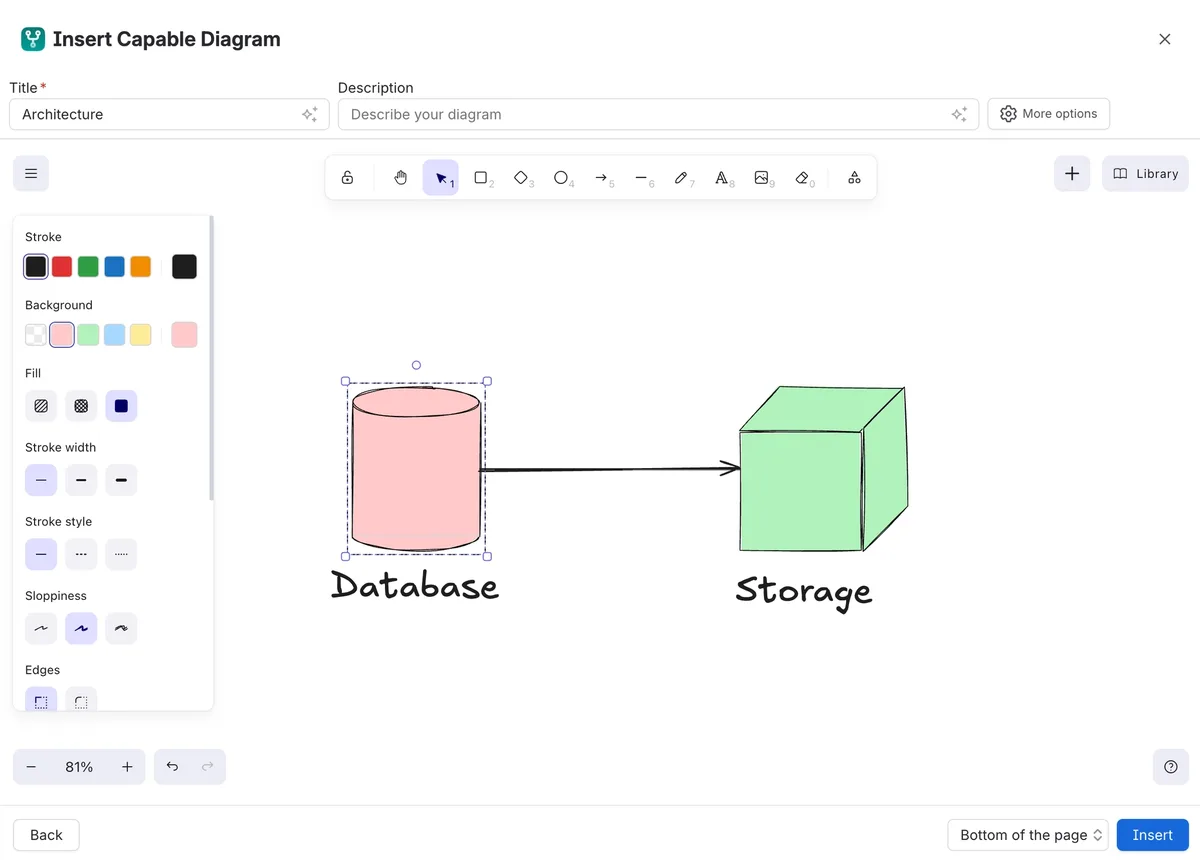
A hand-drawn look for workshops and early ideas, where a provisional sketch invites discussion and a polished one doesn’t.
- Shape libraries
- Saves with the page
A first draft from a sentence
Describe the diagram and Diagram Studio drafts it as real diagram source, ready to edit like any other. Read it before you publish: it’s a starting point, not an authority.
- Output is editable source
- Admins can turn AI off site-wide
One diagram, many pages
Insert a reference to a diagram instead of a copy: change the source once and every page that shows it follows. Templates give a team a consistent starting point.
- Diagram references
- Shared templates
- Version history on every diagram
Diagrams that stay true
Three ways diagrams in Confluence usually go wrong, and what changes when they live on the page.
| Job | Today | With Diagrams |
|---|---|---|
| Keeping them current | Draw it in another tool, export a PNG, paste it in. When the design changes, nobody can find the original file, so the page quietly goes stale. | The diagram is part of the page. Whoever is reading it can open the editor and fix it, and every save is kept in the diagram’s own history.Source: What is Capable Diagrams |
| One tool per notation | A sketching app, a draw.io app and a separate Mermaid macro, each with its own library. | One app with six editors (draw.io, Excalidraw, BPMN, DMN, a text editor and a visual Mermaid editor) and about thirty diagram languages.Source: Editors |
| The same diagram on many pages | The architecture diagram is pasted onto four pages, then updated on one. | Reference the one diagram from every page that needs it. Update the source and every page follows.Source: Find and reuse |
What it looks like on a page
A design page with a Mermaid diagram and a draw.io diagram. Pick a number, or take the tour.
From install to first diagram
Step 1: Install
Install it from the Atlassian Marketplace. A free trial starts with everything switched on, and nothing has to be configured first.
Install Capable DiagramsStep 2: Type /diagram
Edit a page, type /diagram, choose an editor or language, then draw or write. The diagram saves with the page.
Insert a diagramStep 3: Set house defaults
Optionally, set display mode, dark mode and sizing per space, and offer your own templates, so diagrams look consistent.
Space diagram settings



Switching from another diagram app
Bring existing diagrams with you instead of redrawing them.
From draw.io for Confluence, an administrator runs a migration: scan, a dry run that writes nothing, then the real run and a results view. Nothing is deleted.
Migrate from draw.io for ConfluenceFrom other apps, export the source and import it: .drawio and draw.io XML, Visio saved as .vsdx, or Mermaid, PlantUML and other text pasted straight in.
Migrate from other diagram appsStart with a dry run on one space. It shows a realistic failure rate in a few minutes and explains every failure.
Migrate from draw.io for Confluence
Moving from
- Draw.io for ConfluenceDraw.io
- Draw.io Zero Egress for ConfluenceDraw.io
- Mermaid Diagrams for ConfluenceStratus
- PlantUML Diagrams for ConfluenceStratus
- PlantUML for Confluence (Server/Data Center)Avono
- Just Add+ for ConfluenceModus Create
- All apps
Tools and guides
- What can I migrate?Every app we migrate from, and which of its macros convert.
- Migrate to Capable DiagramsThe options for each kind of existing diagram.
App names are trade marks of their respective owners.
Where teams use it
Teams
Also in the All-in-One
Diagrams is one of the capabilities in Capable for Confluence. In the suite, diagrams also appear on published Capable Sites and turn up in search by the text inside them.




Docs and guides
Short, current pages from help.gocapable.com.
- Get startedInstall it and get your first diagram onto a Confluence page in about two minutes.help.gocapable.com/diagrams/get-started
- Diagram macro referenceEvery field on the diagram macro: display mode, alignment, height, border, scrolling, smart scale and dark mode.help.gocapable.com/diagrams/diagram-macro-reference
- Migrate from draw.io for ConfluenceExisting diagrams, converted in place.help.gocapable.com/diagrams/migrate-from-draw-io-for-confluence
- Plans and pricingHow Capable Diagrams is licensed, and whether the suite works out better.help.gocapable.com/diagrams/plans-and-pricing
- Hosting and data residencyWhere the Capable Diagrams services run and where to find our current trust and compliance documents.help.gocapable.com/diagrams/hosting-and-data-residency
Questions, answered from the docs
Each answer links to the page it comes from.
Can I write Mermaid diagrams in Confluence?
Yes. Type /diagram on a page, choose Mermaid, and write the source in the text editor, which shows the drawing beside it as you type. People who would rather not write syntax can use the Mermaid visual editor, which still produces ordinary Mermaid source.
Source: Mermaid
Which diagram languages are supported?
About thirty, including Mermaid, PlantUML, draw.io, Excalidraw, BPMN, DMN, Graphviz, C4, D2, DBML, ERD, Structurizr, Nomnoml, Vega and Vega-Lite. If you have no strong preference, the docs suggest starting with Mermaid.
Source: Diagram languages
Do people need a separate licence to view diagrams?
No. Viewers need a Confluence licence, as they do to read the page. There is no separate diagram seat, and no per-diagram charge.
Source: Plans and pricing
Where are diagrams stored?
In your Confluence site, as custom content or a page attachment, with the macro on the page pointing at it. That is why permissions work without extra setup, and why diagrams survive being copied, exported or migrated with the page.
Source: Where diagrams are stored
Does diagram source leave our Confluence site?
draw.io and Excalidraw render in the browser. Text diagrams such as Mermaid and PlantUML are drawn by our hosted rendering service by default.
Source: Hosting and data residency
Can we move from draw.io for Confluence?
Yes. An administrator runs the migration, starting with a dry run that writes nothing. Diagrams are converted in place from the same draw.io XML, and the original macros and attachments stay until you choose to remove them.
Source: Migrate from draw.io for Confluence
Can we turn the AI features off?
Yes. AI generation, AI chat editing and the Rovo agent can be turned off site-wide. Every language and editor keeps working, and diagrams already generated stay as ordinary diagrams.
Source: Turn off AI features
What happens if the licence lapses?
Diagrams stop rendering, but their source stays in your site and comes back when you renew.
Source: Plans and pricing
Recognition

Draw your first diagram
Install Diagrams for Confluence from the Atlassian Marketplace. The free trial starts automatically, with everything switched on.