How to drive Confluence with Claude
Drive Confluence with Claude: draft pages in markdown, publish them through the API, and have a person approve each one. Our SOC 2 policies are the example.

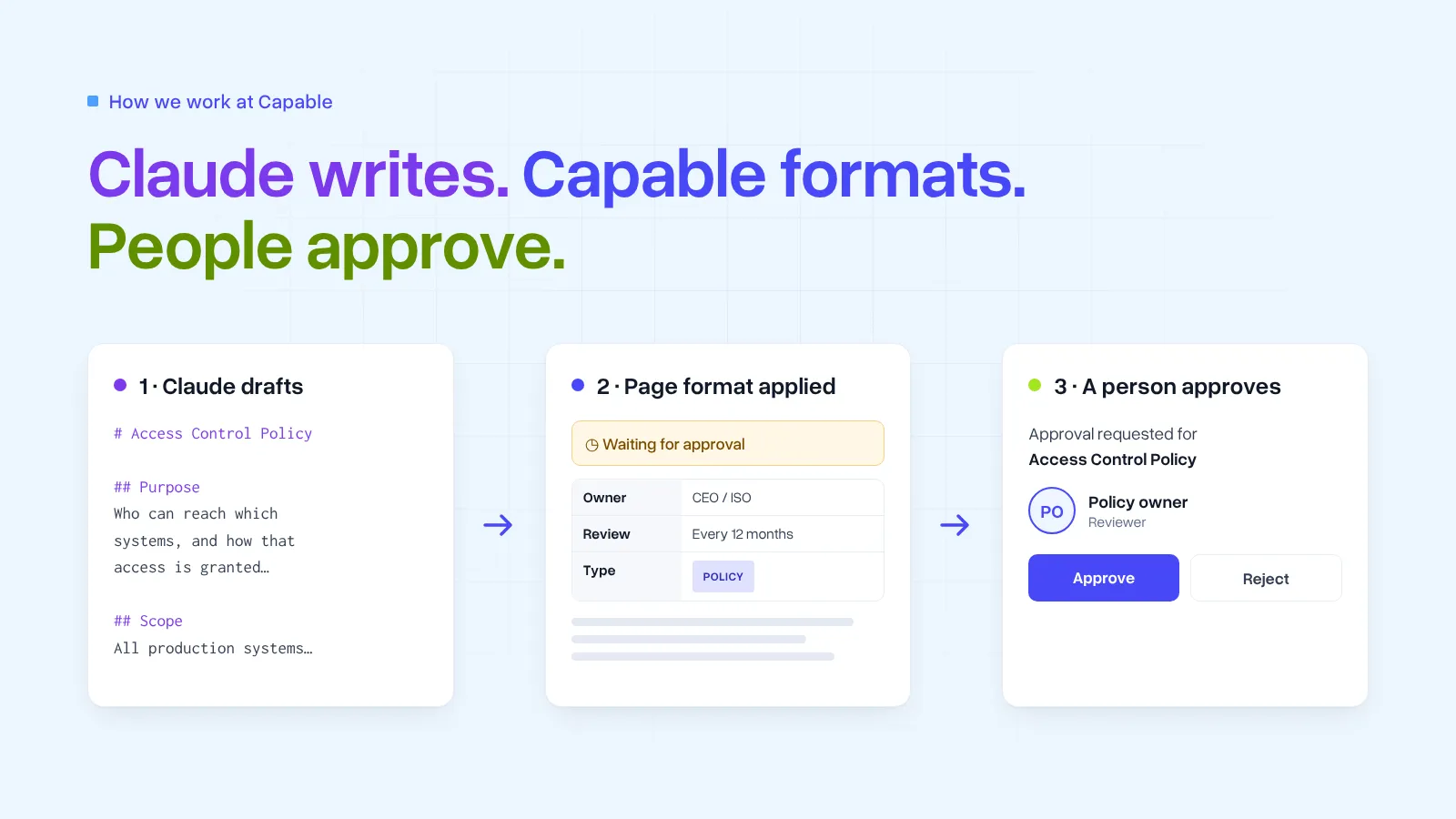
You can drive Confluence with Claude: it drafts each page in markdown, converts that markdown to Atlassian Document Format, and enriches it with Capable and Confluence macros so the page fits your template. A person approves each one before it counts. Nothing is treated as finished while it is still unapproved.
We used that to build the policy space for our SOC 2 Type II audit: 77 documents that had to be accurate, consistent, and signed off by someone accountable. The same steps work for any set of pages with the same shape, such as a handbook, a runbook library, or a release process. The policies are the example. The method is the point.
How do you drive Confluence with Claude?
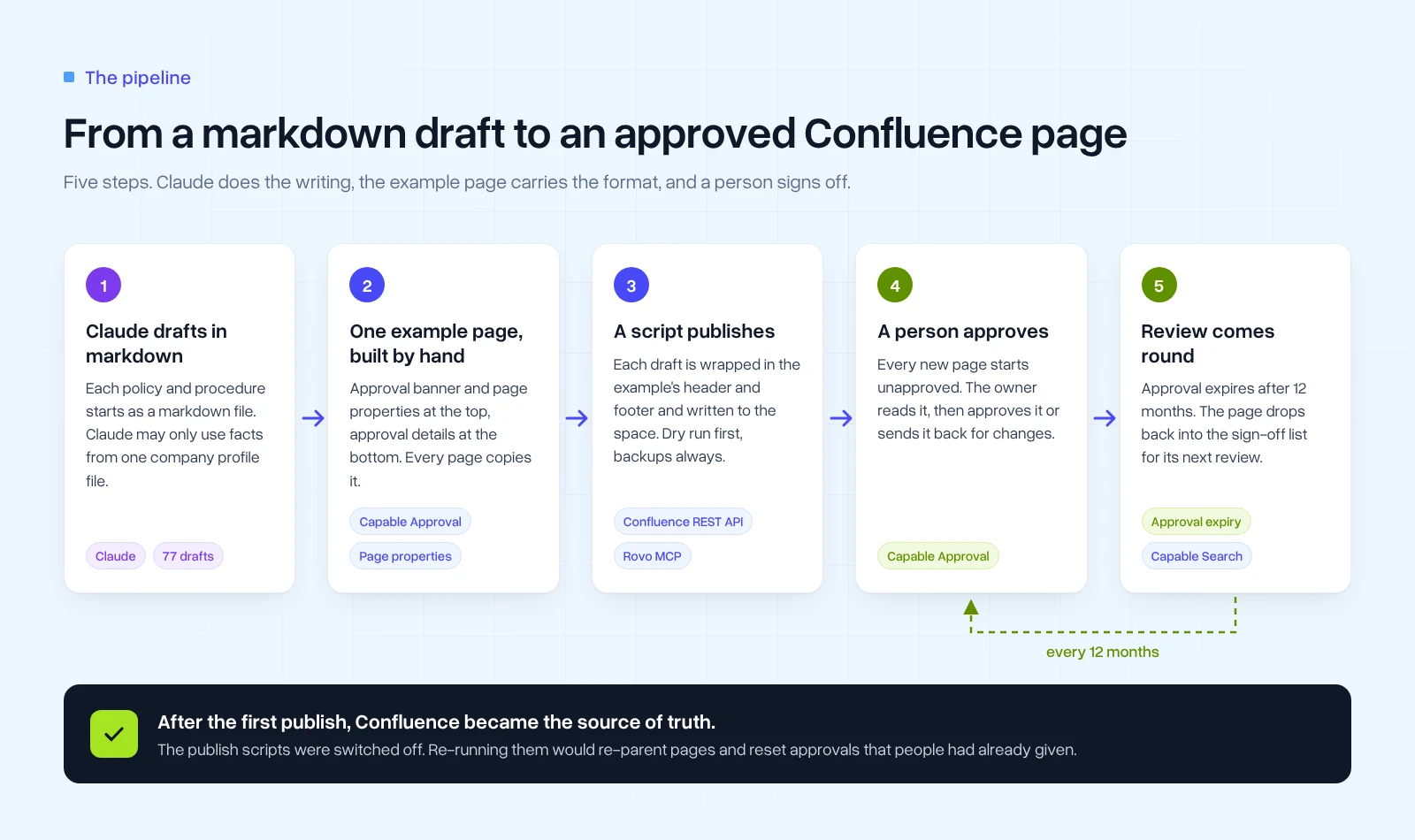
Five steps, in this order:
- Put the facts in one file, and tell Claude not to state anything that is not in it.
- Have Claude draft each page in markdown, then convert it to Atlassian Document Format before upload.
- Give it one example page as the template. Claude enriches the markdown with Capable and Confluence macros so each page fits that template.
- Publish with a script that dry-runs, backs up, and refuses to skip the approval section.
- Have a person read and approve each page. Set an expiry that matches your review cycle.
The Confluence REST API does the writing, and that is how we published the policies. You can do the same through Atlassian's Rovo MCP server: Claude reads the space, then creates and updates the pages from the chat. It is reaching parity with the API quickly. For now it can have trouble uploading images, and with the more advanced parts of a page that the server does not support yet. A script is still the safer writer for those, because it gives you a dry run, a backup, and a log.
Give Claude the facts, and nothing else
The most useful thing we did came before any writing. We put everything true about the company into one profile file: the tools we use, who holds which role, where data lives, and how it is handled.
The rule for Claude was simple: don't state anything that isn't in the profile. If a page needed a fact the profile didn't have, the draft said so, and we added the fact to the profile rather than to the page. That kept all 77 drafts consistent with each other, because they all drew on the same source.
The drafts lived as markdown files in a git repository, which is easy to review as a diff and easy to re-run when something changes. Confluence does not take that file as the page. Before upload, Claude converts the markdown to Atlassian Document Format. Group the drafts however the space is organised. Ours were policies, procedures, registers, roles, governance, and evidence.
Let one example page carry the format
We built one page by hand in Confluence and treated it as the template. Every draft had to come out looking like this:
- a Capable Approval banner at the top, so readers can see whether this version is approved
- page properties for the owner, document type, and review cycle, so reports can list them
- a rule before each section
- an Approval footer showing the current version's status and the full approval history
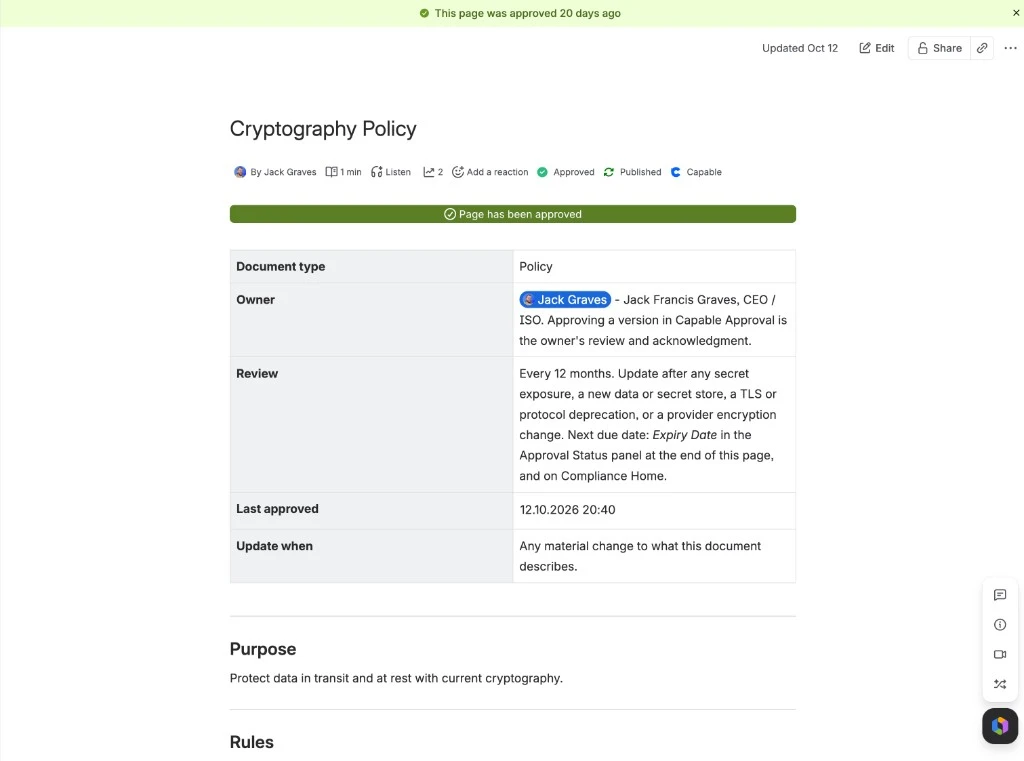
Claude does the fitting when it converts the markdown. It enriches the draft with Capable macros and with Confluence's own elements, so the uploaded page matches the template. It can add any of them: the approval banner and footer, the page properties, a rule before a section, cards, search tables, diagrams and markdown. They all live in Capable for Confluence.
def require_approval(doc, title):
    """ADF after conversion. Publish only if the template's approval macro is there."""
    if not adf_has_macro(doc, "approval"):
        raise SystemExit(f"Refusing to write page missing approval: {title}")
Publish through the API, with a dry run
Every write followed the same rules:
- Dry run by default. The script prints what it would change. It only writes when you explicitly tell it to.
- Back up first. Each page's current content is saved before it is touched.
- Log everything. Every create, update, move, and label goes into a journal file.
- Refuse to publish a page without its approval section. This is the check we'd copy first:
if not adf_has_macro(doc, "approval"):
    raise SystemExit(f"Refusing to write page missing approval: {title}")
A page that skips approval is worse than no page at all, so the script stops rather than publishing one.
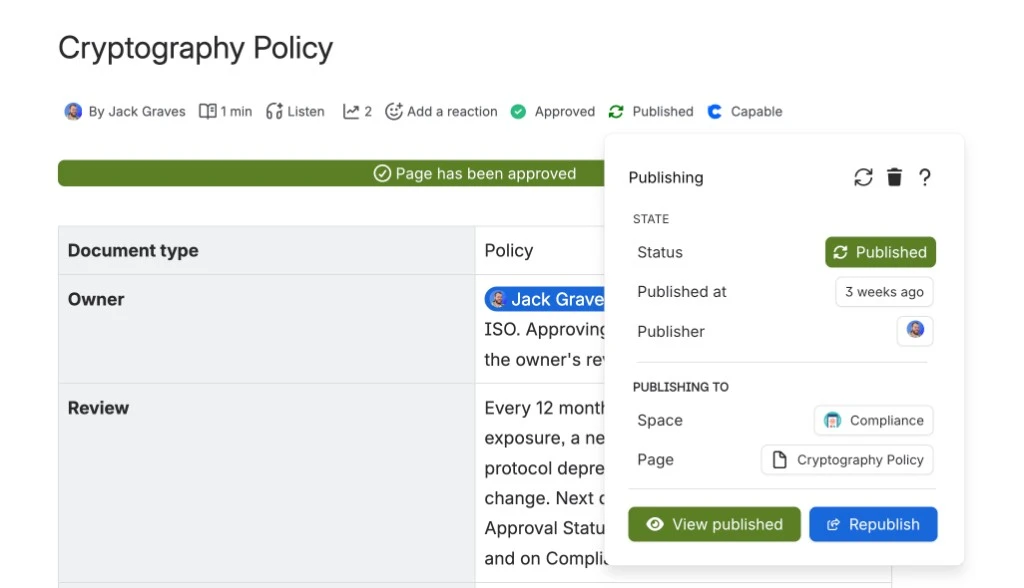
Once a page is in the space, Publishing for Confluence records where it went and who published it. On our example, the policy landed in the Compliance space:
Have a person approve every page
This is the part that makes the method safe to repeat. Claude can write a convincing page that is wrong in a detail only you would spot. The profile file reduces that risk. Human approval is what deals with it.
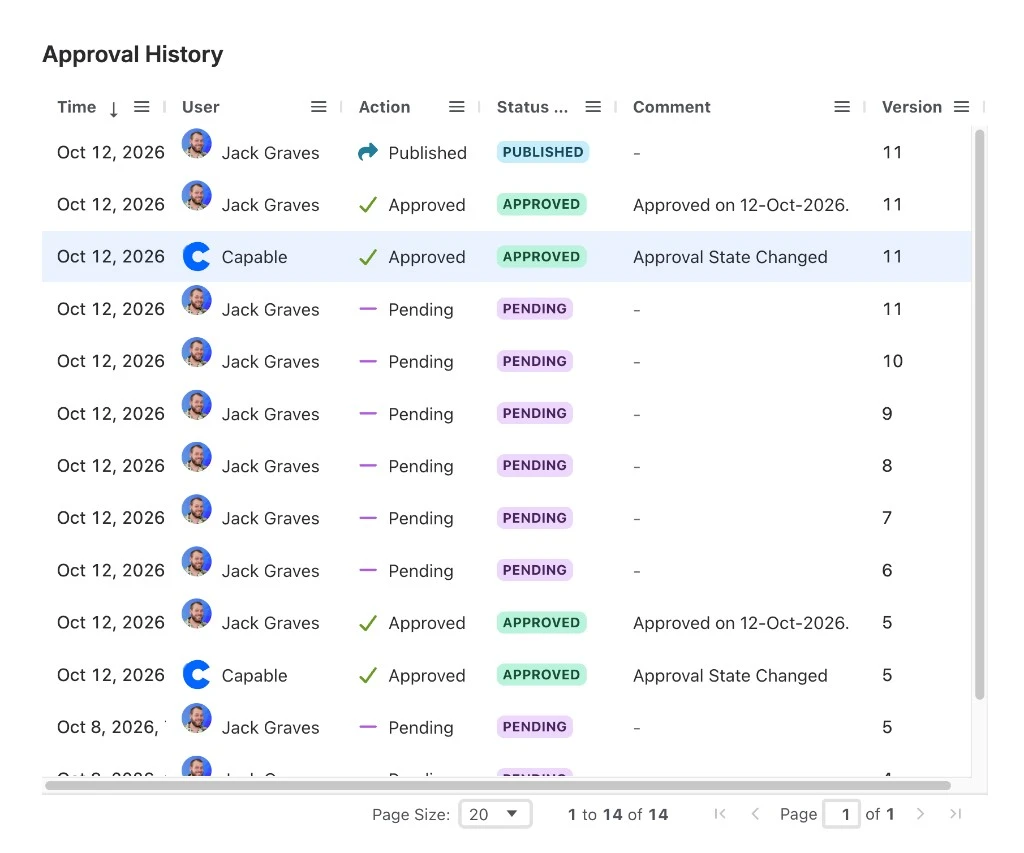
Every page arrived in Confluence unapproved. The owner read it, then approved it or rejected it with comments in Capable Approval. Rejected pages went back for another draft. Nothing was treated as done until it had a named approver and a date.
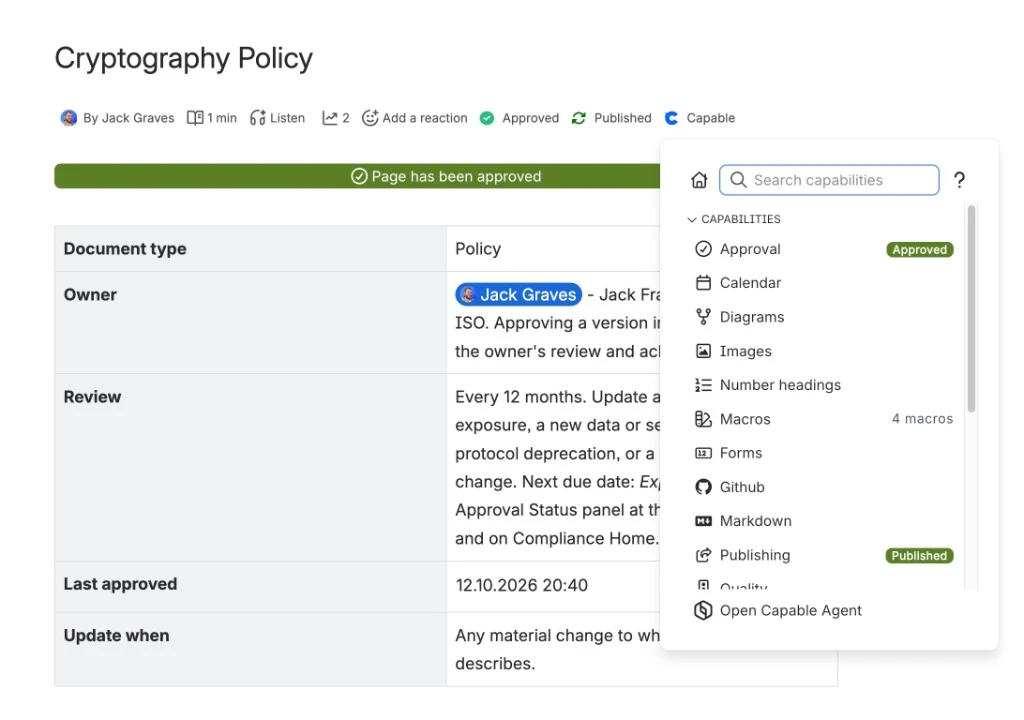
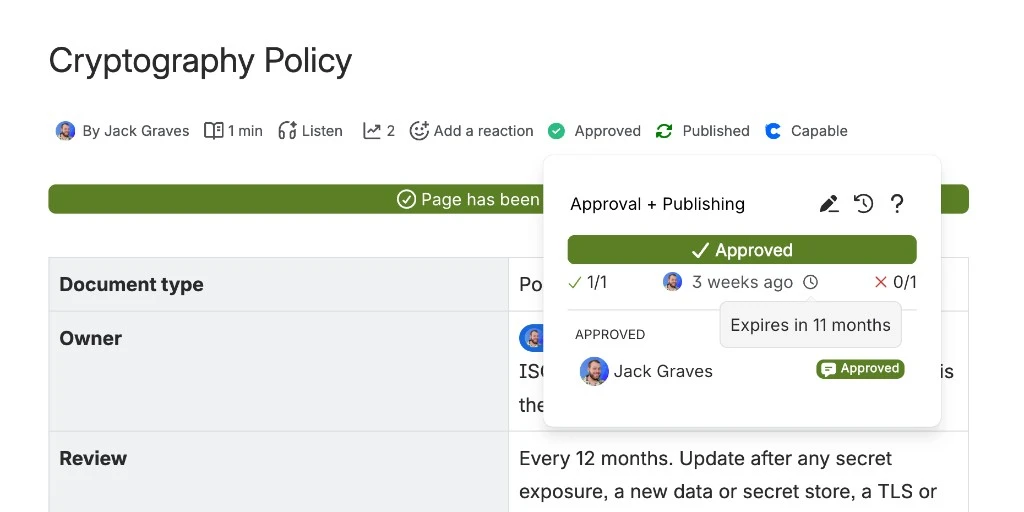
Two settings made this hold up over time. We set them for a 12-month policy review. You would pick the cycle your own pages actually need.
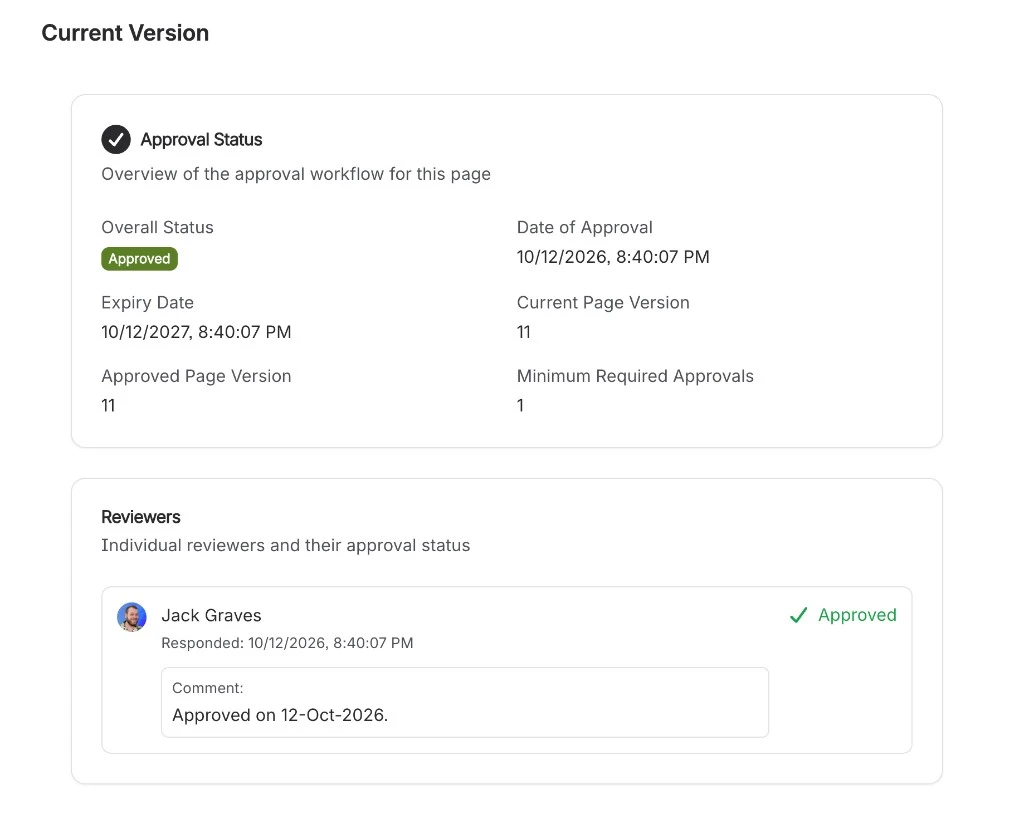
- Approvals expire. The review cycle isn't a reminder in someone's calendar. When an approval expires, the page shows as unapproved again and lands back in the sign-off list. The footer records the date, the version, and the minimum number of approvals.
- The history stays on the page. Every decision, by whom and on which version, is visible in the footer. Capable itself writes a line when the approval state changes, so the record isn't only the person's comment.
Confluence Cloud also has its own page approval on Premium and Enterprise. Our guide to Confluence page approval covers that. Atlassian's documentation doesn't describe approvals that expire on a cycle, and the feature isn't on Free or Standard. Capable Approval is what we used here, because the expiry and the on-page history are the control.
Try Capable Approval free on the Atlassian Marketplace →
Cards, search tables, and the other macros
The policy pages are the documents. The pages around them use the same conversion: Claude enriches the markdown with macros so the hub fits its template.
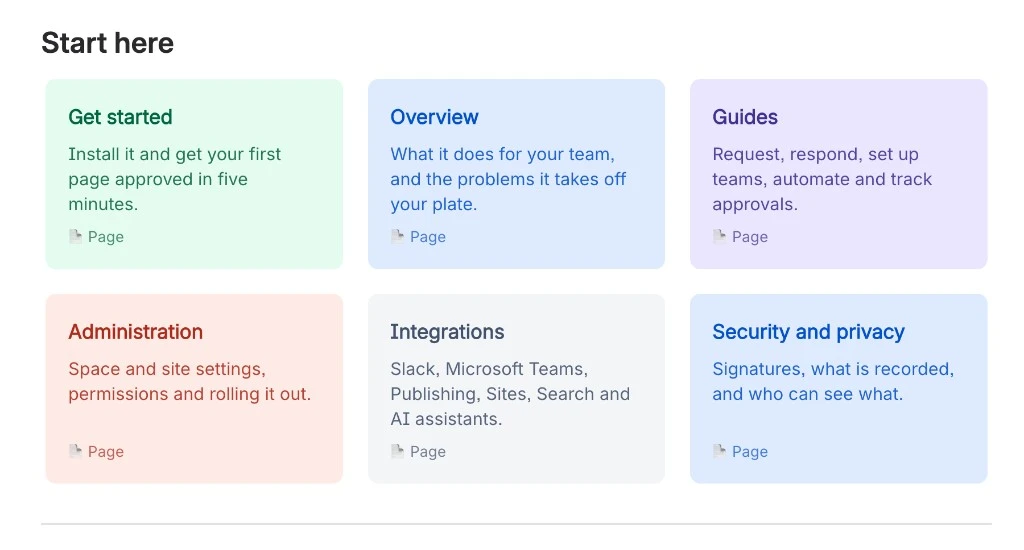
A hub such as Start here is a set of card macros. Each card is a title, a short line, a colour, and a link to a page. Claude adds the card as it converts the markdown. It is not a list of links pasted into the page.
A list of documents is a Capable Search macro, which Claude adds in the same conversion. The rows are not titles it typed. The macro runs a saved search (which pages, which label) and shows the columns you chose. Because Approval is installed, those columns can include Approval Status and Expires at. When someone approves a page, the row updates. The hub page does not have to be published again.
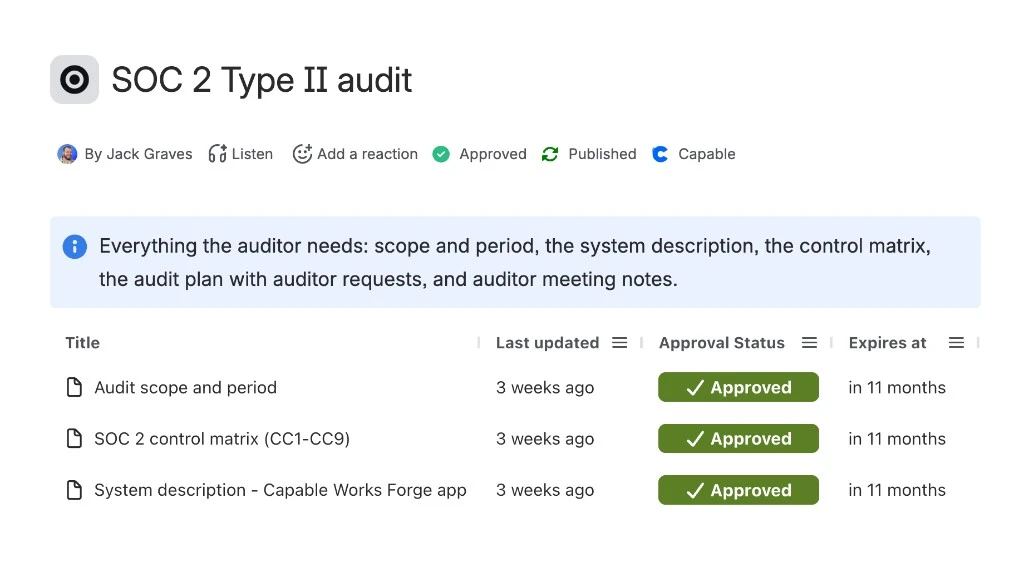
The info panel above the table is a formatting macro too, added in that same pass. A diagram or a markdown block is the same kind of enrichment. Labels decide which pages appear: a page labelled controlled can sit in the review list, a record labelled comp-open stays under open records until it is closed. You can read more about using Capable Search with approvals. The same pattern works for any set of pages, not only an audit.
What to change the second time
Hand over the source of truth. For the first publish, the markdown in git was the master copy. Once people started approving pages and editing them in Confluence, that had to change. Our publish scripts matched pages by title and set each page's parent, so running them again would have moved pages and reset approvals people had already given. We switched them off. Confluence is now the record, and the repository is history.
Links between files don't survive the trip. A link from one markdown file to another becomes a broken link in Confluence. Resolve every link to a real page ID before you publish.
Keep Claude on the facts. Converting markdown to ADF, and enriching it so it fits the template, does not change the rule. It still must not state anything the profile does not contain. Read the page before anyone approves it.
Approval is the control. The value isn't that Claude wrote 77 drafts. It's that every one of them was read and signed off by the person accountable for it, and will be again when the approval expires.
Run it on your own pages
You don't need our scripts to use the same approach:
- Write down the facts your documents depend on, in one place.
- Have Claude draft each page in markdown, using only those facts. Before upload it converts the markdown to Atlassian Document Format and enriches it with Capable and Confluence macros so the page fits your template. Cards, search, diagrams, markdown and approval are all macros it can add.
- Build one example page and treat it as the template.
- Publish with a script that dry-runs, backs up, and refuses to skip the approval section. Rovo MCP can do the create and update from chat, and it is catching up fast, but image uploads and some advanced operations can still fail.
- Turn on approval, with an expiry that matches your review cycle.
- Add card macros for the hubs, and a search table whose columns include approval status, so nothing sits unapproved unnoticed.
Try Capable for Confluence free on the Atlassian Marketplace →
Frequently asked questions
How do you drive Confluence with Claude?
Keep the facts Claude may use in one file, and have it draft each page in markdown. Before upload, Claude converts that markdown to Atlassian Document Format and enriches it with Capable and Confluence macros so the page fits your template. Publish through the Confluence REST API or Rovo MCP, and leave every new page unapproved until a person signs it off.
Can Claude publish a page straight into Confluence?
Yes. A script that calls the Confluence REST API can dry-run, back up the current page, and refuse to publish one that is missing its approval section. Atlassian's Rovo MCP server can create and update pages from the chat as well. It is reaching parity with the API quickly, though uploading images and some more advanced page operations can still fail.
Can Claude create Capable macros?
Yes. When Claude converts the markdown to Atlassian Document Format, it can add every Capable macro, and Confluence's own elements, so the page matches your template. That includes cards, search tables, panels, approval, diagrams and markdown.
How do you stop a republish wiping an approval?
Treat Confluence as the record once people start approving and editing pages there. A script that matches pages by title and sets each parent will move pages and reset approvals if you run it again. Switch it off after the first publish.
Does an approval have to be renewed?
It does if you set an expiry. On our policy pages the approval lasts 12 months. When it expires, the page shows as unapproved and goes back on the sign-off list. Capable Approval keeps the history of each decision on the page.
Atlassian, Confluence and Rovo are trademarks of Atlassian Pty Ltd. Claude is a trademark of Anthropic, PBC. Capable Works Limited is not affiliated with Anthropic.