How to Add a Date in Confluence: Shortcut, Tables and Due Dates
Type two slashes and pick a day. How Confluence Cloud dates work in sentences, tables and action items, what you can change about the format, and the limits.


Launch days, review dates and deadlines end up on almost every Confluence page. Typed as plain text ("next Friday", "12/03"), they're easy to misread and impossible to find again. Confluence has a proper date element for this, and once you know the shortcut you can add a date in Confluence in about two seconds.
This guide covers the shortcut, dates in tables and action items, what you can and can't change about the format, and how to see the dates from your pages on a calendar. Every step was checked on a Confluence Cloud site in October 2026.
How to add a date in Confluence
- Open the page and select Edit (the pencil icon at the top right).
- Put the cursor where the date should go: in a sentence, a table cell or an action item.
- Type
//(two forward slashes). A date picker opens, set to today's date. - Click a day in the calendar, or type a date into the box at the top of the picker and press Enter.
- Select Update (or Publish on a new page) to save the page.
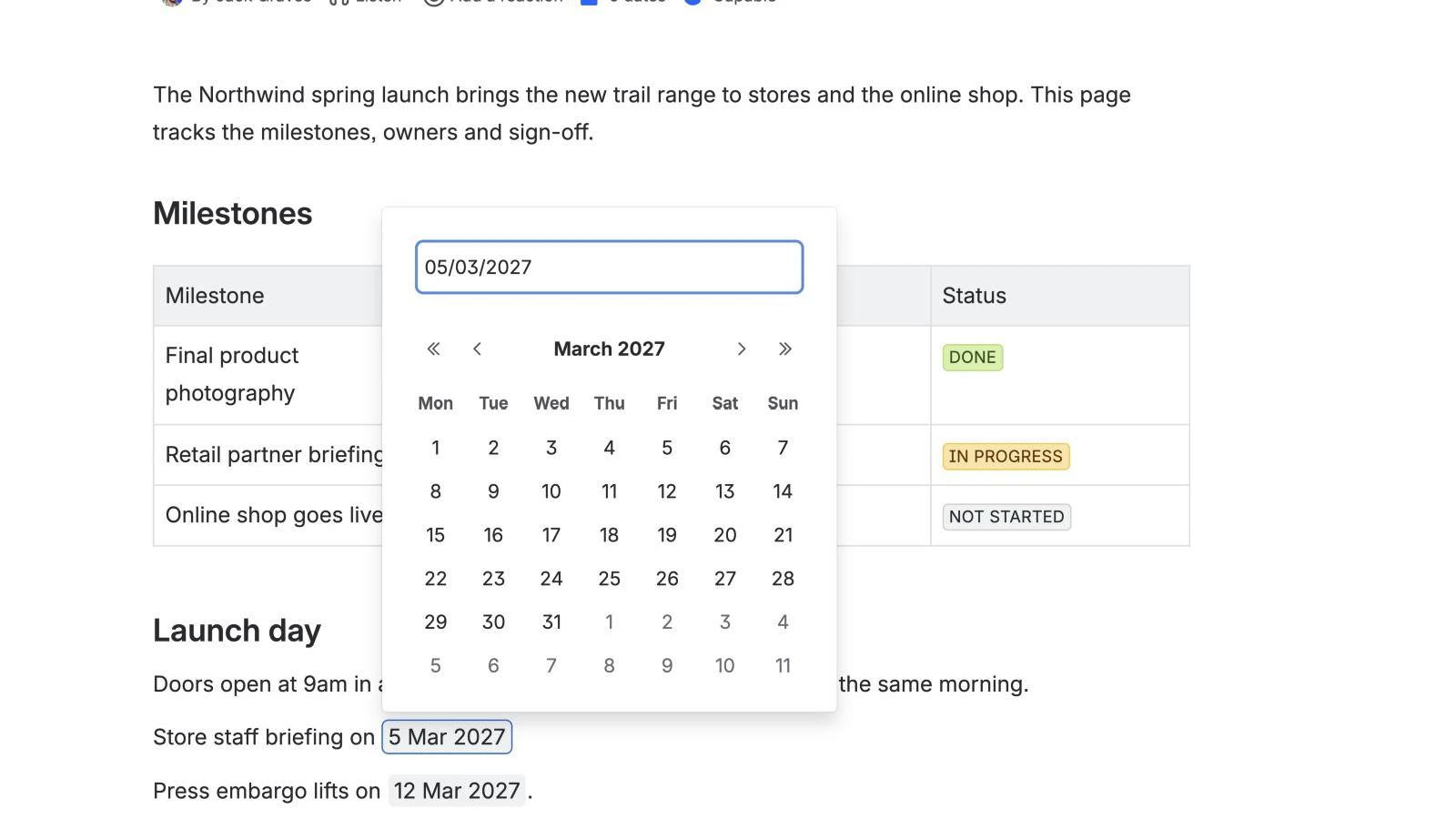
If you'd rather use the menu, type /date and choose Date ("Add a date using a calendar"). The menu shows // beside it as the shortcut, so you only need to look it up once.
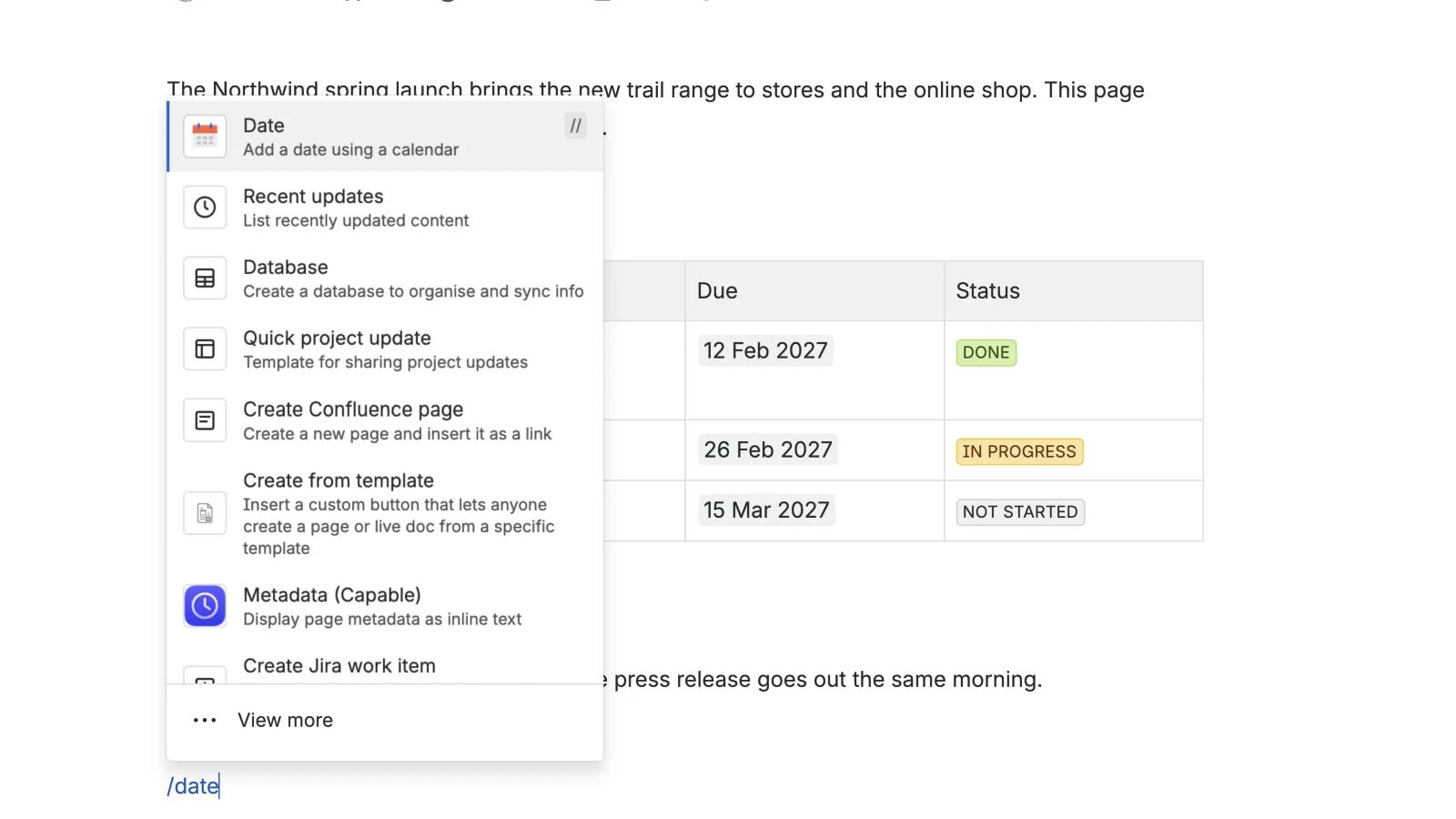
Atlassian calls the date an "element" rather than a macro, which is why searching the macro browser for a "date macro" can come up empty. It's documented with the other elements in Atlassian's guide to adding elements to a page.
To change a date later, edit the page, click the date and pick a new day.
How to add a date to a Confluence table
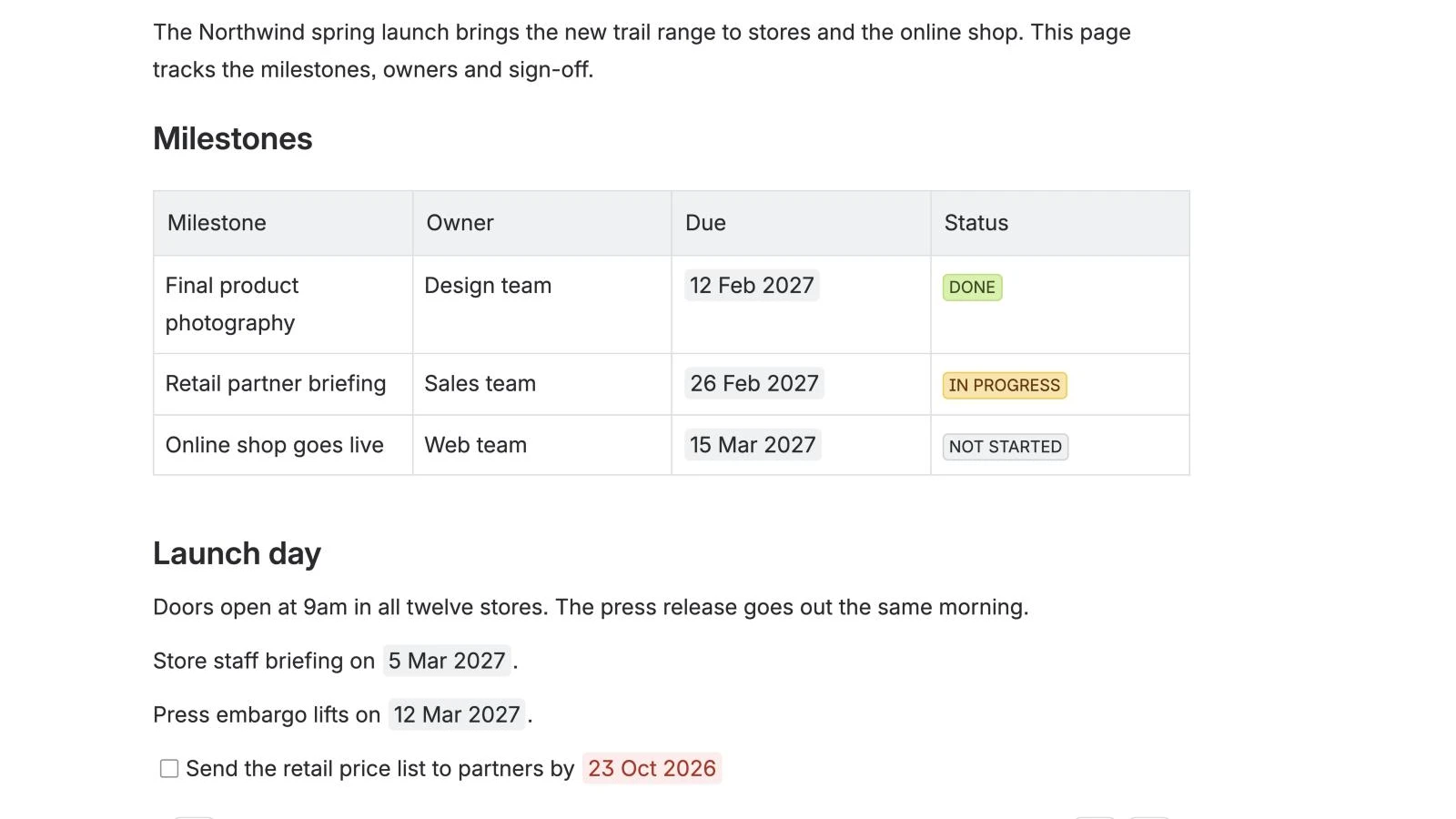
Click into a table cell and type //, exactly as in a sentence. A column of dates is the simplest way to track milestones on a plan page: one row per milestone, with an owner, a due date and a status.
How to add a due date to a task in Confluence
- Type
[]to start an action item (or type/actionand choose Action item). - Write the task, and @mention the person who owns it if you like.
- Type
//and pick the due date.
The date becomes the task's due date. Once it has passed, Confluence shows it in red, as on "23 Oct 2026" in the screenshot above. To see everyone's tasks in one place, add the Task report macro to a page: it lists action items from the spaces or pages you choose and can sort them by due date.
How to change the date format in Confluence
You can't change the format of an inserted date. Atlassian's documentation gives the format as "Mon DD, YYYY"; on our UK English test site the same element showed as "12 Mar 2027". Either way, there's no setting on the date itself.
Site admins do have a Date format setting under General configuration, in Formatting and international settings, but Atlassian documents it for the dates Confluence shows in its interface, such as when a page was created or last updated. A request to make the inserted date's format configurable, CONFCLOUD-35168, has been open on Atlassian's issue tracker since 2014 and was still gathering interest in October 2026.
Can you insert today's date automatically?
Yes, once. The picker opens on today's date, so typing // and pressing Enter inserts today. The date then stays fixed: Confluence has no live "today" value that updates each time the page is viewed. A request for one (CONFCLOUD-74864) is also still gathering interest.
Where the native way runs out
Dates in Confluence do one job well: they put an unambiguous date on a page. Beyond that, the native options thin out.
- They stay on the page. Atlassian's documentation doesn't describe inserted dates appearing on any calendar. Team Calendars is a Premium feature, and you add its events separately, so a date on a plan page and the same date on a team calendar are two things to keep in step.
- No times or time zones. The date element holds a day. There's no time, range or time zone to set.
- No overview. The Task report covers due dates on action items. There's no native view of every date across your pages, such as the milestones in a dozen project plans.
- The format and "today" are fixed, as above.
For a project plan, the usual result is that the dates live on the pages and someone keeps a separate calendar by hand. If that's your team, our guide to embedding a project calendar in Confluence covers keeping the whole schedule in one view.
The shorter way: turn the dates on your pages into a calendar
Capable Calendar reads the dates you've already added with // and shows them as events, with no extra setup. As its documentation puts it, "a page needs no Capable macro before a calendar can read it".
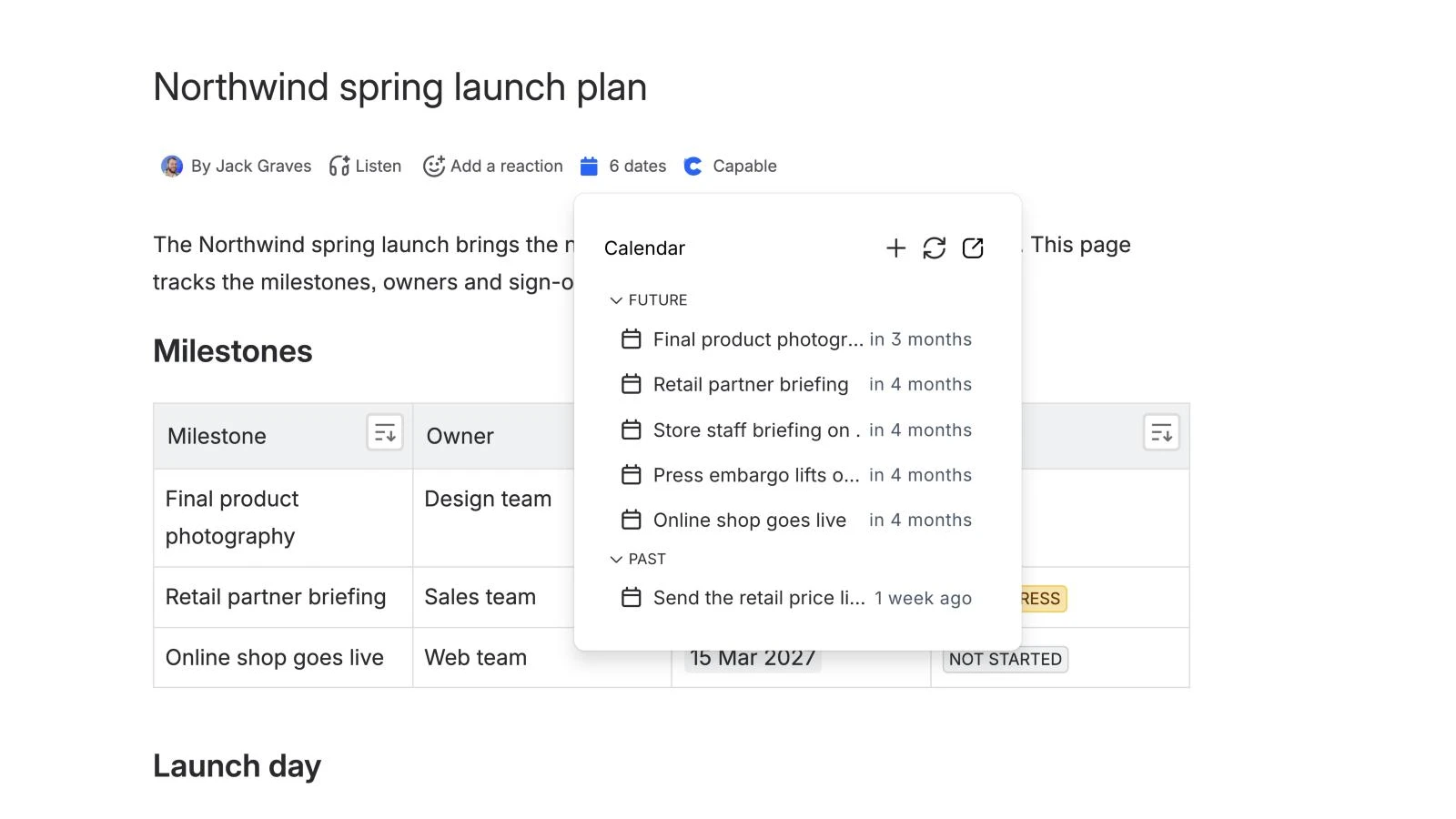
- Every date becomes an event. A date in a paragraph makes one event. A table row with a date makes one event, named from the row's first cell (so "Final product photography" above becomes an event on 12 Feb). Action items with due dates count too.
- See a page's dates at a glance. The byline shows how many dates a page holds; click it to list them as upcoming and past events.
- Put a calendar on the page. Type
/calendarand choose Calendar (Capable). Leave its source unset and it shows the page's own dates, in Day, Week, Month, Year or Agenda view. Or point it at a saved calendar that collects dates from many pages. - Times and time zones when you need them.
/eventadds an Event (Capable) with start and end times and a time zone, shown in each reader's own time zone. - Follow it from your own calendar. Subscribe to a saved calendar from Google Calendar, Apple Calendar or Outlook with a personal iCal link.
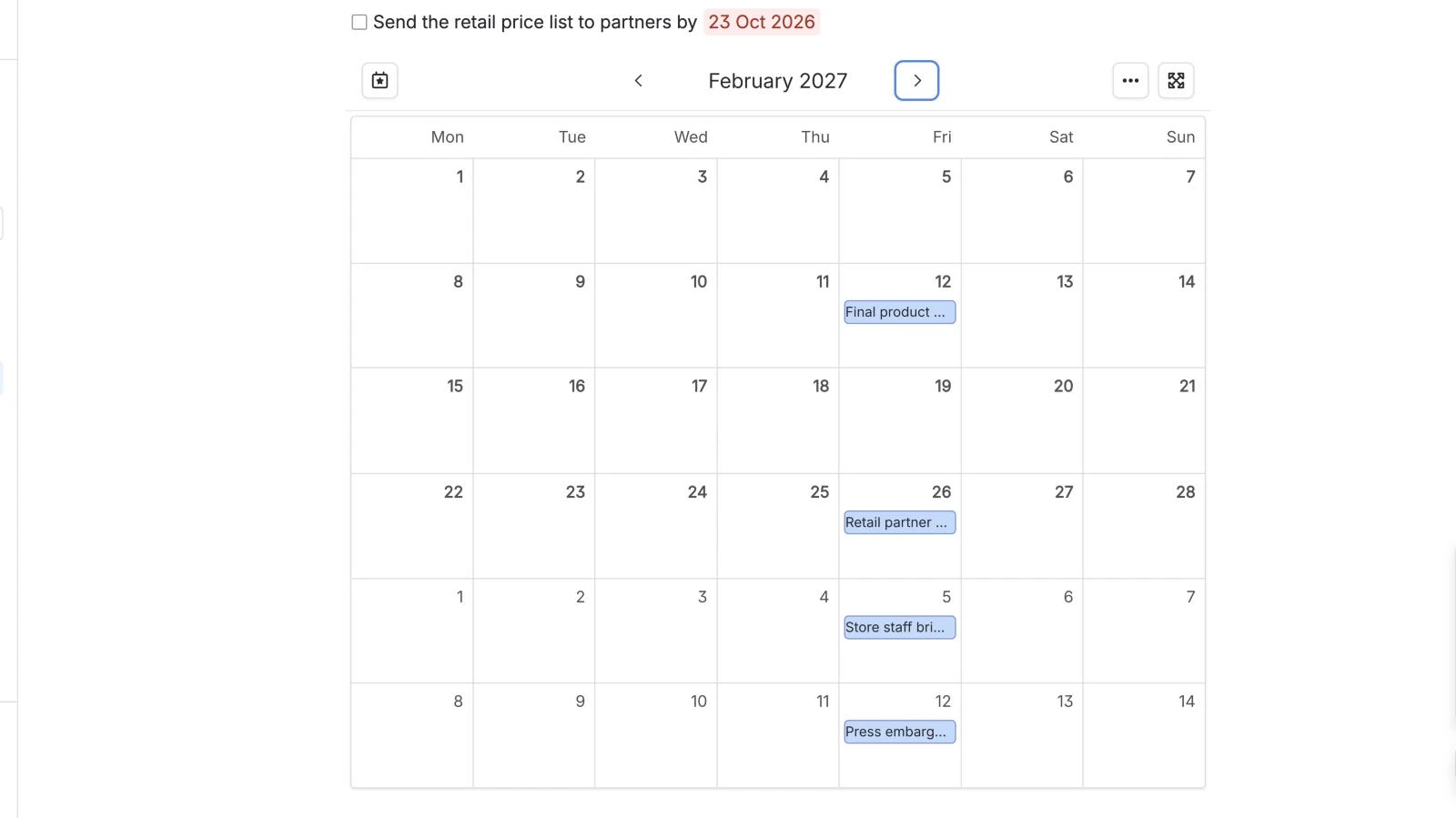
Capable Calendar doesn't do reminders or repeating events yet. How dates on a page become events in the docs explains exactly which dates it picks up.
Try Capable Calendar free on the Atlassian Marketplace
See everything Capable Calendar does
Frequently asked questions
How do I add a date in Confluence?
Edit the page, put the cursor where the date should go and type //. A date picker opens: click a day or type the date, then press Enter. You can also type /date and choose Date from the menu.
How do I change the date format in Confluence?
You can't change it for a single date. Site admins have a date format setting under General configuration, but Atlassian documents it for dates the interface shows, such as when a page was created, not for dates you insert. A request to make the inserted date's format configurable has been open on Atlassian's tracker since 2014.
Can I insert today's date automatically in Confluence?
Yes, but it won't update. The date picker opens on today's date, so typing // and pressing Enter inserts today. The date stays fixed after that: Confluence has no live "today" value.
How do I add a due date to a task in Confluence?
Type [] to start an action item, write the task, then type // and pick the date. The date becomes the task's due date and turns red once it has passed. The Task report macro can list tasks and sort them by due date.
Can Confluence dates show on a calendar?
Not on their own. Atlassian's documentation doesn't describe inserted dates appearing on a calendar, and Team Calendars (a Premium feature) holds events you add separately. A Marketplace app such as Capable Calendar can read the dates already on your pages and show them as events.
Atlassian and Confluence are trademarks of Atlassian Pty Ltd. Google Calendar is a trademark of Google LLC; Apple Calendar is a trademark of Apple Inc.; Outlook is a trademark of Microsoft Corporation. Capable Works Limited is not affiliated with Atlassian, Google, Apple or Microsoft.