Comparison

AURA Content Formatting Macros vs Capable for Confluence

Capable for Confluence brings 38 formatting macros that share one brand, a migrator that turns AURA macros into native Confluence content or Capable macros, and diagrams, approvals, search and more under the same licence. Here it is beside AURA Content Formatting Macros, every claim checked against each vendor's own documentation.

  • Last checked 11 November 2026
  • 39 cited sources

Works insideCloud

The short answer

Formatting in Capable for Confluence is 38 macros, from banners, cards and buttons to tabs, progress trackers, countdowns, embeds, footnotes, tables, HTML and LaTeX. Every macro is set up through a form, the colour controls in twenty-two of them draw on one set of brand themes, and twenty can start from a preset your administrator saved. Diagrams, approvals, search, Markdown, calendars and more come in the same app.

Moving from AURA does not mean rebuilding pages. Capable's migrator converts 11 AURA macros in place. Panels, titles, status lozenges, dividers, tabs and expands become native Confluence content, which keeps working with no app at all, and cards, buttons, backgrounds, progress bars and LaTeX become Capable macros.

AURA is the better fit if you need Confluence Data Center or Atlassian Government Cloud, content overviews that rebuild themselves from pages, users and org charts, custom fonts and icons, or the Karma page builder. For formatting on Confluence Cloud, Capable for Confluence does a good deal more, and at 50 users it listed at US$500 a year on 11 November 2026, against US$575 for AURA.

More than a box of macros

Formatting is one part of Capable for Confluence, built so a page made from six different macros still looks like one page.

Set your brand once

An administrator sets five colour roles in a theme, and the colour control in twenty-two macro forms starts from your colours. Presets let a team start new macros from the house configuration, and freeform colours can be switched off so pages stay on brand.

  • 38 formatting macros
  • Five brand colour roles
  • Up to ten presets per macro

See the difference

Screens from real Confluence pages. Where both sides are shown, the same page was built once in AURA Content Formatting Macros and once in Capable for Confluence, with the same text, images and links.

1 / 5

Why Capable

A release readiness page, side by side

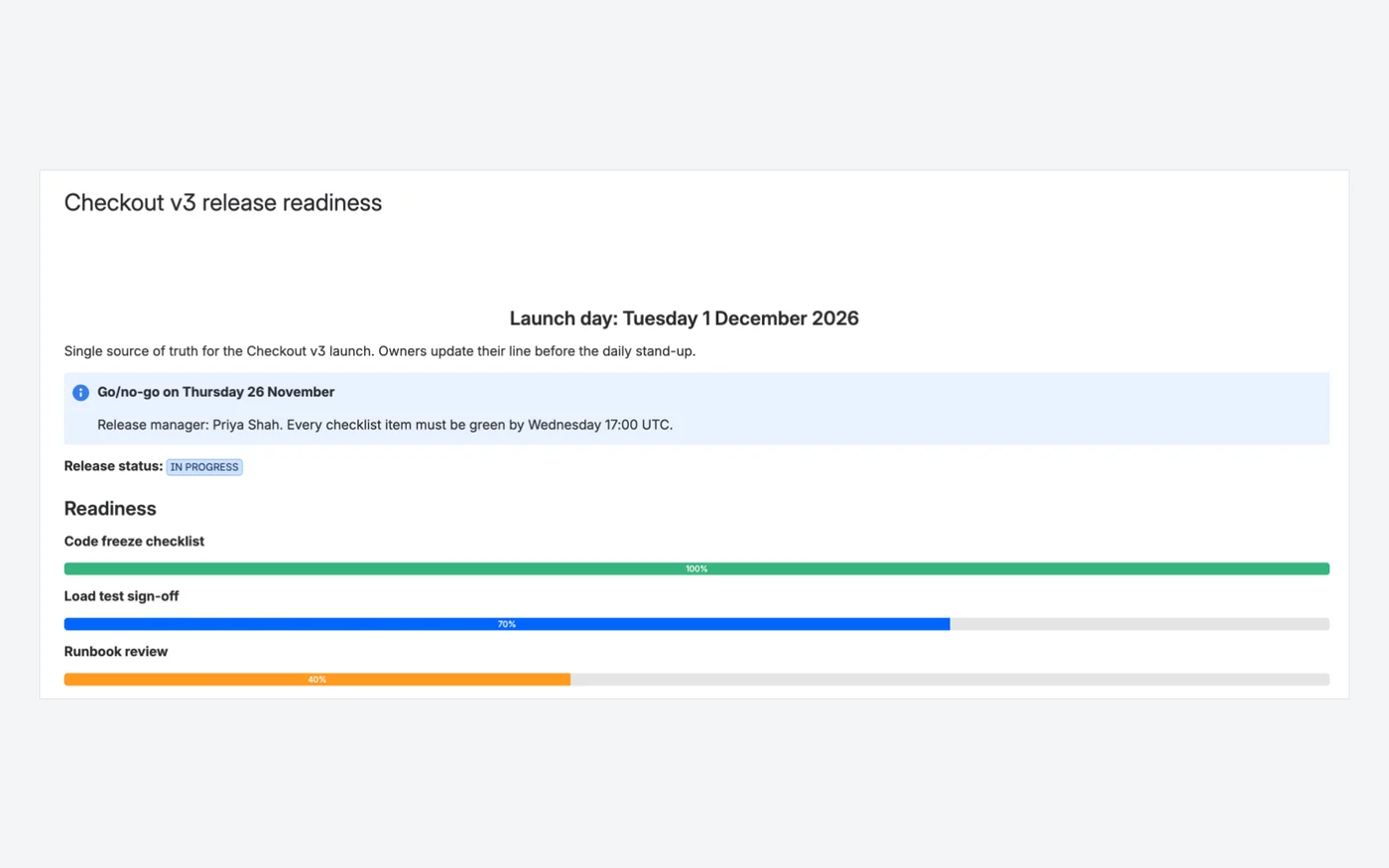
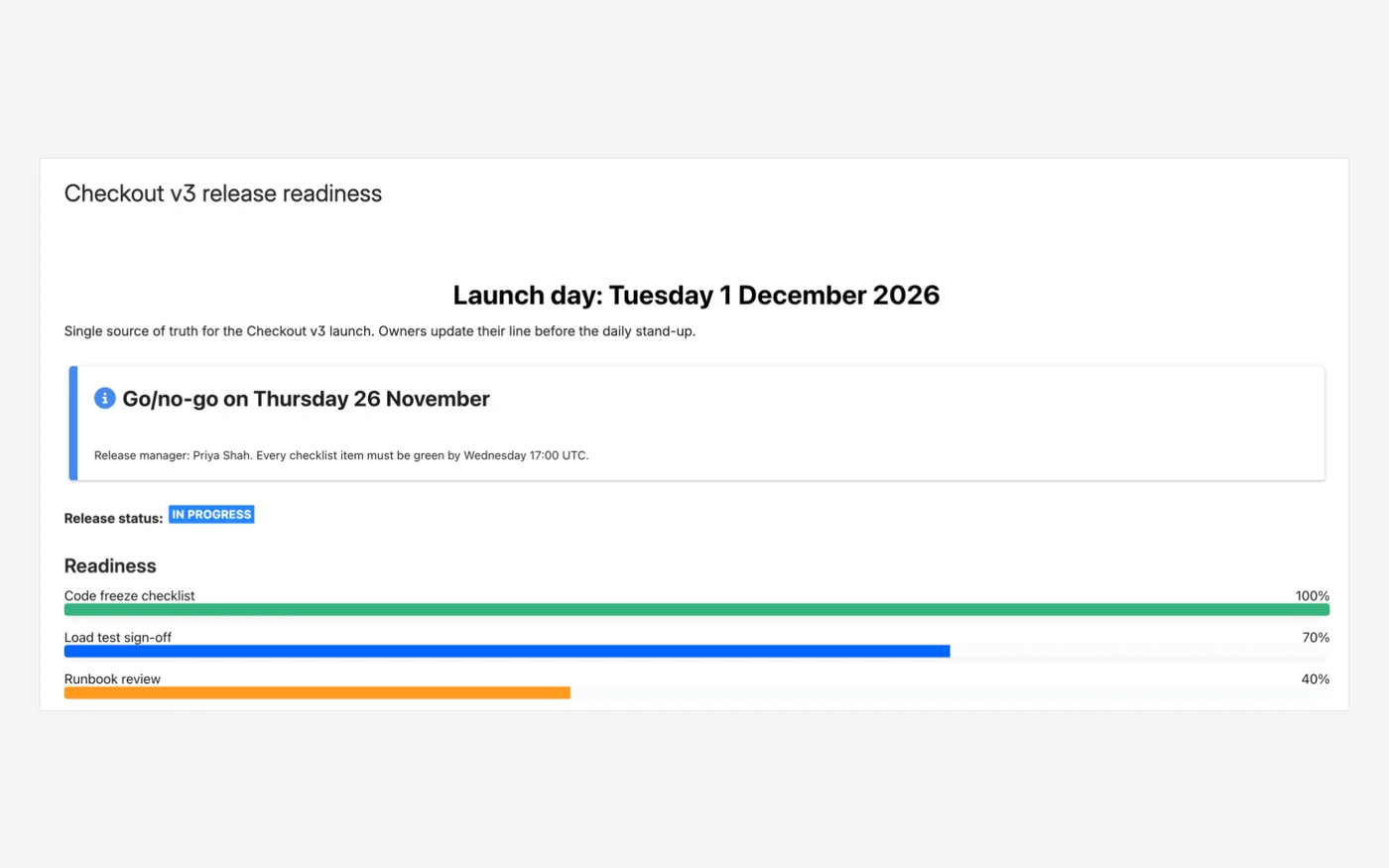
The same Checkout v3 readiness page: a centred title, an info panel, a status lozenge and three progress bars.

  • Label and value shown on the bar
  • Fill and track colours from your brand palette
  • Editors can drag the bar on the published page
Capable for ConfluenceCapable for Confluence page with a centred heading, info panel, IN PROGRESS status and three coloured progress bars
Capable for Confluence: native Confluence heading, panel and status, with three Progress bar macros.39
AURA Content Formatting MacrosAURA Content Formatting Macros page with a large centred title, a panel, a status and three progress bars
AURA Content Formatting Macros: Title, Panel, Status and Progress on the same page.35323433

Why Capable

Linked cards and a button

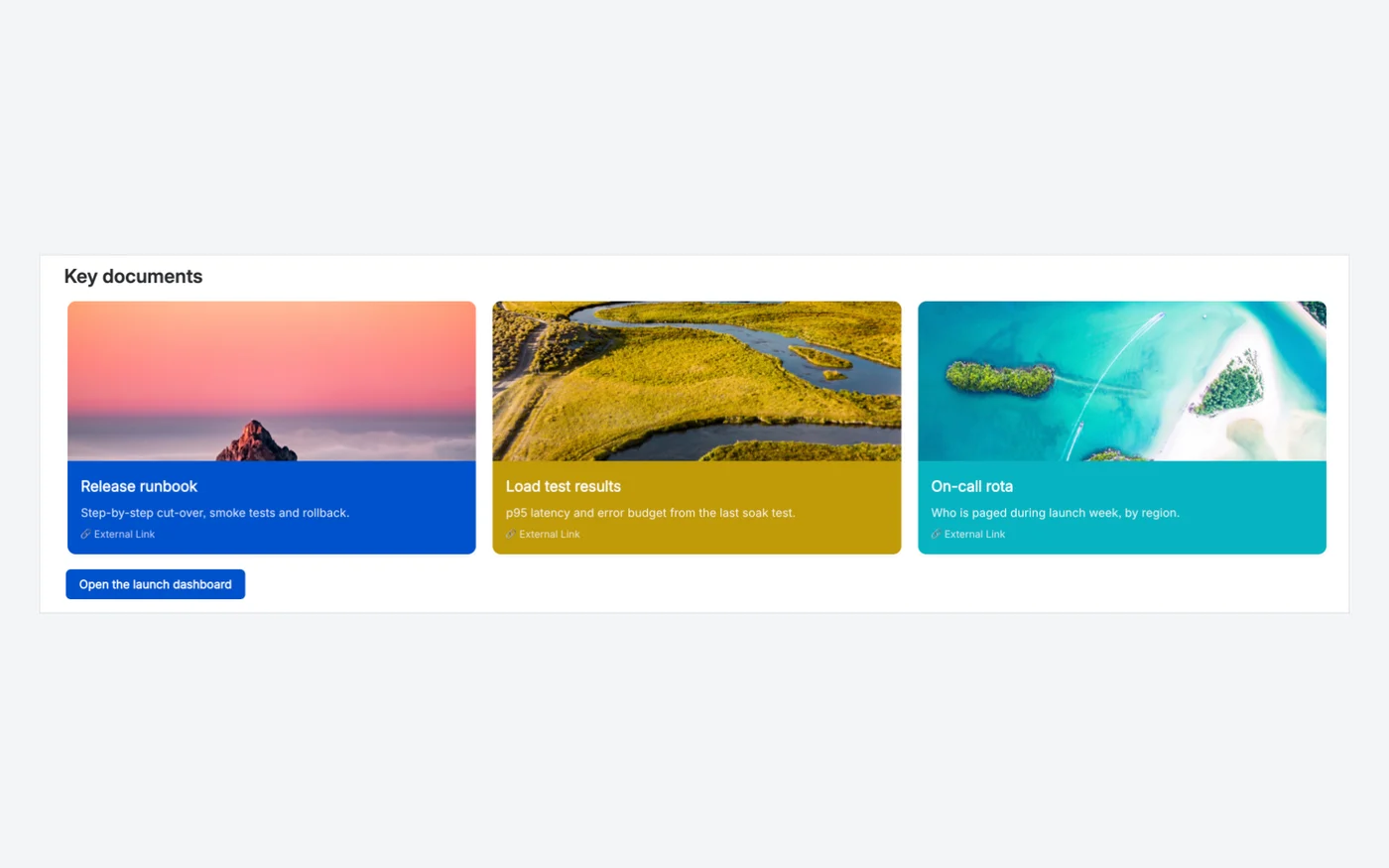
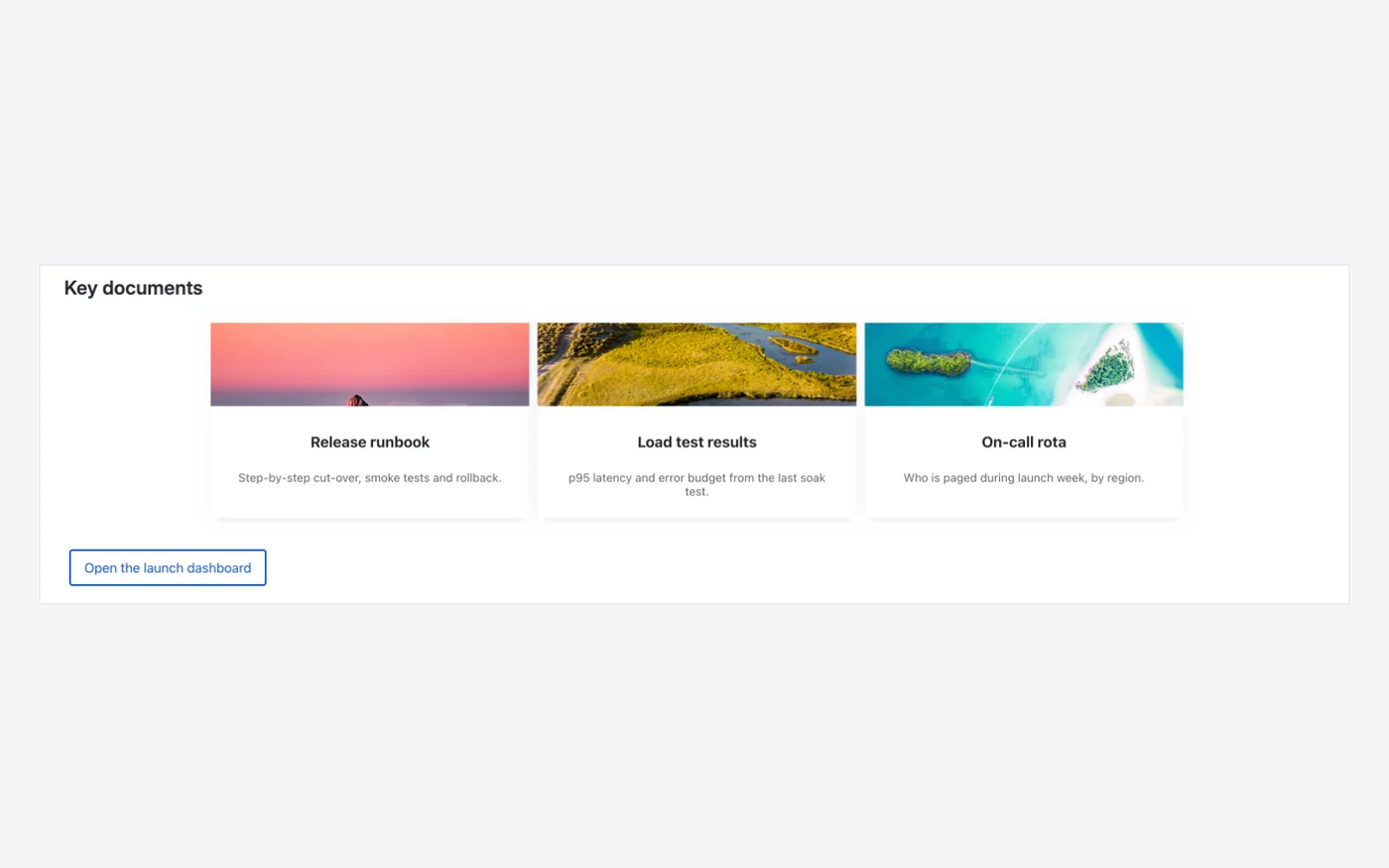
Three linked document cards with images and a call-to-action button, with the same text and links on both sides.

  • Cards with a title, description, image and link
  • Background and text colour per card
  • Buttons in brand or custom colours
Capable for ConfluenceCapable for Confluence Cards with three coloured image cards and a blue button
Capable for Confluence: Cards and Buttons.3736
AURA Content Formatting MacrosAURA Content Formatting Macros classic cards with three image cards and an outlined button
AURA Content Formatting Macros: Classic Cards and Button.3029

Why Capable

Styling the cards

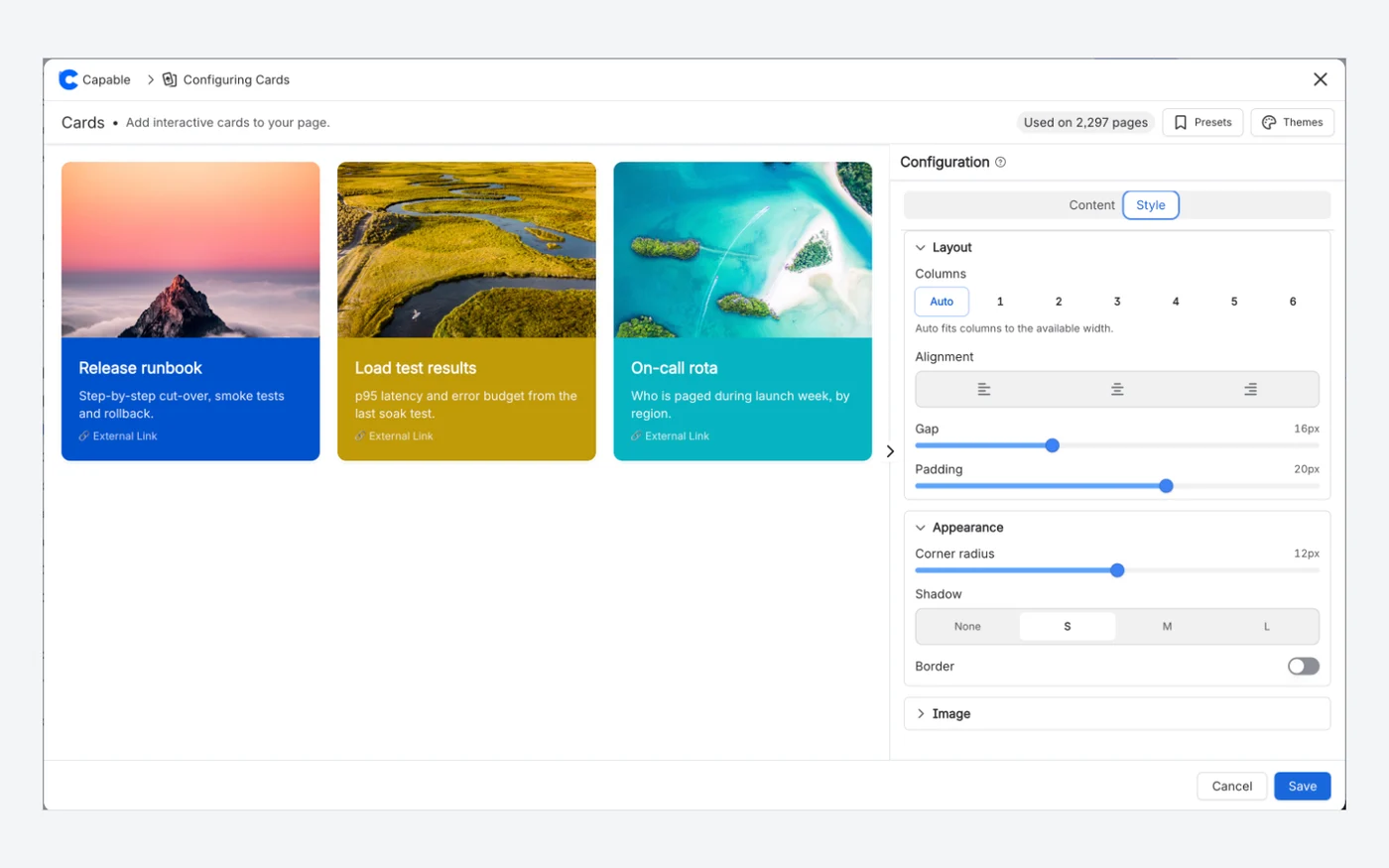
In Capable for Confluence the look of the whole grid is set once on the Style tab, beside a preview that redraws as you type.

  • Columns, alignment, gap and padding
  • Corner radius, shadow and border
  • Content and Style tabs
Capable for ConfluenceCapable for Confluence Cards editor Style tab with columns, alignment, gap, padding, corner radius, shadow and border
Capable for Confluence: the Cards editor, Style tab.37
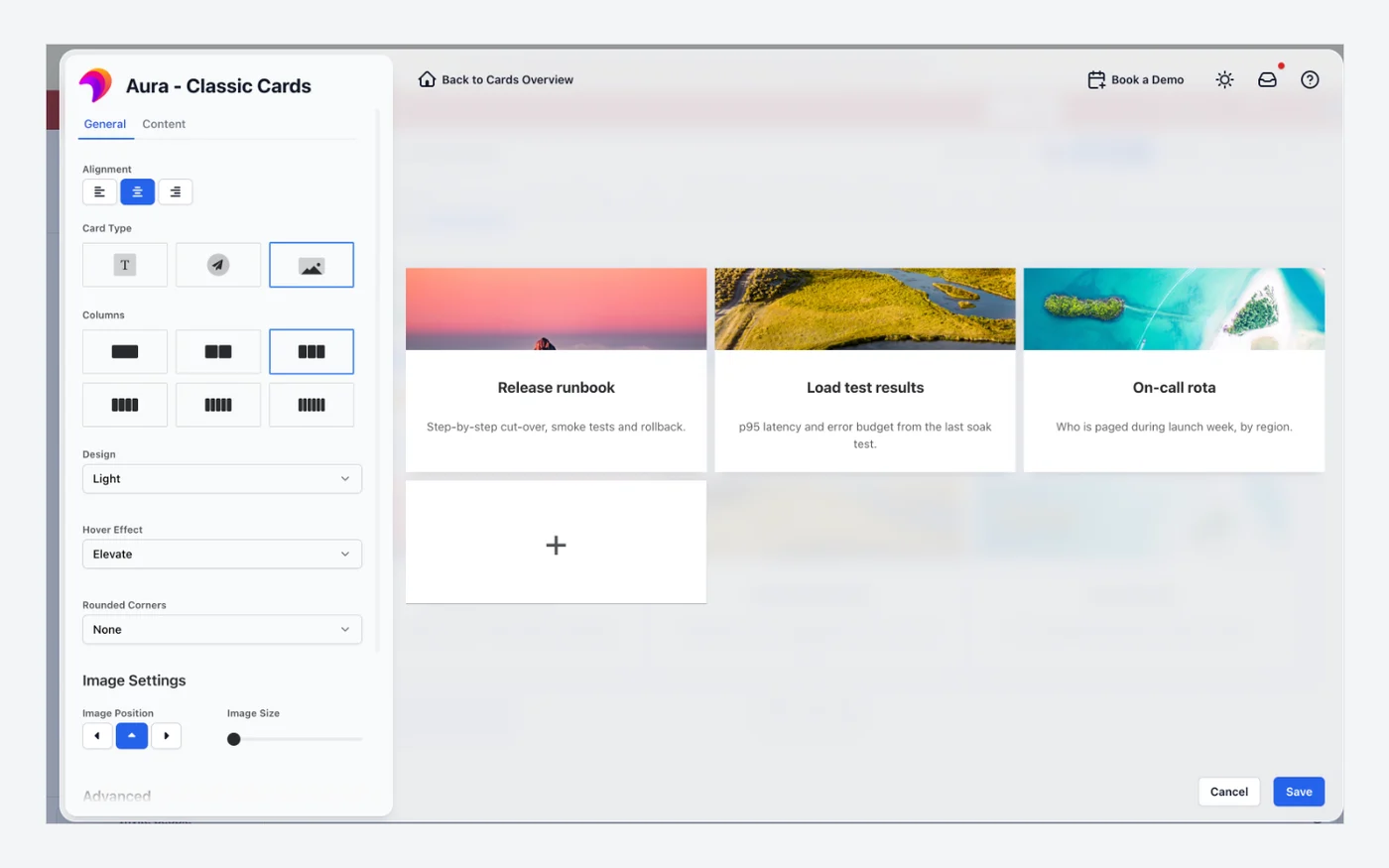
AURA Content Formatting MacrosAURA Content Formatting Macros Classic Cards editor General tab with alignment, card type, columns, design and hover effect
AURA Content Formatting Macros: the Classic Cards editor, General tab.30

Why Capable

Every macro in one catalogue

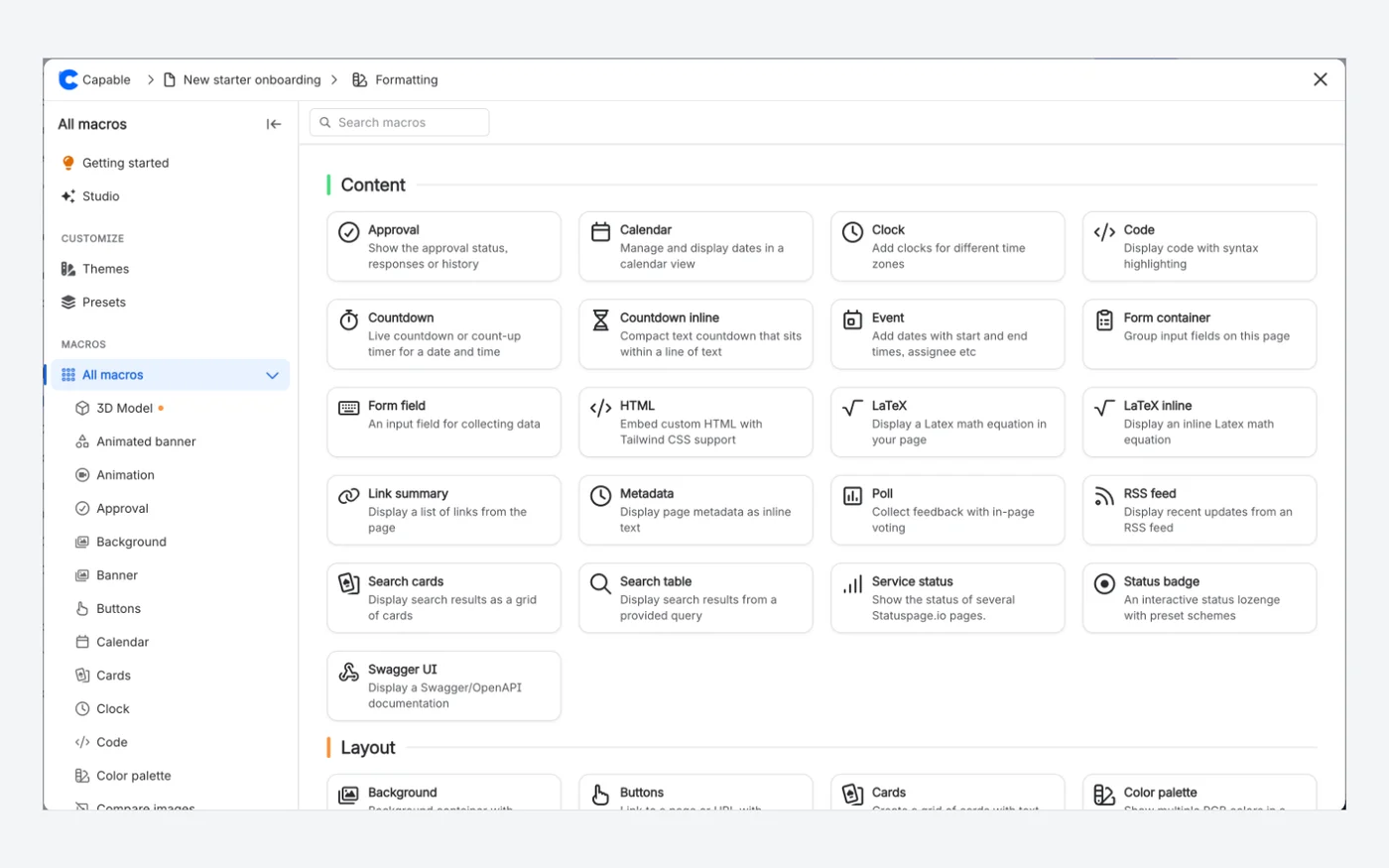
Capable Studio opens the full Capable macro catalogue, grouped by category, with search, previews, templates and the configuration panel in the same window.

  • Search and browse every macro by category
  • Themes and Presets in the sidebar
  • Swapped for the real macro when you insert
Capable for ConfluenceCapable for Confluence macro catalogue listing Content and Layout macros with search, Themes and Presets
Capable for Confluence: the macro catalogue, with search, Themes and Presets.2138

Why Capable

Describe a macro, get it configured

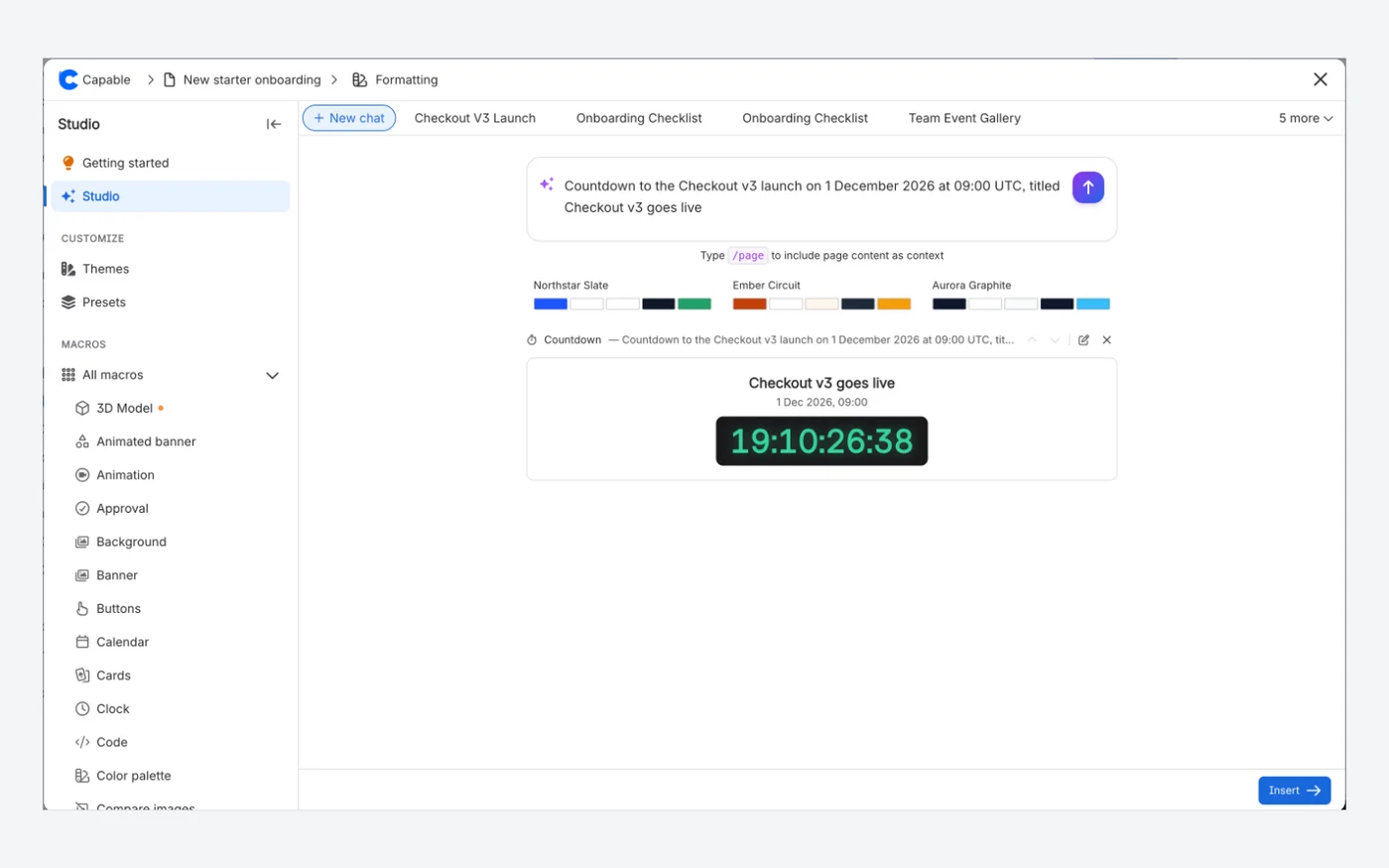
In Capable Studio, a prompt drafts macros you can preview before inserting. Here one prompt produced a launch countdown with the title, date and time already set.

  • One prompt can return several macros
  • Reorder, edit or remove each preview
  • Choose where they go, then insert them all
Capable for ConfluenceCapable Studio with the prompt "Countdown to the Checkout v3 launch on 1 December 2026 at 09:00 UTC, titled Checkout v3 goes live" and the generated countdown preview
Capable for Confluence: Capable Studio drafted this countdown from the prompt shown.21
AURA Content Formatting Macros

AURA Content Formatting Macros has no AI macro builder.

Not in the AURA Content Formatting Macros listing or documentation.131

Which one fits your team?

For most teams on Confluence Cloud, Capable for Confluence does more. Here is why, and the few cases where we would point you at AURA Content Formatting Macros instead.

Choose Capable for Confluence if…

  • You want migrated content that is not tied to any app. AURA panels, titles, status lozenges, dividers, tabs and expands become native Confluence content.2425
  • You want every macro on a page to match. Brand themes and admin presets set the colours and starting configuration for everyone.1819
  • You want more for less. At 50 users Capable for Confluence listed at US$500 a year on 11 November 2026, against US$575 for AURA, and it includes far more than formatting.43
  • You also want diagrams, approvals, search, Markdown, calendars and more, in one app with one licence.78
  • You want to switch without rebuilding pages, with a dry run first and every earlier page version kept in history.2627

Choose AURA Content Formatting Macros if…

  • You run Confluence Data Center or Atlassian Government Cloud, which AURA's listing says it supports alongside Cloud.12
  • You want Dynamic Content, AURA's overviews of pages, blogs, spaces, users and org charts that rebuild themselves.1
  • Your brand depends on custom fonts and custom icons, which AURA lists as admin features.1
  • You already use Karma, AURA's sister page builder. With both, the listing says you get Karma Pro, a drag-and-drop page builder with 200+ templates.1

Feature by feature

Each cell cites its source: AURA Content Formatting Macros's own listing or documentation, or Capable's. A cross against AURA Content Formatting Macros means the feature is in neither its listing nor its documentation. Checked 11 November 2026.

  • Available
  • With limits
  • For context
  • Kept simple, on purpose
Macros
FeatureAURA Content Formatting MacrosCapable for Confluence
Tabs and expandsAvailable:Tabs, Child Tabs and Expand macros, with horizontal or vertical tabs.156Available:Tabs macro with four header styles, three sizes, horizontal or vertical layout and brand colours; expands use Confluence's own.1525
Cards, buttons and backgroundsAvailable:Cards, Buttons, Hero Section, Title and Background macros.15Available:Cards, Buttons, Banner, Animated banner, Background and Gallery macros.14
Panels, dividers and statusAvailable:Panel, Divider and Status macros.15For context:Uses Confluence's own panels, dividers and status lozenges, plus a Status badge macro that editors can click to change.2514
Progress and countdownAvailable:Progress and Countdown macros.15Available:Progress bar, Progress tracker, Countdown and Countdown inline macros.14
EmbedsAvailable:Embed macro for live Figma, Miro, Google and Microsoft 365 content.1Available:Embed/iFrame macro for YouTube, Figma, Google Docs, Miro and any approved HTTPS address.14
HTMLAvailable:HTML macro, listed as working in Cloud.1Available:HTML with Tailwind classes and your own CSS. JavaScript runs only after an admin enables it, in an isolated sandbox.16
LaTeXAvailable:LaTeX macro.15Available:LaTeX math and LaTeX math inline macros, with a visual Live editing mode.1417
Numbered headingsAvailable:Numbered Headings.1Available:Numbered headings capability with built-in numbering templates and optional automatic re-sync.10
Self-updating content listsAvailable:Dynamic Content builds overviews of pages, blogs, spaces, users and org charts.1With limits:Saved searches go on a page as a table or as cards, and RSS feed pulls items in. No user or org chart overviews.1114
Consistency and authoring
FeatureAURA Content Formatting MacrosCapable for Confluence
BrandingAvailable:Color Management, Custom Fonts, Custom Icons and Dark Mode.1Available:Brand themes with five colour roles, used by the colour control in twenty-two macro forms, with dark-mode colours derived; admins can switch off freeform colours.18
Saved configurationsAvailable:Macro Templates.1Available:Admin presets on twenty macros, up to ten per macro with a default, plus starter templates for sixteen macros.1912
AIFor context:Not described in its listing or documentation.15Available:Six macros draft their content from a description, and Capable Studio can return several macros from one prompt. One switch turns AI off.2021
Buying and hosting
FeatureAURA Content Formatting MacrosCapable for Confluence
Beyond formattingFor context:Formatting macros; a drag-and-drop page builder is Karma Pro, with Karma.1Available:Around twenty capabilities in one app: diagrams, approvals, search, Markdown, calendars, publishing and more.78
Confluence Data CenterAvailable:Cloud, Data Center and Atlassian Government Cloud.12Kept simple, on purpose:Cloud only. Capable builds for Confluence Cloud and does not sell Data Center or Server apps.23

How pricing works

Both apps are bought through the Atlassian Marketplace and priced by your Confluence user tier. List prices change, so the savings calculator reads them live from each listing for the team size you set.

How much could you save?

Open the savings calculator with AURA Content Formatting Macros already added, add any other apps you pay for, set your team size and compare the total with Capable.

Work out your saving

Annual price by team size

At 50 users, Capable for Confluence (All-in-One) costs US$75 a year less than AURA Content Formatting Macros.

UsersAURA Content Formatting MacrosCapable for Confluence (All-in-One)Difference
10US$0US$0Same price
50US$575US$500US$75 less
100US$1,150US$1,000US$150 less
250US$2,730US$2,300US$430 less

Difference: Capable for Confluence (All-in-One) against AURA Content Formatting Macros. At 10 users both are free. Atlassian Marketplace list prices for Cloud, annual licences in US dollars, checked 18 November 2026. Prices change; the listings have the current ones.

Price your own team in the savings calculator
  1. Both are billed through Atlassian and priced by your Confluence user tier.34

  2. On 11 November 2026 the Marketplace pricing data showed both free for up to 10 users on Cloud, and at 50 users an annual Cloud licence listed at US$575 for AURA and US$500 for Capable for Confluence on the Standard edition.34

  3. Formatting is in both editions of Capable for Confluence. Sites, Quality and Variables need Advanced. Forms is on Standard with only the plain text input.9

Moving from AURA Content Formatting Macros

Capable's migrator recognises 18 AURA macros on Confluence Cloud. It converts 11 of them in place, fully or in part, and reports the other 7, reading both the current AURA format and older ones. Where Confluence has its own element it uses that, so those parts of your pages no longer depend on any app.

  1. Panels become native Confluence panels, titles become headings, status becomes a native status lozenge, dividers become a horizontal rule, and tabs and expands become native expands, so a tab group turns into a stack of expands. Confluence wraps a migrated tab set in a legacy content block, which limits editing until it is rebuilt.

    Source 24, 25: Capable migration docs, Aura Content Formatting for Confluence
  2. Cards, buttons, backgrounds, progress bars and LaTeX become Capable macros, keeping text, links, button colours and sizes, and progress values. Cards keep images added by link but not uploaded ones, flip cards show both faces at once, a formula saved inline stays inline, and only light-mode colours are kept.

    Source 24: Capable migration docs, Aura Content Formatting for Confluence
  3. Countdown, Dynamic Content, Child Tabs, Embed, HTML, User Profile and LaTeX Reference are found and reported, but left exactly as they are, so plan to rebuild those with Capable or native macros.

    Source 24: Capable migration docs, Aura Content Formatting for Confluence
  4. Start with a dry run on one space, which writes nothing. A real run writes a new page version, so earlier versions with the AURA macros stay in page history. Keep AURA installed until you have reviewed the results.

    Source 27, 28: Capable migration docs, Test a Confluence migration with a dry run

Questions people ask

About moving from AURA Content Formatting Macros to Capable for Confluence.

Is Capable for Confluence an AURA alternative?

For formatting on Confluence Cloud, yes. It has 38 formatting macros, including tabs, cards, buttons, banners, backgrounds, progress, countdowns, embeds, HTML and LaTeX, with colours from one set of brand themes, plus diagrams, approvals, search and more. It is not available for Data Center.
Source: Capable Formatting docs, What Capable Formatting is

Can I move my AURA pages to Capable without rebuilding them?

Mostly. The migrator converts 11 of the 18 AURA macros it recognises in place, from panels and tabs to cards, buttons and LaTeX, with some styling lost. The other 7, such as Countdown, Embed and HTML, are reported and stay as they are, so they need rebuilding.
Source: Capable migration docs, Aura Content Formatting for Confluence

Will my pages still work if we uninstall Capable later?

The parts that became native Confluence panels, headings, status lozenges, rules and expands keep working with no app. Capable macros stay on the page but do not render while Capable is uninstalled.
Source: Capable for Confluence docs, Uninstalling, what is kept and what is deleted

What happens to AURA tabs?

They become native Confluence expands, one per tab, so the content stays readable, searchable and exportable without any app. Capable also has its own Tabs macro if you want tabs on new pages.
Source: Capable migration docs, Why we migrate to native Confluence where we can

Is formatting the same in Capable for Confluence and the standalone Capable Formatting app?

The macros are identical. Capable for Confluence names them slightly differently, exports more of them to PDF and Word, and adds the other capabilities in the same install.
Source: Capable Formatting docs, Suite or standalone

Try it on your own pages

Installing Capable for Confluence starts a free trial with every macro, brand themes, presets and the migrator, ready to run a dry run on your AURA pages.

Sources

Last checked

Claims about AURA Content Formatting Macros come from its vendor's own documentation and its Atlassian Marketplace listing. Claims about Capable come from our documentation at help.gocapable.com. Products change; if something here is out of date, tell us and we will correct it.

  1. AURA Content Formatting Macros Tabs LaTeX HTML in Confluence, Atlassian Marketplace listing (Cloud)Atlassian Marketplace · marketplace.atlassian.com/apps/1221974/aura-content-formatting-macros-tabs-latex-html-in-confluence · checked 11 November 2026
  2. AURA Content Formatting Macros, Atlassian Marketplace listing (Data Center)Atlassian Marketplace · marketplace.atlassian.com/apps/1221974/aura-content-formatting-macros-tabs-latex-html-in-confluence · checked 11 November 2026
  3. AURA Content Formatting Macros, Marketplace pricing (Cloud)Atlassian Marketplace · marketplace.atlassian.com/apps/1221974/aura-content-formatting-macros-tabs-latex-html-in-confluence · checked 11 November 2026
  4. Capable for Confluence (All-in-One), Marketplace pricing (Cloud)Atlassian Marketplace · marketplace.atlassian.com/apps/1234376/capable-for-confluence-all-in-one · checked 11 November 2026
  5. Aura docs, Aura Macro OverviewVendor documentation · appanvil.atlassian.net/wiki/spaces/AC/pages/1912143873/Aura+-+Macro+Overview · checked 11 November 2026
  6. Aura docs, Aura Tab Group & TabVendor documentation · appanvil.atlassian.net/wiki/spaces/AC/pages/2272165915 · checked 11 November 2026
  7. Capable for Confluence docs, What Capable for Confluence isCapable · help.gocapable.com/capable/what-capable-for-confluence-is · checked 11 November 2026
  8. Capable for Confluence docs, CapabilitiesCapable · help.gocapable.com/capable/capabilities · checked 11 November 2026
  9. Capable for Confluence docs, EditionsCapable · help.gocapable.com/capable/editions · checked 11 November 2026
  10. Capable for Confluence docs, Numbered headingsCapable · help.gocapable.com/capable/numbered-headings · checked 11 November 2026
  11. Capable Search docsCapable · help.gocapable.com/search/ · checked 11 November 2026
  12. Capable Formatting docs, What Capable Formatting isCapable · help.gocapable.com/macros/what-capable-formatting-is · checked 11 November 2026
  13. Capable Formatting docs, Suite or standaloneCapable · help.gocapable.com/macros/suite-or-standalone · checked 11 November 2026
  14. Capable Formatting docs, All macrosCapable · help.gocapable.com/macros/all-macros · checked 11 November 2026
  15. Capable Formatting docs, TabsCapable · help.gocapable.com/macros/tabs · checked 11 November 2026
  16. Capable Formatting docs, HTMLCapable · help.gocapable.com/macros/html · checked 11 November 2026
  17. Capable Formatting docs, LaTeX mathCapable · help.gocapable.com/macros/latex-math · checked 11 November 2026
  18. Capable Formatting docs, Brand and colourCapable · help.gocapable.com/macros/brand-and-colour · checked 11 November 2026
  19. Capable Formatting docs, Macro presetsCapable · help.gocapable.com/macros/macro-presets · checked 11 November 2026
  20. Capable Formatting docs, Generating macro content with AICapable · help.gocapable.com/macros/generating-macro-content-with-ai · checked 11 November 2026
  21. Capable Formatting docs, Capable StudioCapable · help.gocapable.com/macros/capable-studio · checked 11 November 2026
  22. Capable for Confluence docs, Uninstalling, what is kept and what is deletedCapable · help.gocapable.com/capable/uninstalling-what-is-kept-and-what-is-deleted · checked 11 November 2026
  23. Capable, About us (FAQ on Cloud, Data Center and Server)Capable · gocapable.com/about/about-us · checked 11 November 2026
  24. Capable migration docs, Aura Content Formatting for ConfluenceCapable · help.gocapable.com/migration/aura-content-formatting-for-confluence · checked 11 November 2026
  25. Capable migration docs, Why we migrate to native Confluence where we canCapable · help.gocapable.com/migration/why-we-migrate-to-native-confluence-where-we-can · checked 11 November 2026
  26. Capable Formatting docs, Migrating from another vendor's macrosCapable · help.gocapable.com/macros/migrating-from-another-vendor-s-macros · checked 11 November 2026
  27. Capable migration docs, Test a Confluence migration with a dry runCapable · help.gocapable.com/migration/test-a-confluence-migration-with-a-dry-run · checked 11 November 2026
  28. Capable migration docs, Before you uninstall the old appCapable · help.gocapable.com/migration/before-you-uninstall-the-old-app · checked 11 November 2026
  29. AURA docs, Aura ButtonVendor documentation · appanvil.atlassian.net/wiki/spaces/AC/pages/1911619585 · checked 11 November 2026
  30. AURA docs, Aura CardsVendor documentation · appanvil.atlassian.net/wiki/spaces/AC/pages/1910308879 · checked 11 November 2026
  31. AURA Content Formatting Macros documentation space (appanvil)Vendor documentation · appanvil.atlassian.net/wiki/spaces/AC/overview · checked 11 November 2026
  32. AURA docs, Aura PanelVendor documentation · appanvil.atlassian.net/wiki/spaces/AC/pages/1911685121 · checked 11 November 2026
  33. AURA docs, Aura ProgressVendor documentation · appanvil.atlassian.net/wiki/spaces/AC/pages/2731442194 · checked 11 November 2026
  34. AURA docs, Aura StatusVendor documentation · appanvil.atlassian.net/wiki/spaces/AC/pages/2633039891 · checked 11 November 2026
  35. AURA docs, Aura TitleVendor documentation · appanvil.atlassian.net/wiki/spaces/AC/pages/1911717889 · checked 11 November 2026
  36. Capable Formatting docs, ButtonsCapable · help.gocapable.com/macros/buttons · checked 11 November 2026
  37. Capable Formatting docs, CardsCapable · help.gocapable.com/macros/cards · checked 11 November 2026
  38. Capable for Confluence docs, Inserting macrosCapable · help.gocapable.com/capable/inserting-macros · checked 11 November 2026
  39. Capable Formatting docs, Progress barCapable · help.gocapable.com/macros/progress-bar · checked 11 November 2026

Cookie Settings

We take good care of you and your data. You can read more about how we use cookies, the third parties who set cookies and update your cookie settings here.