Comparison

GitHub Macros vs Capable for Confluence

GitHub Macros for Confluence by Appfire embeds GitHub files, Markdown, issues and pull requests. Capable for Confluence shows GitHub files and Markdown live, lets logged-out readers see public files, and comes with diagrams, approvals, search and more in the same licence. Every claim is checked against each vendor's own documentation.

  • Last checked 11 November 2026
  • 21 cited sources

Works insideCloud

The short answer

GitHub Macros for Confluence has four macros, for a GitHub file, a Markdown file, an issue list and a pull request list, using GitHub tokens set up on the app's configuration page. Capable for Confluence covers files and Markdown with one GitHub macro.

In Capable, public files need no connection and show to everyone, including logged-out and unlicensed readers. Each person connects their own GitHub account for private files. Markdown renders with its images, a Mermaid file arrives as a drawn diagram, pasted GitHub links turn into the macro, and a catalogue lists every page that uses GitHub files.

GitHub Macros is the better pick if you need issue or pull request lists, line ranges, or Data Center. At 50 users the list prices are within US$10 a year of each other, and Capable's licence also covers diagrams, Markdown, formatting, approvals, calendars, search and sites.

More than a GitHub macro

GitHub in Capable is one capability of a larger app. Here is what it is like to use, and what else comes with it.

Files that render live on the page

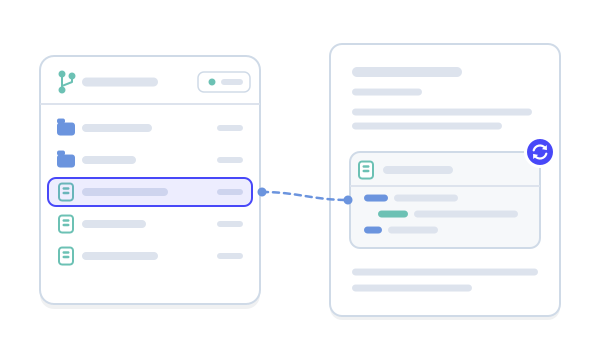
Code arrives with syntax highlighting, Markdown as formatted text with its images, a Mermaid file as a drawn diagram, and images inline. The file is fetched each time the page loads.

  • Paste a GitHub link to insert it
  • Public files need no connection

See it in Capable for Confluence

Screens from a real Confluence page running Capable for Confluence.

1 / 2

Why Capable

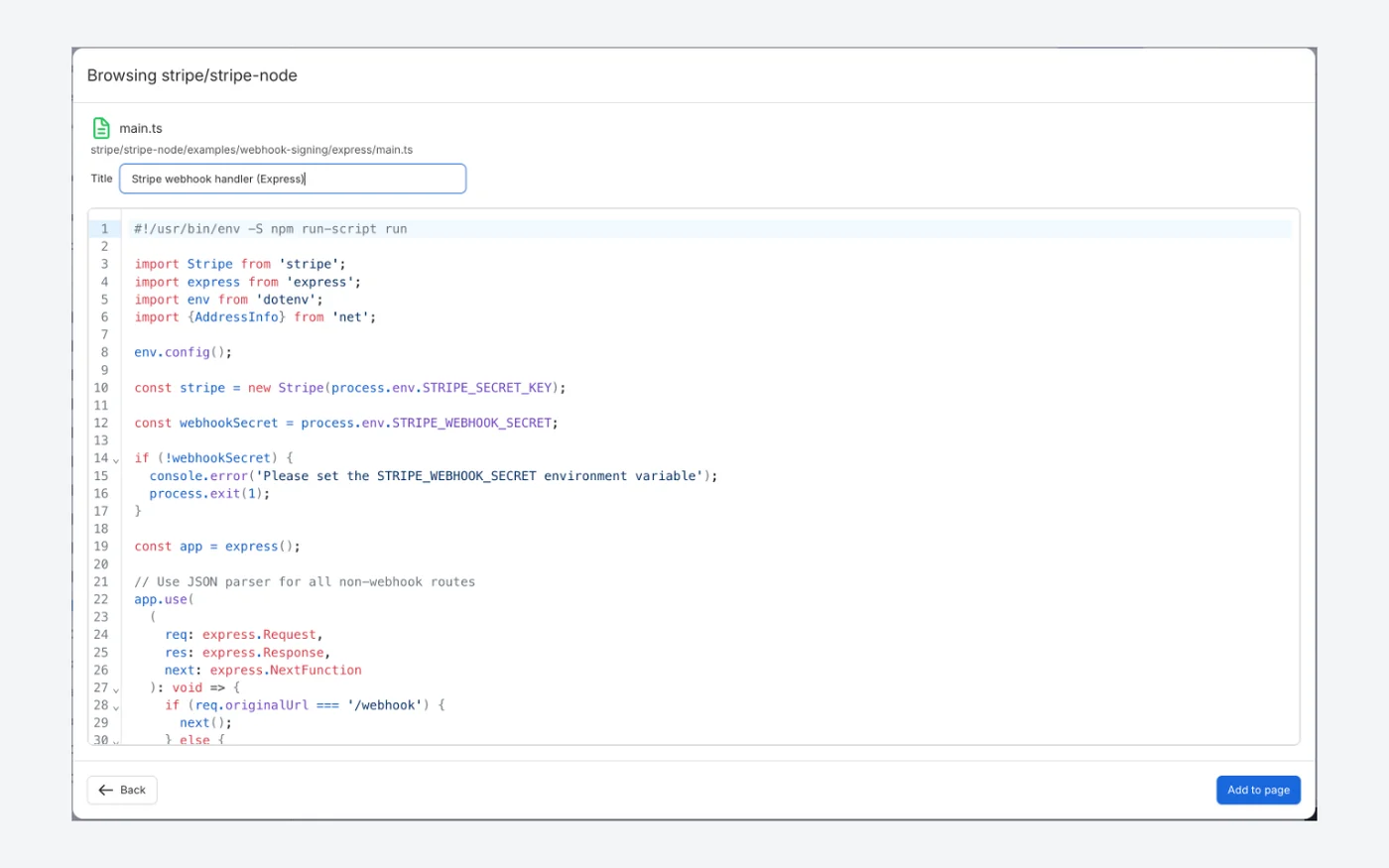
Add a public GitHub file from its link

Paste a github.com file link into the picker's search box, select the file to preview it, then add it to the page. A public file pasted as a link needs no GitHub connection.

  • No GitHub connection for a public file
  • Preview the file before adding it
  • Or paste the link into the editor to get the macro
Capable for ConfluenceCapable for Confluence Browsing stripe/stripe-node dialog previewing main.ts with syntax highlighting and an Add to page button
Capable for Confluence: previewing a public file from stripe/stripe-node, ready to add to the page.92012

Why Capable

A public file, live on the page

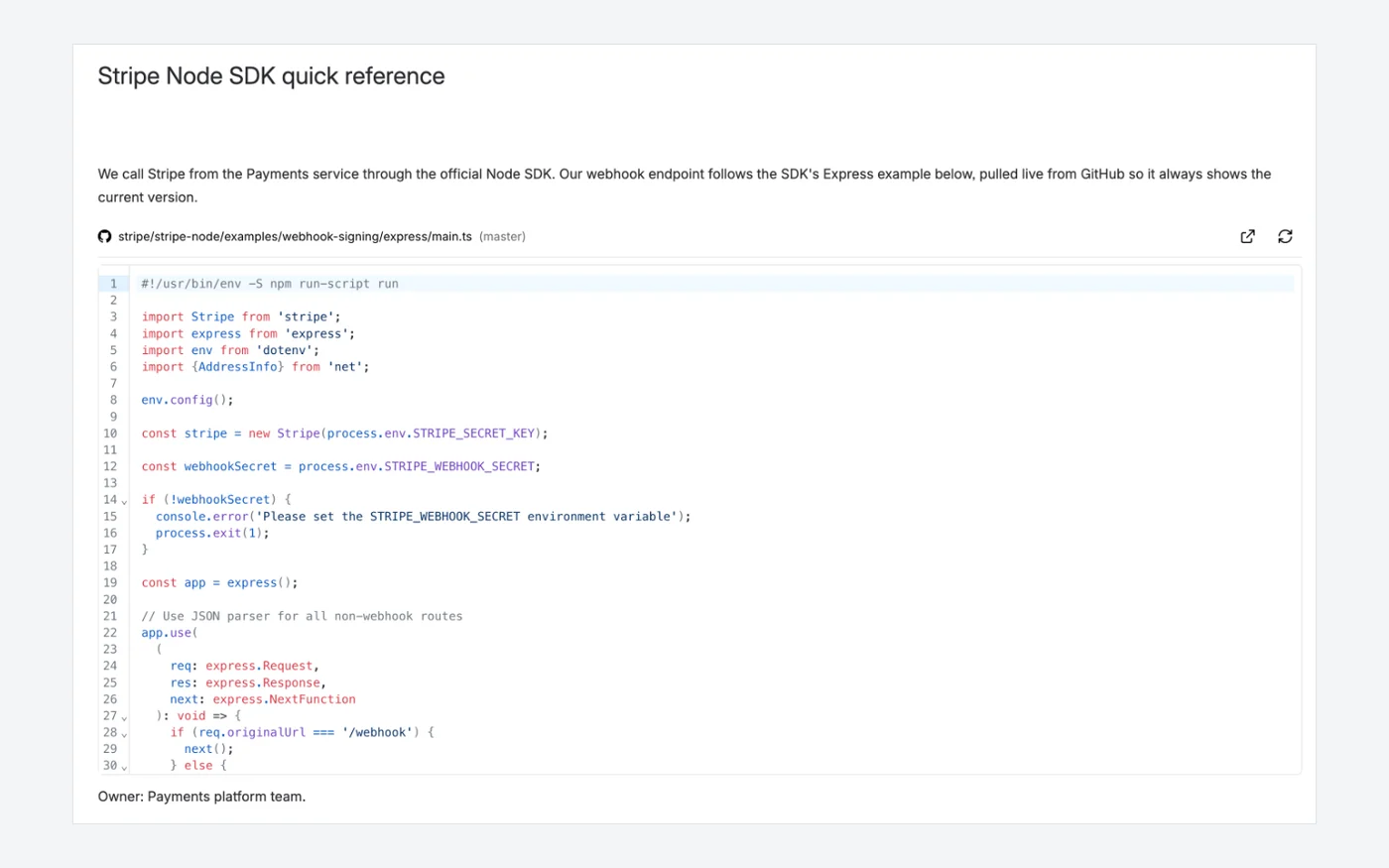
The file renders with syntax highlighting and line numbers and is read from GitHub each time the page is viewed. Public files show to every reader, including logged-out readers, and readers can open the file on GitHub.

  • Read from GitHub each time the page is viewed
  • Syntax highlighting and line numbers
  • Public files visible to logged-out readers
Capable for ConfluenceCapable for Confluence page showing stripe/stripe-node examples/webhook-signing/express/main.ts with syntax highlighting and line numbers
Capable for Confluence: a public GitHub file on the Stripe Node SDK quick reference page.8921

Which one fits your team?

For most teams on Confluence Cloud, Capable for Confluence does more. Here is why, and the few cases where we would point you at GitHub Macros for Confluence instead.

Choose Capable for Confluence if…

  • Public GitHub files should show to everyone, including logged-out readers and people without a licence.9
  • Each reader should see private files through their own GitHub account, so access follows GitHub permissions.810
  • You want to paste a GitHub link and have it become the macro.12
  • You want a catalogue of every page that uses GitHub files, and a byline that lists them on each page.138
  • For about the same list price at 50 users, you also want diagrams, Markdown, formatting, approvals, calendars, search and sites in one licence.1667

Choose GitHub Macros for Confluence if…

  • You want GitHub issue lists or pull request lists on your pages, chosen with GitHub's query syntax.15
  • You show only some lines of a file. GitHub Macros has a lines-of-code setting; Capable shows the whole file.514
  • You run Confluence Data Center, or need the same app on Data Center and Cloud.2
  • You want GitHub tokens managed on one configuration page. Capable has no site-wide GitHub connection.415

Feature by feature

Each cell cites its source: GitHub Macros for Confluence's own listing or documentation, or Capable's. A cross against GitHub Macros for Confluence means the feature is in neither its listing nor its documentation. Checked 11 November 2026.

  • Available
  • Not available
  • For context
  • Kept simple, on purpose
GitHub content
FeatureGitHub Macros for ConfluenceCapable for Confluence
Files and source codeAvailable:GitHub File macro, by branch, tag or commit.5Available:Github file macro, by branch, tag or commit, with syntax highlighting.811
Markdown filesAvailable:GitHub Markdown macro, from a URL or repository settings.5Available:Renders as formatted text with its images in place.8
Diagram filesFor context:Not described in its listing or docs.15Available:A Mermaid file in a repository arrives as a drawn diagram.8
Issue and pull request listsAvailable:Issue List and Pull Request List macros, with GitHub query syntax.15Not available:Not available. Files only.8
Line rangesAvailable:Show a range of lines or a line limit, set per macro or globally.45Not available:Not available. The whole file is shown.14
Paste a link to insertFor context:The Markdown macro takes a file URL and a Check button.5Available:A pasted github.com or raw file link becomes the macro.12
Access
FeatureGitHub Macros for ConfluenceCapable for Confluence
How GitHub is connectedFor context:Named GitHub tokens are created on the app configuration page and picked in each macro.45For context:Each person connects their own GitHub account, and can add more than one.89
Public files for logged-out and unlicensed readersFor context:Not stated in the listing or documentation.14Available:Public files are fetched without credentials and shown read-only to everyone.9
Private repositoriesAvailable:Public and private repositories, and multiple GitHub accounts.1Available:Through the reader's own connected accounts; readers only see what they can access in GitHub.108
Beyond the macro
FeatureGitHub Macros for ConfluenceCapable for Confluence
Byline and catalogueFor context:Not described in its listing or docs.15Available:A page byline of GitHub files, and a catalogue of every page that uses them.813
Other Confluence toolsFor context:Four GitHub macros.5Available:Diagrams, Markdown, approvals, calendars, search, sites and more, in the same app and licence.166
Confluence Data CenterAvailable:Data Center version on the Marketplace.2Kept simple, on purpose:Cloud only. Capable builds for Confluence Cloud and does not sell Data Center or Server apps.18

How pricing works

Both apps are bought through the Atlassian Marketplace and priced by your Confluence user tier. Capable for Confluence's licence covers far more than GitHub, with diagrams, Markdown, approvals, search and the rest of the suite. The savings calculator reads both prices live for the team size you set.

How much could you save?

Open the savings calculator with GitHub Macros for Confluence already added, add any other apps you pay for, set your team size and compare the total with Capable.

Work out your saving
  1. Both are billed through Atlassian, priced by user tier, and free for up to 10 users on Cloud, according to the Marketplace pricing data on 11 November 2026.37

  2. On the same day, an annual licence for 50 users listed at $490 for GitHub Macros for Confluence and $500 for Capable for Confluence Standard.37

  3. On Confluence, GitHub is only in Capable for Confluence, with no standalone Confluence GitHub app, and it is included in both editions.1517

Moving from GitHub Macros for Confluence

Capable's migrator recognises the four GitHub Macros for Confluence macros. It converts GitHub File and GitHub Markdown macros to Capable GitHub, whether they were saved by the app's current version or an older one, and reports the issue and pull request lists.

  1. A File macro set to show only some lines is left in place, because Capable shows the whole file. Stored access tokens are ignored; readers of private files connect their own GitHub account after migration.

    Source 19, 14: Capable migration docs, GitHub Macros for Confluence (Appfire)
  2. GitHub Issue List and Pull Request List macros are reported only and left exactly as they are.

    Source 19: Capable migration docs, GitHub Macros for Confluence (Appfire)

Questions people ask

About moving from GitHub Macros for Confluence to Capable for Confluence.

Is Capable for Confluence an alternative to GitHub Macros for Confluence?

For GitHub files and Markdown on Confluence Cloud, yes. Capable also shows public files to logged-out readers, turns pasted links into the macro, and lists GitHub files in a byline and a catalogue. It has no issue or pull request lists and no line ranges.
Source: Capable GitHub docs, What Capable GitHub is

Can people without a Capable licence see GitHub files?

Public files, yes. Capable fetches them without anyone's credentials, so logged-out and unlicensed readers see them read-only.
Source: Capable GitHub docs, Public file path (no connection needed)

How do private repositories work in Capable?

Each person connects their own GitHub account, and can add more than one. A reader only sees files from repositories they can access in GitHub.
Source: Capable GitHub docs, Private file path

Can I migrate my GitHub Macros for Confluence macros?

Partly. The migrator converts GitHub File and GitHub Markdown macros, from the app's current version and older ones. A File macro set to show only some lines, and issue and pull request lists, are left in place, and the report shows exactly what converted.
Source: Capable migration docs, GitHub Macros for Confluence (Appfire)

Try Capable for Confluence on your own pages

GitHub files, diagrams, Markdown, approvals, calendars, search and more in one app, with a free trial.

Sources

Last checked

Claims about GitHub Macros for Confluence come from its vendor's own documentation and its Atlassian Marketplace listing. Claims about Capable come from our documentation at help.gocapable.com. Products change; if something here is out of date, tell us and we will correct it.

  1. GitHub Macros for Confluence, Atlassian Marketplace listing (Cloud)Atlassian Marketplace · marketplace.atlassian.com/apps/1216734/github-macros-for-confluence · checked 11 November 2026
  2. GitHub Macros for Confluence, Atlassian Marketplace listing (Data Center)Atlassian Marketplace · marketplace.atlassian.com/apps/1216734/github-macros-for-confluence · checked 11 November 2026
  3. GitHub Macros for Confluence, Marketplace pricing (Cloud)Atlassian Marketplace · marketplace.atlassian.com/apps/1216734/github-macros-for-confluence · checked 11 November 2026
  4. GitHub Macros for Confluence documentation, Configuring GitHub Macros for Confluence (Cloud)Vendor documentation · appfire.atlassian.net/wiki/spaces/GMFC/pages/150241327/Configuring+Github+Macros+for+Confluence+Cloud · checked 11 November 2026
  5. GitHub Macros for Confluence documentation, Tutorials (macros and parameters)Vendor documentation · appfire.atlassian.net/wiki/spaces/GMFC/pages/705955580/Tutorials · checked 11 November 2026
  6. Capable for Confluence (All-in-One), Atlassian Marketplace listing (Cloud)Atlassian Marketplace · marketplace.atlassian.com/apps/1234376/capable-for-confluence-all-in-one · checked 11 November 2026
  7. Capable for Confluence (All-in-One), Marketplace pricing (Cloud)Atlassian Marketplace · marketplace.atlassian.com/apps/1234376/capable-for-confluence-all-in-one · checked 11 November 2026
  8. Capable GitHub docs, What Capable GitHub isCapable · help.gocapable.com/git/what-capable-github-is · checked 11 November 2026
  9. Capable GitHub docs, Public file path (no connection needed)Capable · help.gocapable.com/git/public-file-path-no-connection-needed · checked 11 November 2026
  10. Capable GitHub docs, Private file pathCapable · help.gocapable.com/git/private-file-path · checked 11 November 2026
  11. Capable GitHub docs, Show a GitHub file from a branch, tag or commitCapable · help.gocapable.com/git/show-a-github-file-from-a-branch-tag-or-commit-in-confluence · checked 11 November 2026
  12. Capable GitHub docs, Auto-convert pasted GitHub linksCapable · help.gocapable.com/git/auto-convert-pasted-github-links · checked 11 November 2026
  13. Capable GitHub docs, Capable GitHub catalogue pageCapable · help.gocapable.com/git/capable-github-catalogue-page · checked 11 November 2026
  14. Capable GitHub docs, Pasted a link with a line range but the whole file is shownCapable · help.gocapable.com/git/pasted-a-link-with-a-line-range-like-l10-l20-but-the-whole-file-is-shown · checked 11 November 2026
  15. Capable GitHub docs, What is not availableCapable · help.gocapable.com/git/what-is-not-available · checked 11 November 2026
  16. Capable for Confluence docs, What Capable for Confluence isCapable · help.gocapable.com/capable/what-capable-for-confluence-is · checked 11 November 2026
  17. Capable for Confluence docs, EditionsCapable · help.gocapable.com/capable/editions · checked 11 November 2026
  18. Capable, About us (FAQ on Cloud, Data Center and Server)Capable · gocapable.com/about/about-us · checked 11 November 2026
  19. Capable migration docs, GitHub Macros for Confluence (Appfire)Capable · help.gocapable.com/migration/github-macros-for-confluence-appfire · checked 11 November 2026
  20. Capable GitHub docs, Embed a GitHub file in ConfluenceCapable · help.gocapable.com/git/embed-a-github-file-in-confluence · checked 11 November 2026
  21. Capable GitHub docs, Github file macroCapable · help.gocapable.com/git/github-file · checked 11 November 2026

Cookie Settings

We take good care of you and your data. You can read more about how we use cookies, the third parties who set cookies and update your cookie settings here.