Comparison

Macro Pack vs Capable for Confluence

Macro Pack puts more than 30 content types behind one macro. Capable for Confluence covers the diagram, Markdown, HTML, LaTeX and Swagger jobs with a macro built for each, and adds approvals, calendars, search and publishing under the same licence. Every claim is checked against each vendor's own documentation.

  • Last checked 11 November 2026
  • 32 cited sources

Works insideCloud

The short answer

Macro Pack by Warsaw Dynamics is one macro that renders diagrams, Markdown, HTML, LaTeX, code, data files, specs and media from pasted text, attachments, URLs or repositories, plus Numbered Headings and a Page Builder. Capable for Confluence covers the diagram and documentation jobs with a macro built for each, and real editors for diagrams, Markdown, HTML and LaTeX.

In Capable, draw.io is a full editor on the page, not a rendered file. Diagrams get 31 languages, BPMN, DMN and Excalidraw editors, a catalogue with collections and templates, a full-screen view with comments, and AI drafts. Markdown, HTML, LaTeX, Swagger, code and numbered headings come in the same app, with approvals, calendars, search and sites.

Macro Pack handles more file types and sources in one macro, including CSV, Excel, PDF, Word, 3D models, audio, video, surveys, cloud storage and databases, and Macro Pack for Jira brings most of the same macros to Jira. Pick it if that breadth matters more to you than editing and finding what you embed.

More than a set of renderers

Capable for Confluence is one app that replaces a shelf of add-ons. Here is what the parts that overlap with Macro Pack are like to use.

draw.io you can edit on the page

The draw.io editor is the full drag-and-drop canvas, with shape libraries, layers and styling. Files stay ordinary draw.io XML, so .drawio and .xml files import and remain editable.

  • Full draw.io canvas
  • Imports .drawio, .xml and Visio
  • PNG and SVG exports keep the XML

See it in Capable for Confluence

Screens from a real Confluence site running Capable for Confluence.

1 / 4

Why Capable

draw.io XML as a Capable diagram

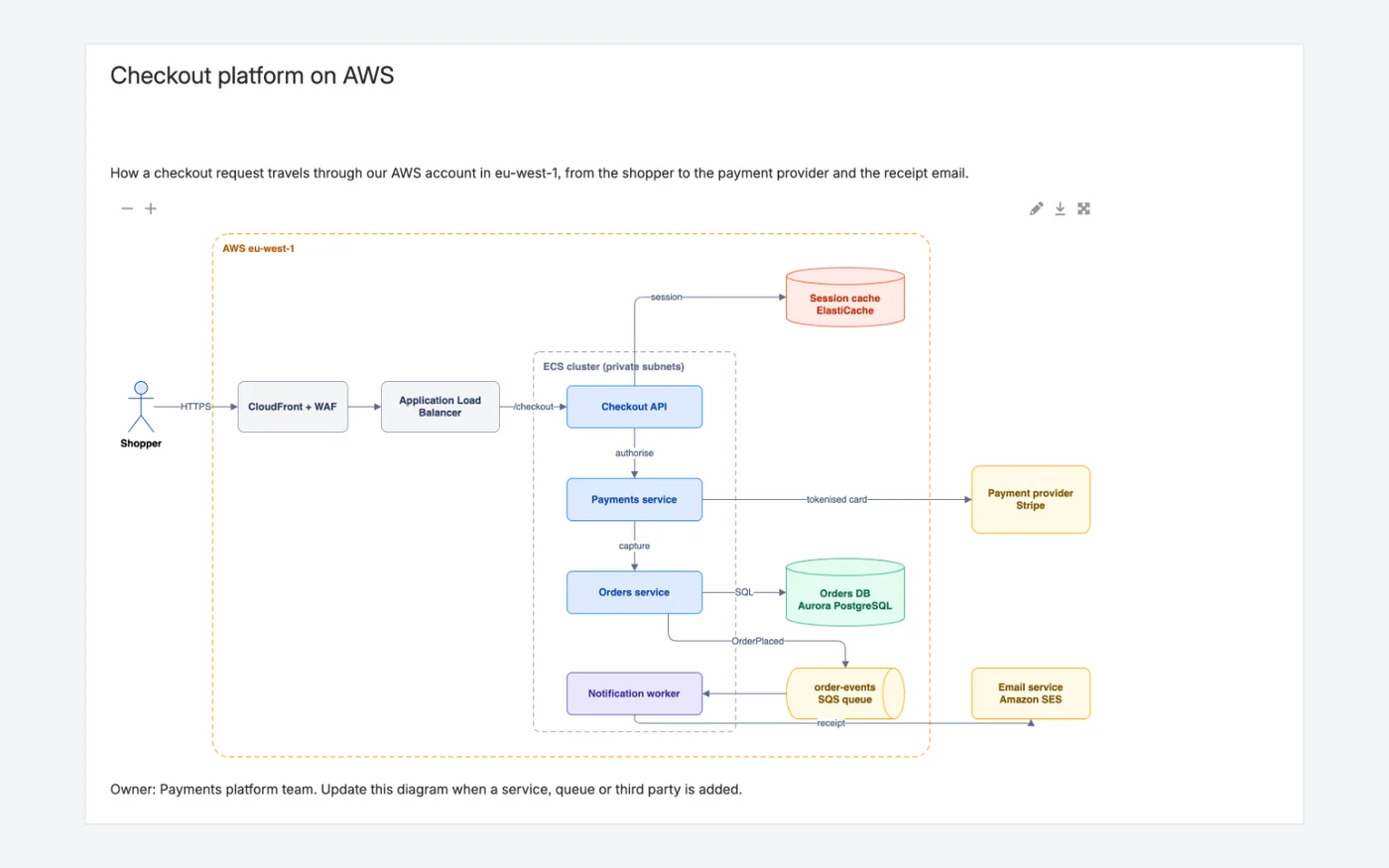
A checkout architecture stored as ordinary draw.io XML and shown on the page. Hovering over it shows download and full screen at the top and zoom at the bottom.

  • Ordinary draw.io XML that opens in any draw.io-compatible tool
  • Download, full screen and zoom on the diagram
  • PNG and SVG exports keep the XML inside
Capable for ConfluenceCapable for Confluence page with the Checkout platform on AWS architecture diagram and viewer controls
Capable for Confluence: the diagram on the page, with zoom, edit, download and full-screen controls.1231

Why Capable

A full draw.io canvas inside Confluence

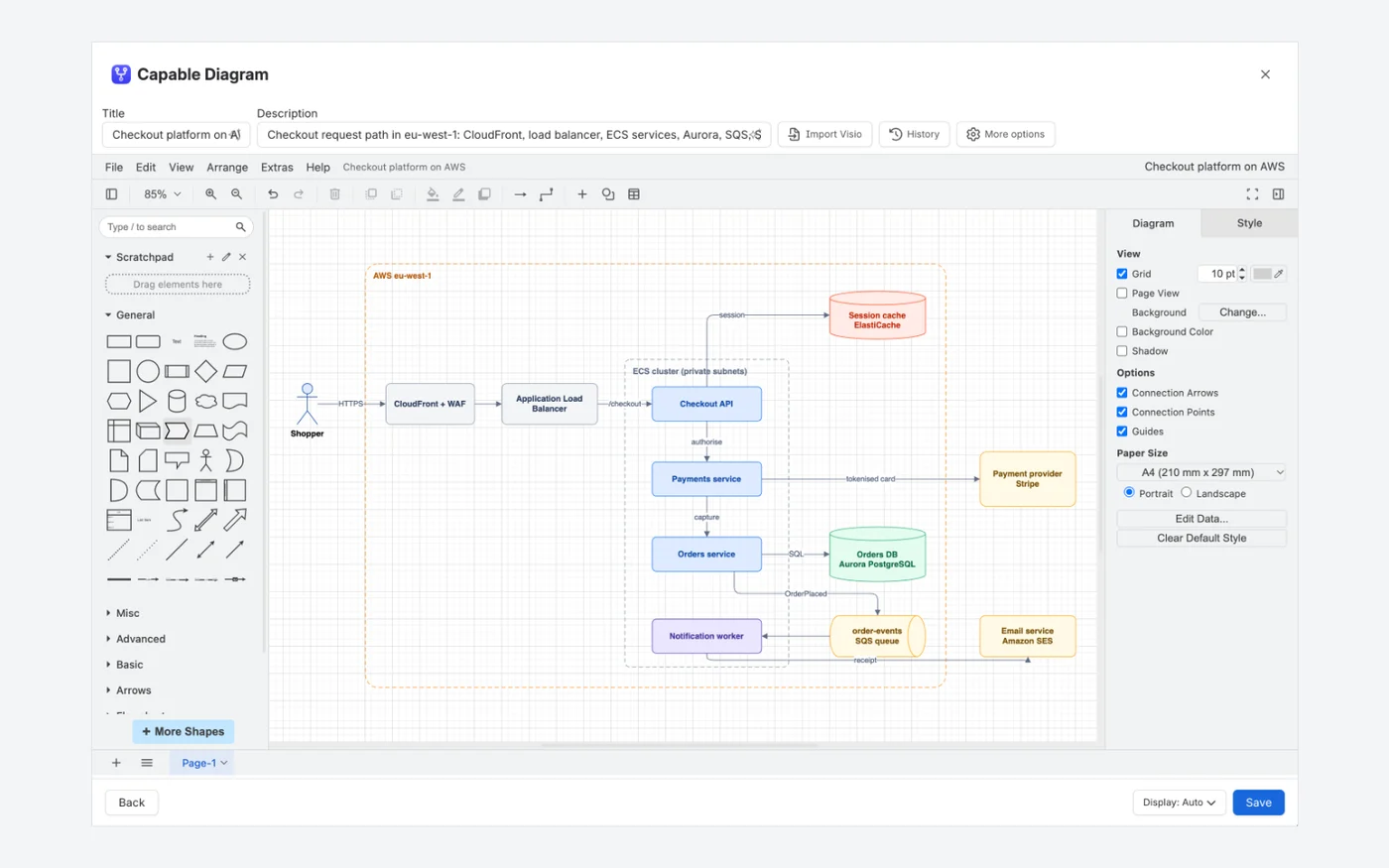
The draw.io editor in Capable for Confluence is the familiar draw.io surface, with shape libraries down the left and the style, text and arrange tabs on the right. Shape libraries, layers, custom styling and shape search work as they do in the standalone tool.

  • Title shown in search, the diagram library and export alt text
  • Visio files import as editable draw.io diagrams
  • Every save kept in the diagram's own history
Capable for ConfluenceCapable for Confluence diagram editor showing a checkout architecture in a draw.io-style canvas with title, description, Import Visio and History above it
Capable for Confluence: the draw.io canvas in the Capable Diagram editor, with Title, Description, Import Visio and History above it.12313230

Why Capable

Comment on the diagram itself

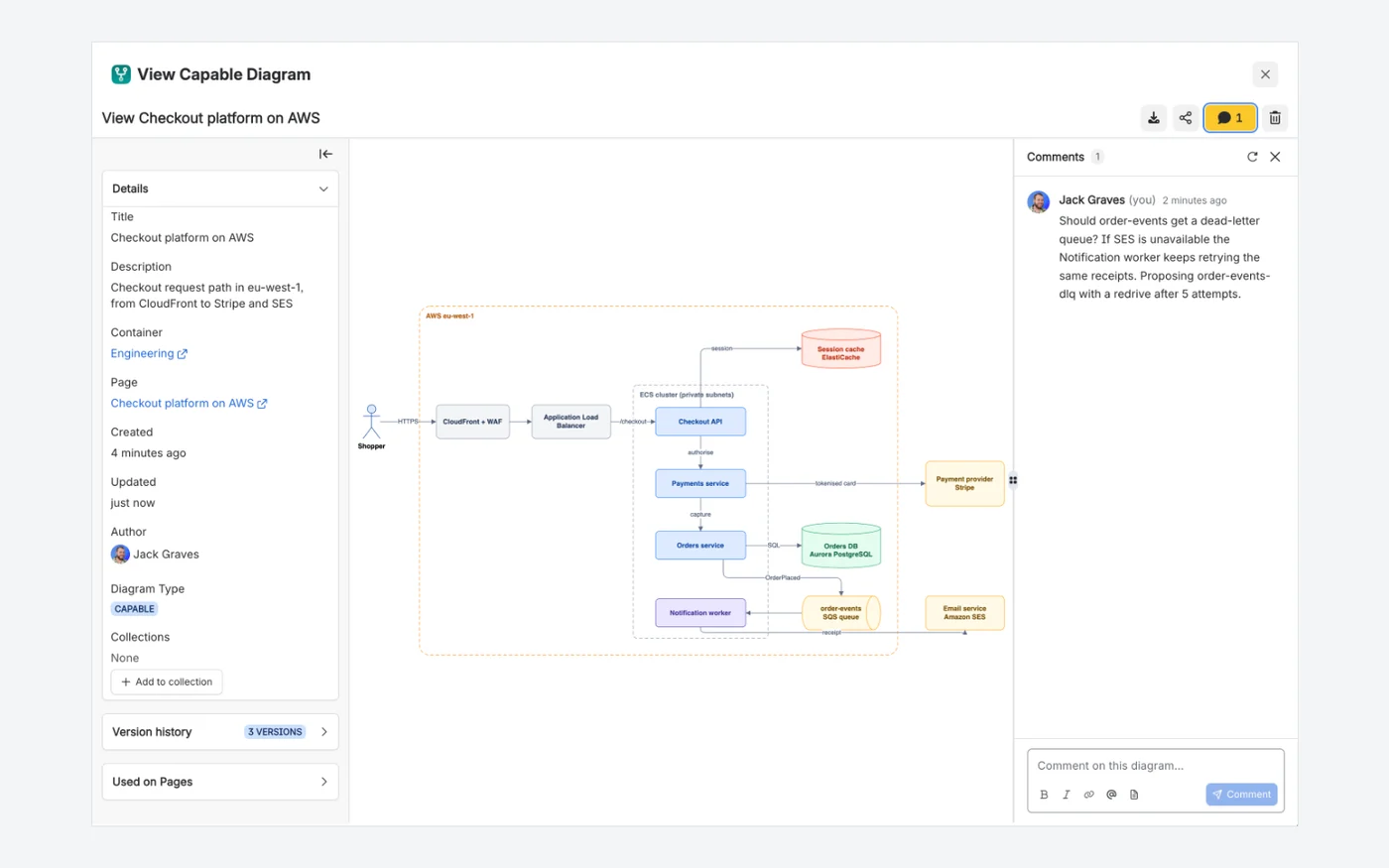
Full screen shows the diagram with its comments beside it. Comments are stored on the diagram, not the page around it, so the conversation stays with the drawing it is about.

  • @mentions send the usual Confluence notification
  • One conversation wherever the diagram is shown
  • Download and share beside the Comments button
Capable for ConfluenceCapable for Confluence full-screen diagram view with a details sidebar on the left and a comment about a dead-letter queue on the right
Capable for Confluence: the full-screen view with the diagram details and a comment thread.19

Why Capable

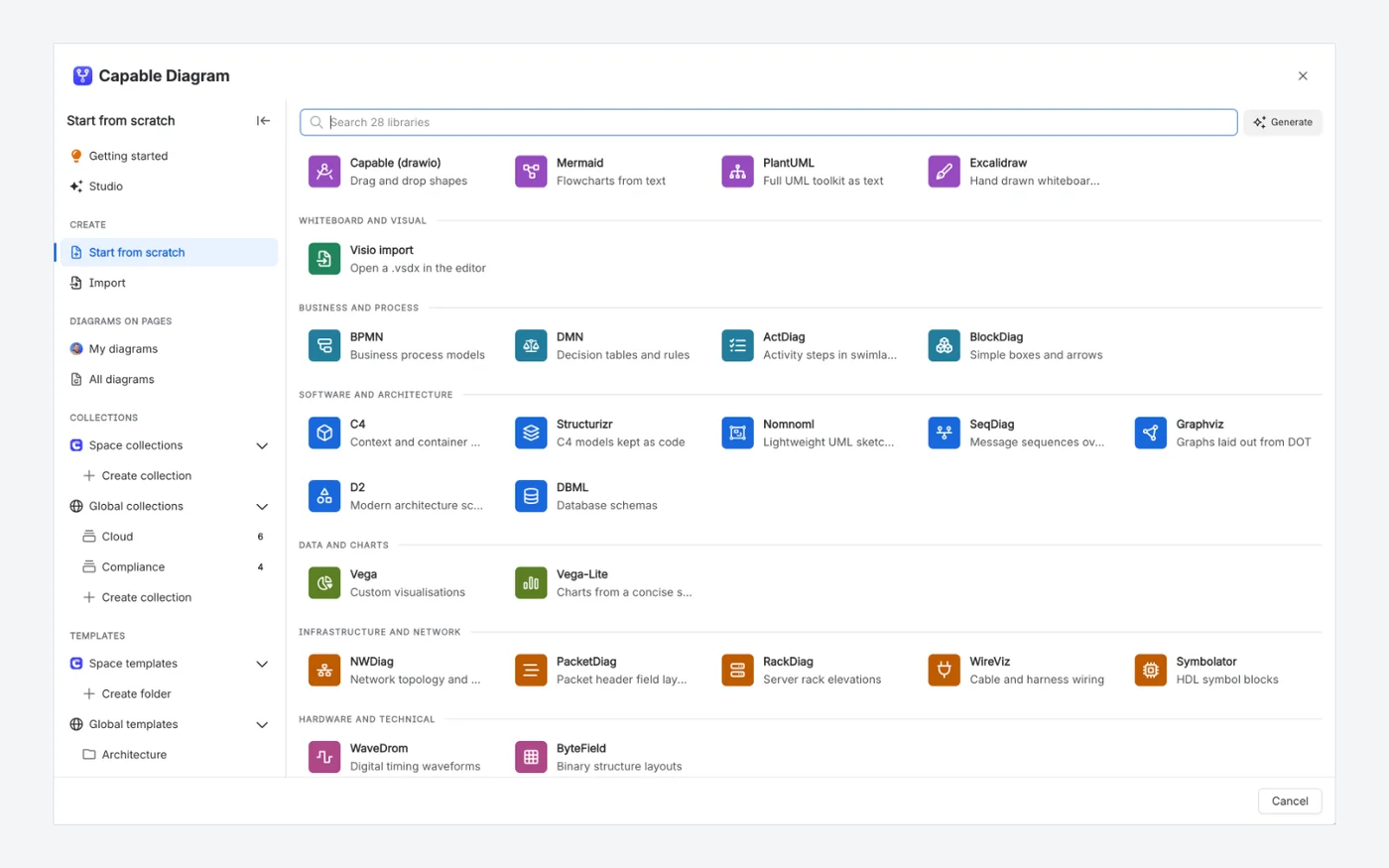
One picker for every diagram language

Capable for Confluence starts every diagram from one picker: the draw.io canvas sits next to Mermaid, PlantUML, Excalidraw, BPMN, C4, D2, Graphviz, Vega and more, with collections and templates in the sidebar.

  • Thirty-one diagram languages in one app
  • Space and global templates
  • Visio files import as editable draw.io diagrams
Capable for ConfluenceCapable for Confluence diagram picker listing diagram libraries grouped by category, with collections and templates in the sidebar
The Capable for Confluence diagram picker, grouped by category, with collections and templates in the sidebar.14181732

Which one fits your team?

For most teams on Confluence Cloud, Capable for Confluence does more. Here is why, and the few cases where we would point you at Macro Pack instead.

Choose Capable for Confluence if…

  • You want to edit draw.io diagrams on the page with the full canvas, not only render a .drawio file.12
  • You want visual editors for Mermaid, BPMN, DMN and Excalidraw as well as diagram text.13
  • You want a catalogue of every diagram, with collections, templates and searchable shape text.161718
  • You want to review diagrams full screen and comment on them, with @mentions.19
  • You want AI drafts of diagrams and one Rovo agent across the app.159
  • You also want approvals, calendars, search, sites and forms in the same licence.910

Choose Macro Pack if…

  • You embed CSV, Excel, PDF, Word, 3D models, audio, video or surveys, and want one macro for all of them.1
  • You pull content from GitLab, Bitbucket, Dropbox, Google Drive, OneDrive, S3 storage or file servers as well as GitHub.14
  • You want most of the same macros in Jira. Warsaw Dynamics sells Macro Pack for Jira as a separate app.34
  • You want a drag-and-drop Page Builder for landing pages and team hubs.1

Feature by feature

Each cell cites its source: Macro Pack's own listing or documentation, or Capable's. A cross against Macro Pack means the feature is in neither its listing nor its documentation. Checked 11 November 2026.

  • Available
  • With limits
  • Not available
  • For context
Content types
FeatureMacro PackCapable for Confluence
Diagram languagesAvailable:BPMN, draw.io, Excalidraw, Mermaid, Miro, PlantUML, GraphQL, Ditaa, SVGBob, WaveDrom and NomNoml.14Available:31 languages, including Mermaid, PlantUML, GraphViz, C4, D2, BPMN and DMN.14
draw.ioFor context:Embeds .drawio files from an attachment or a URL. Its docs say some shapes may still be unsupported.5Available:A full draw.io editor on the page. .drawio and .xml files import and stay editable.12
Visual editorsFor context:Excalidraw files are embedded and rendered. Its draw.io steps embed a .drawio file from an attachment or a URL; a visual editor is not described in its listing or docs.145Available:draw.io, Excalidraw, BPMN, DMN and a Mermaid visual editor.13
MarkdownAvailable:From text, attachments, URLs or repositories.1Available:From an attachment, a URL or stored with the page, with Edit, Live and Preview modes.2021
HTMLAvailable:HTML with CSS. JavaScript is excluded; declarative attributes build interactive elements such as modals.14Available:HTML with Tailwind classes styled automatically, your own CSS, and JavaScript once an admin turns it on.22
LaTeXAvailable:LaTeX input for maths.16Available:Block and inline equations, typed or built in a visual Live editor.2324
OpenAPI and SwaggerAvailable:OpenAPI/Swagger and AsyncAPI.1Available:Swagger UI from a URL, an attachment or an inline spec, for OpenAPI 3 and Swagger 2.25
CodeAvailable:30+ languages with custom themes, line highlighting and a copy button.4Available:18 languages plus auto-detection, nine colour themes and a copy button.26
Numbered headingsAvailable:ISO 2145, decimal, outline and Roman, Latin or Greek schemes.1Available:Six presets with a preview, and optional re-sync when the page changes.27
Sources
FeatureMacro PackCapable for Confluence
Where content comes fromAvailable:Text, attachments, URLs, GitHub, GitLab, Bitbucket, Dropbox, Google Drive, OneDrive, S3-compatible storage, SFTP and PostgreSQL.14With limits:Inline, attachment or URL for Markdown and Swagger, and Markdown links to GitHub, GitLab and Bitbucket files are switched to the raw file. Connected repositories are GitHub only.20251028
Working with diagrams
FeatureMacro PackCapable for Confluence
Catalogue, collections and templatesNot available:Not described in its listing or docs.14Available:A catalogue of every diagram, with space and global collections and templates.161718
Viewing controlsWith limits:Pan and zoom are described for some macros, including WaveDrom, GraphQL (with full screen), Image and 3D models, but not for Mermaid, PlantUML or draw.io.47Available:Full-screen view with download, share and comments on the diagram.19
AINot available:Not described in its listing or docs.14Available:Diagram Studio drafts diagram source from a description.15
Beyond macros
FeatureMacro PackCapable for Confluence
Other toolsFor context:Page Builder, surveys, Announcements, and export of pages, spaces or CQL results to Markdown, HTML or ADF.1Available:Approvals, calendars, search, images, sites, forms and more, in the same app and licence.910

How pricing works

Both apps are bought through the Atlassian Marketplace and priced by your Confluence user tier. Capable for Confluence is one licence for much more than macros. The savings calculator reads both prices live for the team size you set.

How much could you save?

Open the savings calculator with Macro Pack already added, add any other apps you pay for, set your team size and compare the total with Capable.

Work out your saving
  1. Both are billed through Atlassian, priced by user tier, and free for up to 10 users on Cloud, according to the Marketplace pricing data on 11 November 2026.28

  2. On the same day, an annual licence for 50 users listed at $315 for Macro Pack and $500 for Capable for Confluence Standard.28

  3. Capable for Confluence has two editions. Sites, Quality and Variables need Advanced. Forms is on Standard with only the plain text input. Everything else is in both.11

Moving from Macro Pack

Capable's migrator recognises Macro Pack and the older MacroSuite macros. Pasted content converts to the matching Capable macro, diagrams, Markdown and Swagger also convert from a web address, a public Git link or an attachment, and anything the migrator cannot convert is counted and left exactly as it is.

  1. A Macro Pack becomes a Capable Diagram, Markdown, Swagger, HTML, LaTeX, Code or Embed macro, depending on what it renders. Diagrams, Markdown and Swagger from a web address, public Git or attachment source keep reading that source, without any sign-in details; HTML, LaTeX and code convert from pasted text only.

    Source 29: Capable migration docs, Macro Pack for Confluence (Warsaw Dynamics)
  2. draw.io content is cleaned of the stray elements that would otherwise draw a blank canvas, and becomes a Capable diagram you can open in the draw.io editor.

    Source 29, 12: Capable migration docs, Macro Pack for Confluence (Warsaw Dynamics)
  3. AsciiDoc, AsyncAPI, Excel tables, surveys and Page Builder layouts are reported and left untouched. CSV is not converted automatically. Capable can show an attached CSV with Table from CSV, but the migrator does not build that table for you.

    Source 29: Capable migration docs, Macro Pack for Confluence (Warsaw Dynamics)

Moving from

Tools and guides

App names are trade marks of their respective owners.

Questions people ask

About moving from Macro Pack to Capable for Confluence.

Is Capable for Confluence an alternative to Macro Pack?

For diagrams, Markdown, HTML, LaTeX, Swagger, code and numbered headings, yes, with editors, a diagram catalogue and AI added. It does not put CSV, Excel, PDF, Word, 3D, audio, video and surveys behind one macro.
Source: Capable for Confluence docs, Capabilities

Can I edit my Macro Pack draw.io diagrams in Capable?

Yes, once they are migrated. Pasted draw.io content becomes a Capable diagram, and the Capable draw.io editor opens it on the full canvas.
Source: Capable migration docs, Macro Pack for Confluence (Warsaw Dynamics)

Which Macro Pack content does not migrate?

Content Capable has no equivalent for, such as AsciiDoc, AsyncAPI, CSV and Excel tables, surveys and Page Builder layouts, is reported and left in place, so you can see how much there is before deciding what to do.
Source: Capable migration docs, Macro Pack for Confluence (Warsaw Dynamics)

Does Capable have numbered headings?

Yes, in Capable for Confluence. It numbers a page's headings from six presets, previews the result first, and can re-sync when the page changes.
Source: Capable for Confluence docs, Numbered headings

Try Capable for Confluence on your own pages

One app for diagrams, Markdown, formatting, approvals, calendars, search and more, with a free trial.

Sources

Last checked

Claims about Macro Pack come from its vendor's own documentation and its Atlassian Marketplace listing. Claims about Capable come from our documentation at help.gocapable.com. Products change; if something here is out of date, tell us and we will correct it.

  1. PlantUML, Swagger, drawio.xml, Mermaid, Numbered Headings, Atlassian Marketplace listing (Cloud)Atlassian Marketplace · marketplace.atlassian.com/apps/1227600/plantuml-swagger-drawio-xml-mermaid-numbered-headings · checked 11 November 2026
  2. PlantUML, Swagger, drawio.xml, Mermaid, Numbered Headings, Marketplace pricing (Cloud)Atlassian Marketplace · marketplace.atlassian.com/apps/1227600/plantuml-swagger-drawio-xml-mermaid-numbered-headings · checked 11 November 2026
  3. Macro Pack - Mermaid, PlantUML, Documents & More for Jira, Atlassian Marketplace listingAtlassian Marketplace · marketplace.atlassian.com/apps/164673678/macro-pack-mermaid-plantuml-documents-more-for-jira · checked 11 November 2026
  4. Macro Pack documentation, User guidesVendor documentation · docs.warsawdynamics.com/content/69236/macro_pack_documentation/351961130 · checked 11 November 2026
  5. Macro Pack documentation, Draw.io macroVendor documentation · docs.warsawdynamics.com/content/69236/macro_pack_documentation/351961130/1895759894/810188859 · checked 11 November 2026
  6. Macro Pack documentation, LaTeX macroVendor documentation · docs.warsawdynamics.com/content/69236/macro_pack_documentation/351961130/1895759894/356941828 · checked 11 November 2026
  7. Macro Pack documentation, GraphQL macroVendor documentation · docs.warsawdynamics.com/content/69236/macro_pack_documentation/1807024129 · checked 11 November 2026
  8. Capable for Confluence (All-in-One), Marketplace pricing (Cloud)Atlassian Marketplace · marketplace.atlassian.com/apps/1234376/capable-for-confluence-all-in-one · checked 11 November 2026
  9. Capable for Confluence docs, What Capable for Confluence isCapable · help.gocapable.com/capable/what-capable-for-confluence-is · checked 11 November 2026
  10. Capable for Confluence docs, CapabilitiesCapable · help.gocapable.com/capable/capabilities · checked 11 November 2026
  11. Capable for Confluence docs, EditionsCapable · help.gocapable.com/capable/editions · checked 11 November 2026
  12. Capable Diagrams docs, draw.ioCapable · help.gocapable.com/diagrams/draw-io · checked 11 November 2026
  13. Capable Diagrams docs, EditorsCapable · help.gocapable.com/diagrams/editors · checked 11 November 2026
  14. Capable Diagrams docs, Diagram languagesCapable · help.gocapable.com/diagrams/diagram-languages · checked 11 November 2026
  15. Capable Diagrams docs, Diagram StudioCapable · help.gocapable.com/diagrams/diagram-studio · checked 11 November 2026
  16. Capable Diagrams docs, Find diagrams on your pagesCapable · help.gocapable.com/diagrams/find-diagrams-on-your-pages · checked 11 November 2026
  17. Capable Diagrams docs, Diagram collectionsCapable · help.gocapable.com/diagrams/diagram-collections · checked 11 November 2026
  18. Capable Diagrams docs, Diagram templatesCapable · help.gocapable.com/diagrams/diagram-templates · checked 11 November 2026
  19. Capable Diagrams docs, Comments on diagramsCapable · help.gocapable.com/diagrams/comments-on-diagrams · checked 11 November 2026
  20. Capable Markdown docs, Markdown macroCapable · help.gocapable.com/markdown/markdown · checked 11 November 2026
  21. Capable Markdown docs, Three-mode markdown editorCapable · help.gocapable.com/markdown/three-mode-markdown-editor · checked 11 November 2026
  22. Capable Formatting docs, HTMLCapable · help.gocapable.com/macros/html · checked 11 November 2026
  23. Capable Formatting docs, LaTeX mathCapable · help.gocapable.com/macros/latex-math · checked 11 November 2026
  24. Capable Formatting docs, LaTeX math inlineCapable · help.gocapable.com/macros/latex-math-inline · checked 11 November 2026
  25. Capable Formatting docs, Swagger/OpenAPICapable · help.gocapable.com/macros/swagger-openapi · checked 11 November 2026
  26. Capable Formatting docs, CodeCapable · help.gocapable.com/macros/code · checked 11 November 2026
  27. Capable for Confluence docs, Numbered headingsCapable · help.gocapable.com/capable/numbered-headings · checked 11 November 2026
  28. Capable GitHub docs, What is not availableCapable · help.gocapable.com/git/what-is-not-available · checked 11 November 2026
  29. Capable migration docs, Macro Pack for Confluence (Warsaw Dynamics)Capable · help.gocapable.com/migration/macro-pack-for-confluence-warsaw-dynamics · checked 11 November 2026
  30. Capable Diagrams docs, Diagram version historyCapable · help.gocapable.com/diagrams/diagram-version-history · checked 11 November 2026
  31. Capable Diagrams docs, Insert a diagramCapable · help.gocapable.com/diagrams/insert-a-diagram · checked 11 November 2026
  32. Capable Diagrams docs, Import from VisioCapable · help.gocapable.com/diagrams/import-from-visio · checked 11 November 2026

Cookie Settings

We take good care of you and your data. You can read more about how we use cookies, the third parties who set cookies and update your cookie settings here.