Comparison

Mermaid Diagrams for Confluence vs Capable for Confluence

Mermaid Diagrams for Confluence by Stratus Add-ons Ltd is a focused Mermaid app. Capable for Confluence writes the same Mermaid, adds a visual editor for people who will not type syntax, and puts about 30 other diagram languages in the same macro, with a diagram catalogue alongside, inside one app that also covers approvals, Markdown and search. Every claim is checked against each vendor's own documentation.

  • Last checked 11 November 2026
  • 41 cited sources

Works insideCloud

The short answer

Mermaid Diagrams for Confluence does one job well. It writes Mermaid in an editor with syntax highlighting and a live preview, keeps a diagram history, has an AI-friendly macro with a Rovo agent, and, on its Advanced edition, pulls Mermaid files from GitHub or GitLab.

Capable for Confluence writes the same Mermaid, and its visual editor lets people build a Mermaid diagram by clicking rather than typing, with ordinary Mermaid source underneath. The same Diagram macro also writes PlantUML, C4, D2, GraphViz, DBML and about 20 more text languages, alongside a draw.io-compatible canvas, Excalidraw, BPMN and DMN.

Around the diagrams, Capable adds a catalogue in every space, collections, team and global templates, comments on each diagram and Diagram Studio for AI drafts. Stratus's app is the better pick if you run Confluence Data Center, or keep your Mermaid files in GitHub or GitLab and want them pulled in from the diagram editor.

More than a Mermaid macro

Diagrams in Capable for Confluence are a whole workspace inside Confluence. Mermaid is one of about 30 languages it writes, and everything you draw can be found, organised and reused.

Mermaid for people who will not write Mermaid

The Mermaid visual editor builds flowcharts, sequence diagrams and the other common types by adding nodes and connections directly. It writes ordinary Mermaid, so the diagram stays diffable and anyone can switch to the text editor and keep typing.

  • Visual edits stay readable as text
  • Hand-written source opens in the visual editor

See the difference

Screens from real Confluence pages. Where both sides are shown, the same Mermaid source was used in Mermaid Diagrams for Confluence and in Capable for Confluence.

1 / 4

Why Capable

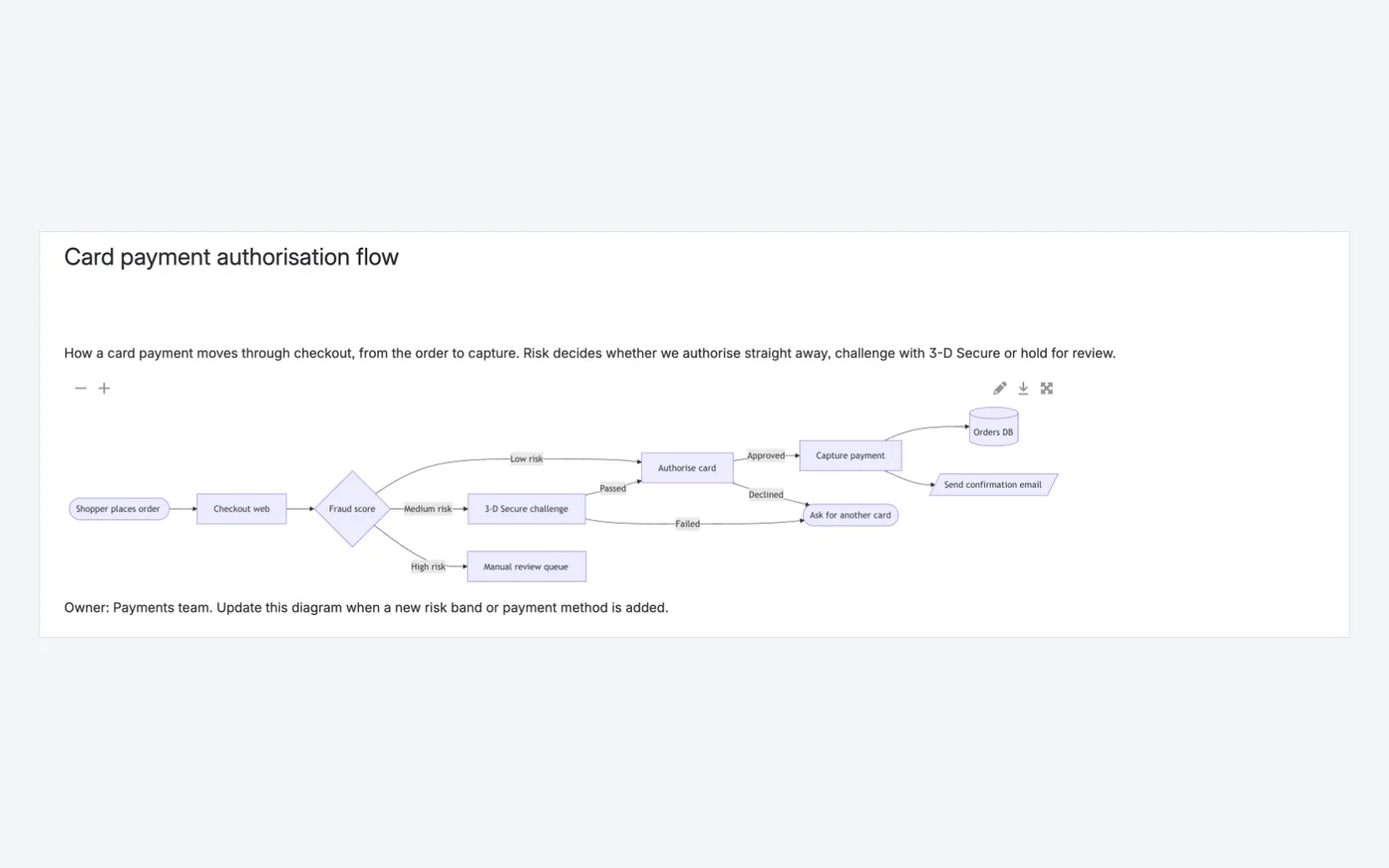
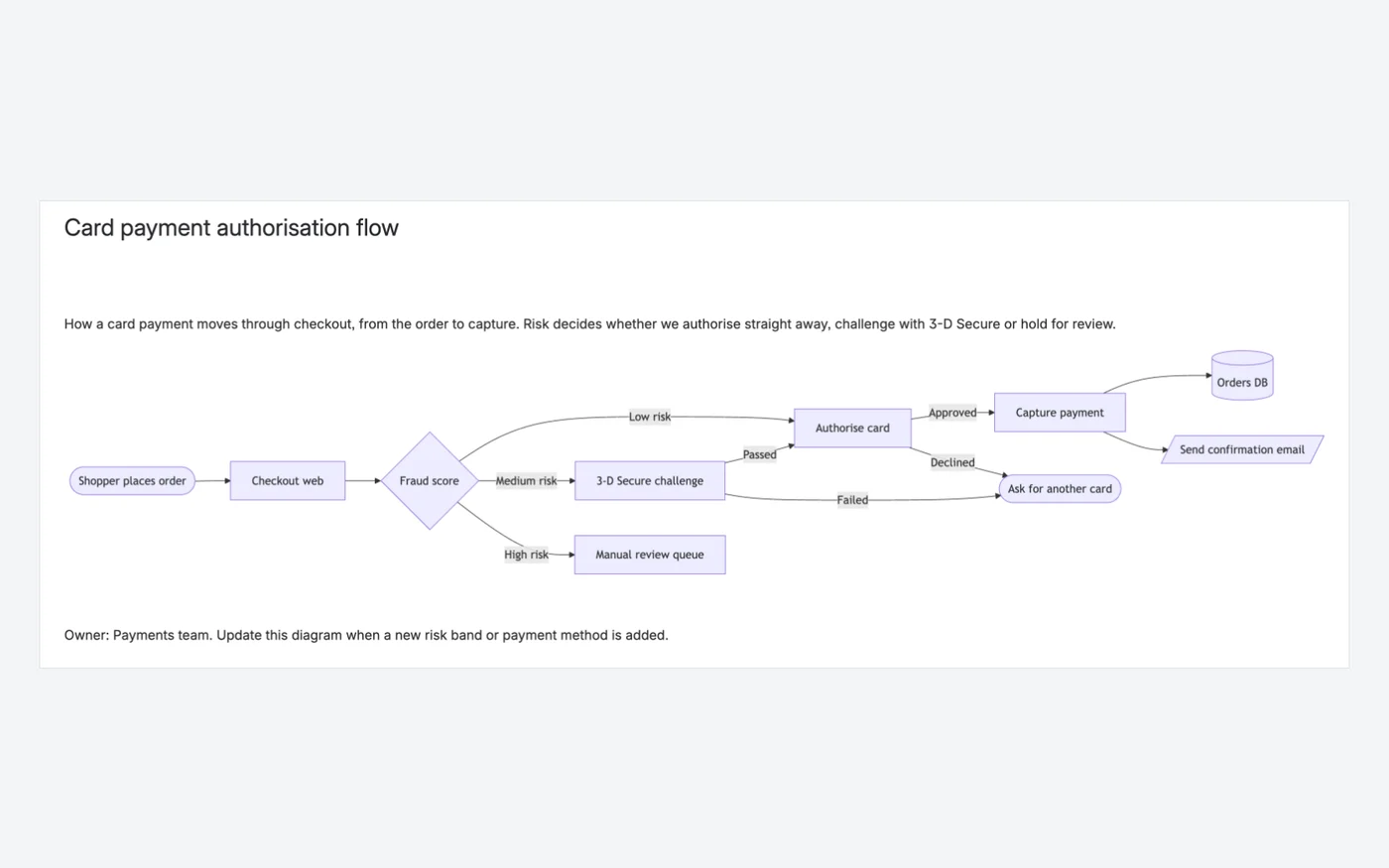
The same Mermaid flowchart on a page

One payment flowchart from identical Mermaid source, shown on a page in both apps.

  • Migrated diagrams keep the same source
  • Download, full screen and zoom on the page
  • Diagram text is findable from Confluence search
Capable for ConfluenceCapable for Confluence page with the card payment Mermaid flowchart and viewer controls
Capable for Confluence: the Mermaid flowchart with zoom, edit, download and full-screen controls.403539
Mermaid Diagrams for ConfluenceMermaid Diagrams for Confluence page with the same card payment flowchart
Mermaid Diagrams for Confluence: the same flowchart on the page.1

Why Capable

Editing the source

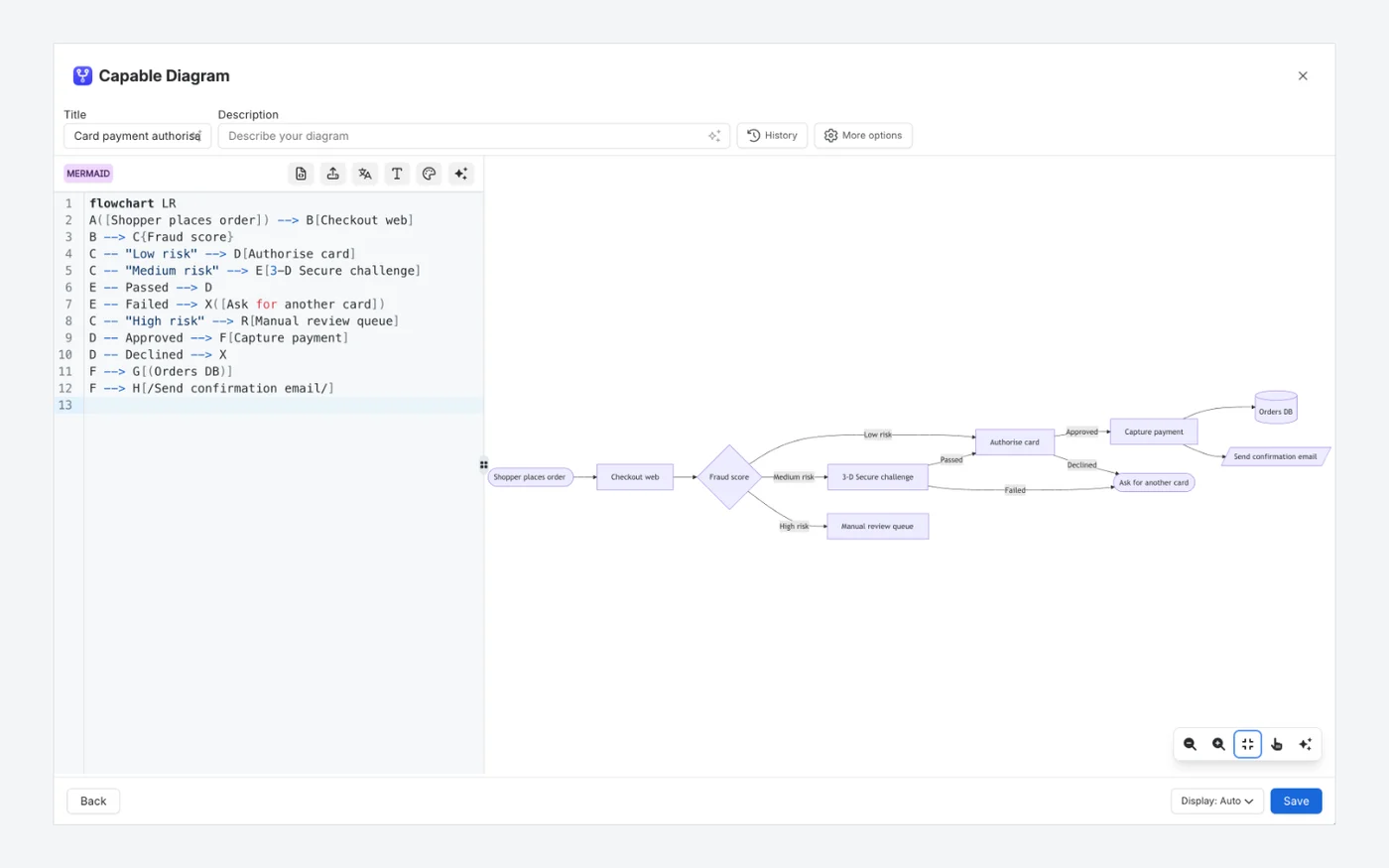
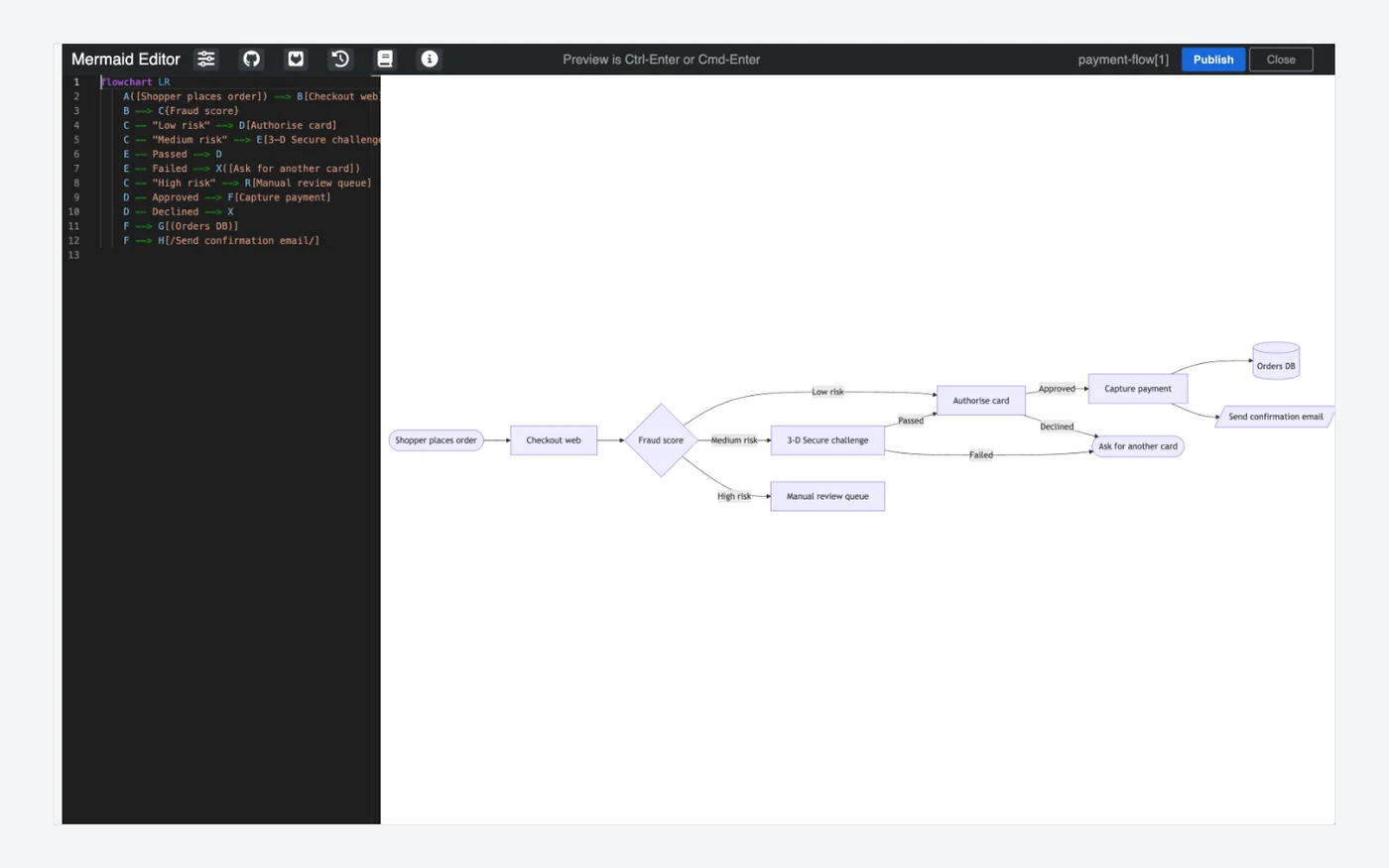
Both editors put the Mermaid source beside a preview. In Capable for Confluence the preview redraws as you type, and an error points at the line rather than blanking the diagram.

  • Live preview as you type
  • Errors shown in place, naming the line
  • A visual editor for Mermaid as well as text
Capable for ConfluenceCapable for Confluence diagram editor with Mermaid source on the left and the live flowchart preview on the right
Capable for Confluence: the Mermaid source beside its live preview, with History in the toolbar.1938
Mermaid Diagrams for ConfluenceMermaid Diagrams for Confluence editor with dark source pane and preview
Mermaid Diagrams for Confluence: the Mermaid Editor with source and preview.1

Why Capable

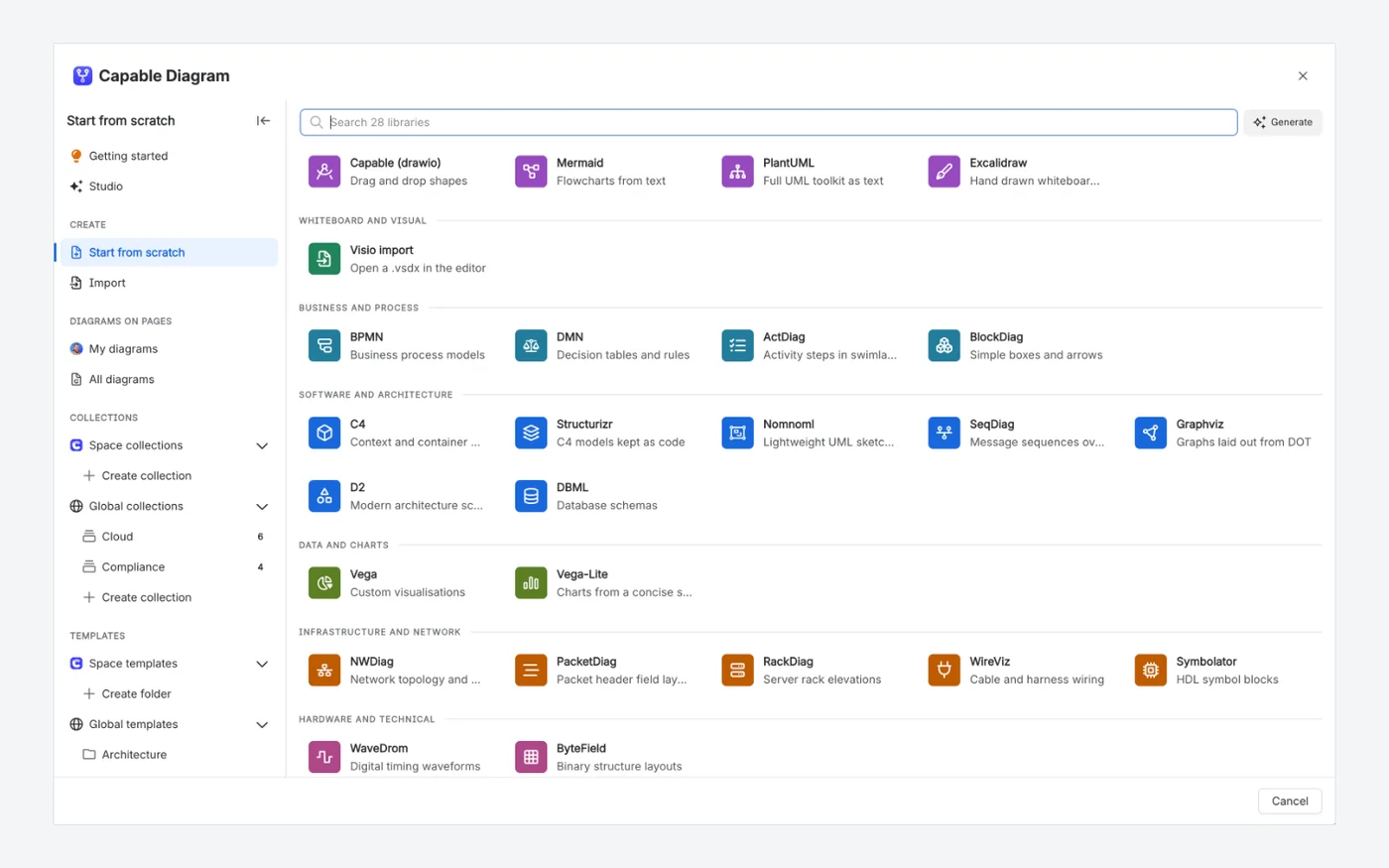
One picker for every diagram language

Capable for Confluence starts every diagram from one picker: Mermaid sits next to draw.io, Excalidraw, BPMN, C4, D2, Graphviz, Vega and more, with collections and templates in the sidebar.

  • Thirty-one diagram languages in one app
  • Space and global templates
  • Visio files import as editable draw.io diagrams
Capable for ConfluenceCapable for Confluence diagram picker listing diagram libraries grouped by category, with collections and templates in the sidebar
The Capable for Confluence diagram picker, grouped by category, with collections and templates in the sidebar.16232241

Why Capable

Describe it, get the diagram

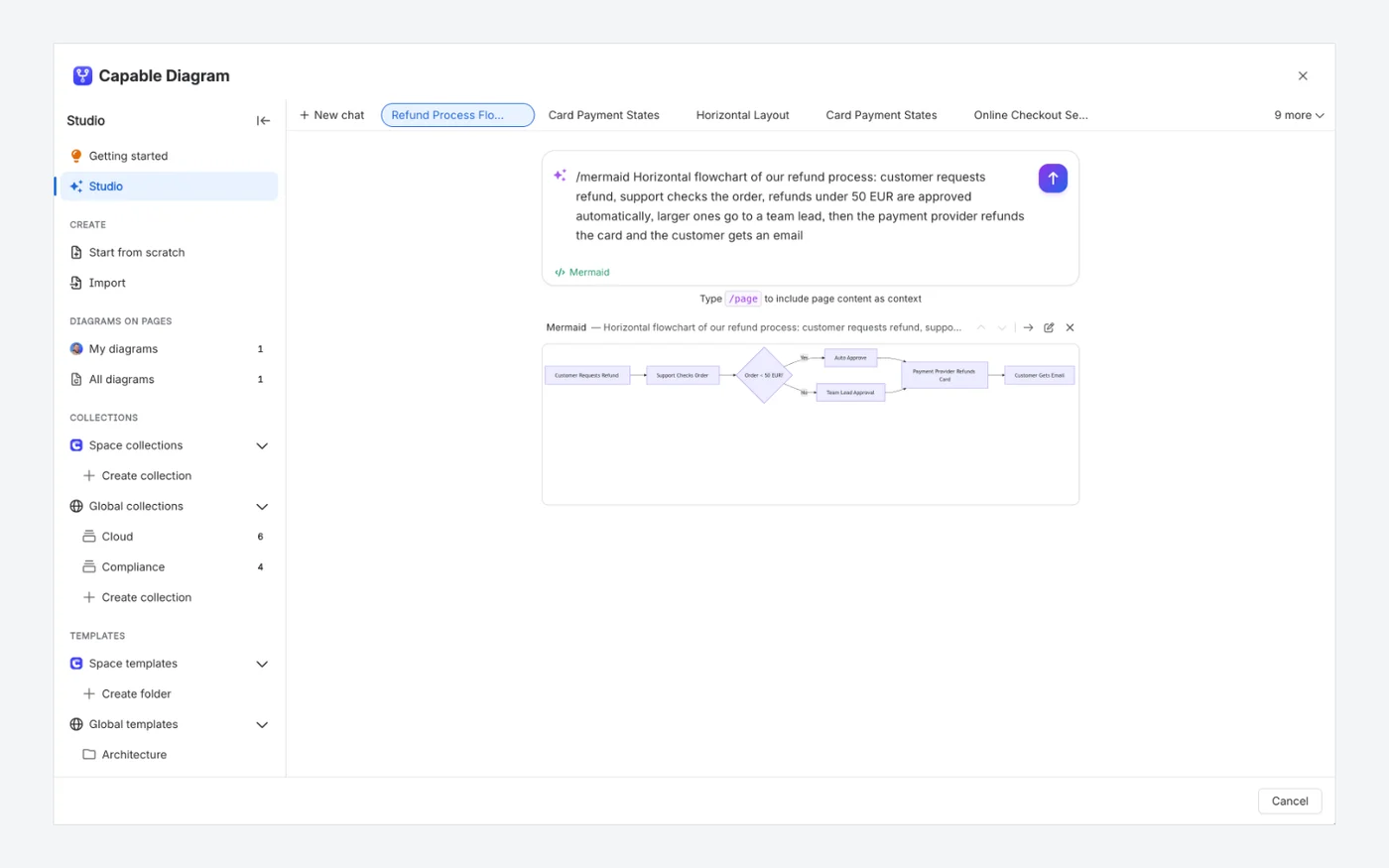
Diagram Studio writes Mermaid source from a plain-language description and shows the result below the prompt, ready to open, edit or discard.

  • A plain-language description in
  • Real diagram source out, not an image
  • Refine by describing changes or editing the source
Capable for ConfluenceCapable for Confluence Diagram Studio with a prompt and the generated Mermaid diagram preview
Capable for Confluence: Diagram Studio drew this Mermaid flowchart from the prompt shown.26

Which one fits your team?

For most teams on Confluence Cloud, Capable for Confluence does more. Here is why, and the few cases where we would point you at Mermaid Diagrams for Confluence instead.

Choose Capable for Confluence if…

  • Not everyone on your team will write syntax. The Mermaid visual editor builds diagrams by clicking and still writes ordinary Mermaid.20
  • You need more than Mermaid. One Diagram macro covers about 30 languages, from PlantUML, C4, D2, GraphViz and DBML to a draw.io-compatible canvas, Excalidraw, BPMN and DMN.1618
  • You want diagrams to be easy to find again. Each space gets a catalogue, and collections and templates work across spaces.212223
  • You want feedback to stay on the diagram, in comments with @mentions that the next reader will see.24
  • You also want approvals, Markdown, calendars, search and published sites, which come with diagrams in Capable for Confluence.3114

Choose Mermaid Diagrams for Confluence if…

  • You run Confluence Data Center, or need the same Mermaid app on Data Center and Cloud.26
  • Your Mermaid files live in GitHub or GitLab and you want to pick them from a repository browser inside the diagram editor, with the page refreshing when the file changes. That needs its Advanced edition.71011
  • You already use PlantUML Diagrams for Confluence from the same vendor and want both text-diagram apps from Stratus Add-ons.14
  • You want an AI agent in Rovo that draws, changes and deletes Mermaid diagrams on your pages, as its LLM-friendly macro offers.17

Feature by feature

Each cell cites its source: Mermaid Diagrams for Confluence's own listing or documentation, or Capable's. A cross against Mermaid Diagrams for Confluence means the feature is in neither its listing nor its documentation. Checked 11 November 2026.

  • Available
  • With limits
  • Not available
  • For context
  • Kept simple, on purpose
Writing Mermaid
FeatureMermaid Diagrams for ConfluenceCapable for Confluence
Mermaid text editorAvailable:Editor with basic syntax highlighting and a live preview; diagrams can be panned, zoomed and opened full screen.6Available:Text editor with live preview, syntax highlighting and errors pointed at the line.19
Mermaid diagram typesAvailable:Flowchart, sequence, class, state, ER, Gantt, journey, Git graph, mindmap, timeline, C4, quadrant, Sankey, XY chart, block and architecture, with LaTeX maths in some labels.7Available:Including flowchart, sequence, class, state, ER, Gantt, Git graph, mind map, timeline, pie, quadrant, Sankey and journey.17
Visual editingNot available:Not described in its listing or docs.16Available:Mermaid visual editor: add nodes and connections directly, with ordinary Mermaid source underneath.20
Other diagram languagesFor context:Mermaid only.16Available:About 30 languages in the same macro, including PlantUML, C4, D2, GraphViz, DBML and Structurizr.16
Canvas, sketch, BPMN and DMNNot available:Not described in its listing or docs.16Available:draw.io-compatible canvas, Excalidraw, a BPMN 2.0 modeller and a DMN editor.18
AIAvailable:A Mermaid Diagram (LLM) macro and a Rovo agent that draws, changes and deletes diagrams from a plain-language request.17Available:Diagram Studio drafts editable diagram source to refine in place; a Rovo agent finds, drafts and places diagrams.2627
Finding and reusing diagrams
FeatureMermaid Diagrams for ConfluenceCapable for Confluence
TemplatesAvailable:Built-in templates, plus custom templates kept as diagrams on child pages of a template root page.68Available:Space templates for a team, global templates for every space, and built-in starters in every language.23
Browse every diagramNot available:Not described in its listing or docs.16Available:A catalogue in every space with your diagrams, all diagrams, collections, templates and examples, as a grid, list or table.21
CollectionsNot available:Not described in its listing or docs.16Available:Space and global collections gather diagrams from any page or space without moving them.22
Comments on a diagramNot available:Not described in its listing or docs.16Available:Comments stored on the diagram, with @mentions and page links, shown on the page and in the catalogue.24
Version historyAvailable:History button to review and restore earlier versions of a diagram.9Available:Every diagram keeps its own history, separate from page history. Restoring adds a version, so it can be undone.25
Working in Confluence
FeatureMermaid Diagrams for ConfluenceCapable for Confluence
Diagrams from GitHub or GitLabAvailable:Advanced edition: import a .mmd file from GitHub or GitLab through a repository browser; the preview updates when the file changes.71011With limits:The Github file macro draws .mmd and other diagram files from GitHub, and shows changes the next time the page is viewed. GitLab is not available, and it is a separate macro, not the diagram editor.2815
Where diagram content goesFor context:Rendered in the browser; source and output are stored only in your Confluence site.612For context:Stored in your Confluence site. Text diagram source goes to Capable's rendering service by default; turn that off and Mermaid draws in the reader's browser.2930
Beyond diagramsFor context:Mermaid diagrams.1Available:The same app covers approvals, Markdown, search, calendars, forms, published sites and more.31
Hosting
FeatureMermaid Diagrams for ConfluenceCapable for Confluence
PlatformAvailable:The current release brings the app to Forge.1Available:Built on Atlassian Forge.29
Confluence Data CenterAvailable:Data Center version on the Marketplace.2Kept simple, on purpose:Cloud only. Capable builds for Confluence Cloud and does not sell Data Center or Server apps.34

How pricing works

Both are bought through the Atlassian Marketplace and priced by your Confluence user tier. Capable for Confluence is one licence for much more than Mermaid. The savings calculator reads both prices live for the team size you set.

How much could you save?

Open the savings calculator with Mermaid Diagrams for Confluence already added, add any other apps you pay for, set your team size and compare the total with Capable.

Work out your saving
  1. Both are billed through Atlassian and priced by your Confluence user tier, not per diagram, and both were free for up to 10 users on Cloud in the Marketplace pricing data on 11 November 2026.35

  2. On the same day, an annual licence for 50 users listed at $200 for Mermaid Diagrams for Confluence and $500 for Capable for Confluence Standard.35

  3. Mermaid Diagrams for Confluence has Standard and Advanced editions, and the GitHub and GitLab integrations are in Advanced.7

  4. In Capable for Confluence every diagram editor and language is in Standard. Advanced adds Sites, Quality and Variables, and every Forms input type.1432

Moving from Mermaid Diagrams for Confluence

Capable's migrator converts Mermaid Diagrams for Confluence macros in place. Each one becomes a Capable diagram holding the same Mermaid source, so nothing is redrawn. Some settings around the diagram do not carry across.

  1. Run Perform verification on a pilot space first. It reads the pages and writes nothing.

    Source 35: Capable Diagrams docs, Migrate from Stratus Mermaid and PlantUML
  2. The source is read from the page attachment, at the revision the macro pinned, and the title comes from the attachment name. A macro with no file name and no source in its body is reported, not converted.

    Source 35: Capable Diagrams docs, Migrate from Stratus Mermaid and PlantUML
  3. Only that one revision moves. The app's earlier diagram versions, its GitHub or GitLab link and its hide-toolbar setting are not carried across, so a repository-linked diagram becomes a copy of its latest source that no longer refreshes.

    Source 35, 9, 10: Capable Diagrams docs, Migrate from Stratus Mermaid and PlantUML
  4. Where the same diagram was pasted more than once, each copy becomes a reference to the one migrated diagram, and a copy that shows a different diagram, revision or zoom migrates on its own.

    Source 35: Capable Diagrams docs, Migrate from Stratus Mermaid and PlantUML
  5. Every changed page gets a new version, so the previous version with the original macro stays in page history, and a whole run can be rolled back from its log.

    Source 36, 37: Capable migration docs, Confluence migration FAQ

Questions people ask

About moving from Mermaid Diagrams for Confluence to Capable for Confluence.

Is Capable for Confluence an alternative to Mermaid Diagrams for Confluence?

For Confluence Cloud, yes. It writes ordinary Mermaid in a text editor or a visual editor, and the same macro covers about 30 other languages. It is not available for Data Center.
Source: Capable Diagrams docs, Diagram languages

Can I move my Stratus Mermaid diagrams to Capable?

Yes. The migrator converts each Mermaid Diagram macro into a Capable diagram with the same source. Only the source at the pinned revision moves, so earlier versions and GitHub or GitLab links stay behind.
Source: Capable Diagrams docs, Migrate from Stratus Mermaid and PlantUML

Can people edit Mermaid without learning the syntax?

Yes. The Mermaid visual editor adds nodes and connections directly and writes ordinary Mermaid, so the source stays editable by hand.
Source: Capable Diagrams docs, Mermaid visual editor

Does Capable keep a history of each diagram?

Yes. Every save keeps a full copy of the source with who saved it and when, separately from page history, and restoring a version adds a new one.
Source: Capable Diagrams docs, Diagram version history

Can Capable show a Mermaid file from GitHub?

Yes. The Github file macro in Capable for Confluence draws a .mmd file from a GitHub repository and shows the new diagram the next time the page is viewed after the file changes. GitLab is not available.
Source: Capable GitHub docs, Show a diagram from GitHub in Confluence

Do people who only read diagrams need a Capable seat?

No. Capable for Confluence is priced by your Confluence user tier, and its macros keep rendering real content for viewers without a seat, including logged-out visitors on public pages.
Source: Capable for Confluence docs, Licence states

Try Mermaid, and the rest, on your own pages

Install Capable for Confluence from the Atlassian Marketplace and try the editors, the catalogue and templates on your own pages. It is free for up to 10 users.

Sources

Last checked

Claims about Mermaid Diagrams for Confluence come from its vendor's own documentation and its Atlassian Marketplace listing. Claims about Capable come from our documentation at help.gocapable.com. Products change; if something here is out of date, tell us and we will correct it.

  1. Mermaid Diagrams for Confluence, Atlassian Marketplace listing (Cloud)Atlassian Marketplace · marketplace.atlassian.com/apps/1226567/mermaid-diagrams-for-confluence · checked 11 November 2026
  2. Mermaid Diagrams for Confluence, Atlassian Marketplace listing (Data Center)Atlassian Marketplace · marketplace.atlassian.com/apps/1226567/mermaid-diagrams-for-confluence · checked 11 November 2026
  3. Mermaid Diagrams for Confluence, Marketplace pricing (Cloud)Atlassian Marketplace · marketplace.atlassian.com/apps/1226567/mermaid-diagrams-for-confluence · checked 11 November 2026
  4. PlantUML Diagrams for Confluence I UML, Flowchart, Git, Atlassian Marketplace listingAtlassian Marketplace · marketplace.atlassian.com/apps/1215115/plantuml-diagrams-for-confluence-i-uml-flowchart-git · checked 11 November 2026
  5. Capable for Confluence (All-in-One), Marketplace pricing (Cloud)Atlassian Marketplace · marketplace.atlassian.com/apps/1234376/capable-for-confluence-all-in-one · checked 11 November 2026
  6. Stratus Add-ons docs, Mermaid Diagrams for ConfluenceVendor documentation · stratus-addons.atlassian.net/wiki/spaces/MDFC/overview · checked 11 November 2026
  7. Stratus Add-ons docs, Standard vs Advanced EditionVendor documentation · stratus-addons.atlassian.net/wiki/spaces/MDFC/pages/3864854529/Standard+vs+Advanced+Edition · checked 11 November 2026
  8. Stratus Add-ons docs, Custom Templates (cloud)Vendor documentation · stratus-addons.atlassian.net/wiki/spaces/MDFC/pages/1910013953/Custom+Templates+cloud · checked 11 November 2026
  9. Stratus Add-ons docs, Diagram HistoryVendor documentation · stratus-addons.atlassian.net/wiki/spaces/MDFC/pages/1907327001/Diagram+History · checked 11 November 2026
  10. Stratus Add-ons docs, Using GitHub DiagramsVendor documentation · stratus-addons.atlassian.net/wiki/spaces/MDFC/pages/3865149441/Using+GitHub+Diagrams · checked 11 November 2026
  11. Stratus Add-ons docs, Using GitLab DiagramsVendor documentation · stratus-addons.atlassian.net/wiki/spaces/MDFC/pages/3865772033/Using+GitLab+Diagrams · checked 11 November 2026
  12. Stratus Add-ons docs, Data Flow and Security ArchitectureVendor documentation · stratus-addons.atlassian.net/wiki/spaces/MDFC/pages/3641081860/Data+Flow+Security+Architecture+Mermaid+Diagrams+for+Confluence · checked 11 November 2026
  13. Capable for Confluence docs, What Capable for Confluence isCapable · help.gocapable.com/capable/what-capable-for-confluence-is · checked 11 November 2026
  14. Capable for Confluence docs, EditionsCapable · help.gocapable.com/capable/editions · checked 11 November 2026
  15. Capable GitHub docs, What is not availableCapable · help.gocapable.com/git/what-is-not-available · checked 11 November 2026
  16. Capable Diagrams docs, Diagram languagesCapable · help.gocapable.com/diagrams/diagram-languages · checked 11 November 2026
  17. Capable Diagrams docs, MermaidCapable · help.gocapable.com/diagrams/mermaid · checked 11 November 2026
  18. Capable Diagrams docs, EditorsCapable · help.gocapable.com/diagrams/editors · checked 11 November 2026
  19. Capable Diagrams docs, Text editorCapable · help.gocapable.com/diagrams/text-editor · checked 11 November 2026
  20. Capable Diagrams docs, Mermaid visual editorCapable · help.gocapable.com/diagrams/mermaid-visual-editor · checked 11 November 2026
  21. Capable Diagrams docs, Find diagrams on your pagesCapable · help.gocapable.com/diagrams/find-diagrams-on-your-pages · checked 11 November 2026
  22. Capable Diagrams docs, Diagram collectionsCapable · help.gocapable.com/diagrams/diagram-collections · checked 11 November 2026
  23. Capable Diagrams docs, Diagram templatesCapable · help.gocapable.com/diagrams/diagram-templates · checked 11 November 2026
  24. Capable Diagrams docs, Comments on diagramsCapable · help.gocapable.com/diagrams/comments-on-diagrams · checked 11 November 2026
  25. Capable Diagrams docs, Diagram version historyCapable · help.gocapable.com/diagrams/diagram-version-history · checked 11 November 2026
  26. Capable Diagrams docs, Diagram StudioCapable · help.gocapable.com/diagrams/diagram-studio · checked 11 November 2026
  27. Capable for Confluence docs, Use the Capable Agent in Rovo for ConfluenceCapable · help.gocapable.com/capable/use-the-capable-agent-in-rovo-for-confluence · checked 11 November 2026
  28. Capable GitHub docs, Show a diagram from GitHub in ConfluenceCapable · help.gocapable.com/git/show-a-diagram-from-github-in-confluence · checked 11 November 2026
  29. Capable Diagrams docs, Security overviewCapable · help.gocapable.com/diagrams/security-overview · checked 11 November 2026
  30. Capable Diagrams docs, External diagram renderingCapable · help.gocapable.com/diagrams/external-diagram-rendering · checked 11 November 2026
  31. Capable for Confluence docs, CapabilitiesCapable · help.gocapable.com/capable/capabilities · checked 11 November 2026
  32. Capable for Confluence docs, DiagramsCapable · help.gocapable.com/capable/diagrams · checked 11 November 2026
  33. Capable for Confluence docs, Licence statesCapable · help.gocapable.com/capable/licence-states · checked 11 November 2026
  34. Capable, About us (FAQ on Cloud, Data Center and Server)Capable · gocapable.com/about/about-us · checked 11 November 2026
  35. Capable Diagrams docs, Migrate from Stratus Mermaid and PlantUMLCapable · help.gocapable.com/diagrams/migrate-from-stratus-mermaid-and-plantuml-to-capable-diagrams-in-confluence · checked 11 November 2026
  36. Capable migration docs, Confluence migration FAQCapable · help.gocapable.com/migration/frequently-asked-questions-about-migrating-to-capable · checked 11 November 2026
  37. Capable migration docs, Before you uninstall the old appCapable · help.gocapable.com/migration/before-you-uninstall-the-old-app · checked 11 November 2026
  38. Capable Diagrams docs, Code pane and live previewCapable · help.gocapable.com/diagrams/code-pane-and-live-preview · checked 11 November 2026
  39. Capable Diagrams docs, OverviewCapable · help.gocapable.com/diagrams/overview · checked 11 November 2026
  40. Capable Diagrams docs, Insert a diagramCapable · help.gocapable.com/diagrams/insert-a-diagram · checked 11 November 2026
  41. Capable Diagrams docs, Import from VisioCapable · help.gocapable.com/diagrams/import-from-visio · checked 11 November 2026

Cookie Settings

We take good care of you and your data. You can read more about how we use cookies, the third parties who set cookies and update your cookie settings here.