Comparison

PlantUML Diagrams for Confluence vs Capable for Confluence

PlantUML Diagrams for Confluence by Stratus Add-ons Ltd is a mature PlantUML and GraphViz app. Capable for Confluence writes the same PlantUML, and puts about 30 other diagram languages, visual editors and a diagram catalogue in one app that also covers approvals, Markdown and search. Every claim is checked against each vendor's own documentation.

  • Last checked 11 November 2026
  • 46 cited sources

Works insideCloud

The short answer

PlantUML Diagrams for Confluence is built for engineers who write diagrams as code. It covers PlantUML and GraphViz with Ascii Math and LaTeX Math formulas, keeps a diagram history, and on its Advanced edition pulls diagrams from GitHub or GitLab and builds them from shared files with !include.

Capable for Confluence writes the same PlantUML, including the standard library behind C4, AWS, Azure and ArchiMate shapes. The same Diagram macro also writes Mermaid, D2, GraphViz, DBML, Structurizr and about 25 more languages, and gives the rest of the team a draw.io-compatible canvas, Excalidraw and a visual Mermaid editor when they would rather not write syntax.

Around the diagrams, Capable adds a catalogue in every space, collections, team and global templates, comments on each diagram and Diagram Studio for AI drafts. Stratus's app is the better pick on Confluence Data Center or Isolated Cloud, or if your diagrams are assembled from !include files in private GitHub or GitLab repositories.

More than a PlantUML macro

Diagrams in Capable for Confluence are a whole workspace inside Confluence. PlantUML is one of about 30 languages it writes, and everything you draw can be found, organised and reused.

About 30 diagram languages in one macro

PlantUML, Mermaid, C4, D2, GraphViz, DBML, Structurizr and more, written in one text editor that redraws as you type and points at the line with the error. Change language and the source is kept.

  • One Diagram macro for every language
  • PlantUML standard library included

See it in Capable for Confluence

Screens from a real Confluence site running Capable for Confluence.

1 / 4

Why Capable

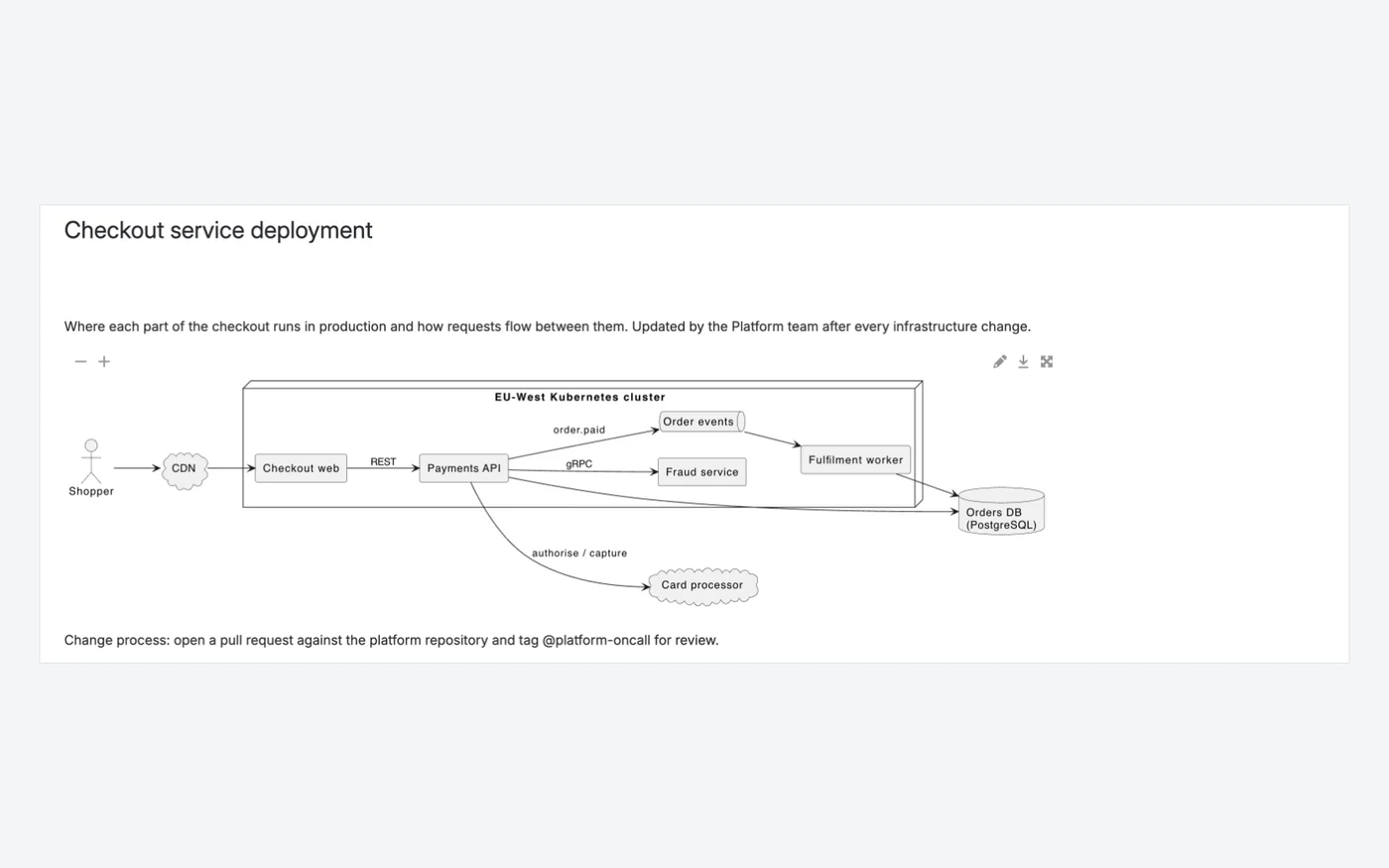
A PlantUML deployment diagram on a page

A deployment diagram written in PlantUML and shown on the page, with zoom, edit, download and full-screen controls.

  • UML in its full range, plus deployment diagrams
  • Drawn in your browser when external rendering is off
  • Download, full screen and zoom on the page
Capable for ConfluenceCapable for Confluence page with a PlantUML deployment diagram of the checkout service
Capable for Confluence: a PlantUML deployment diagram on the page.2245

Why Capable

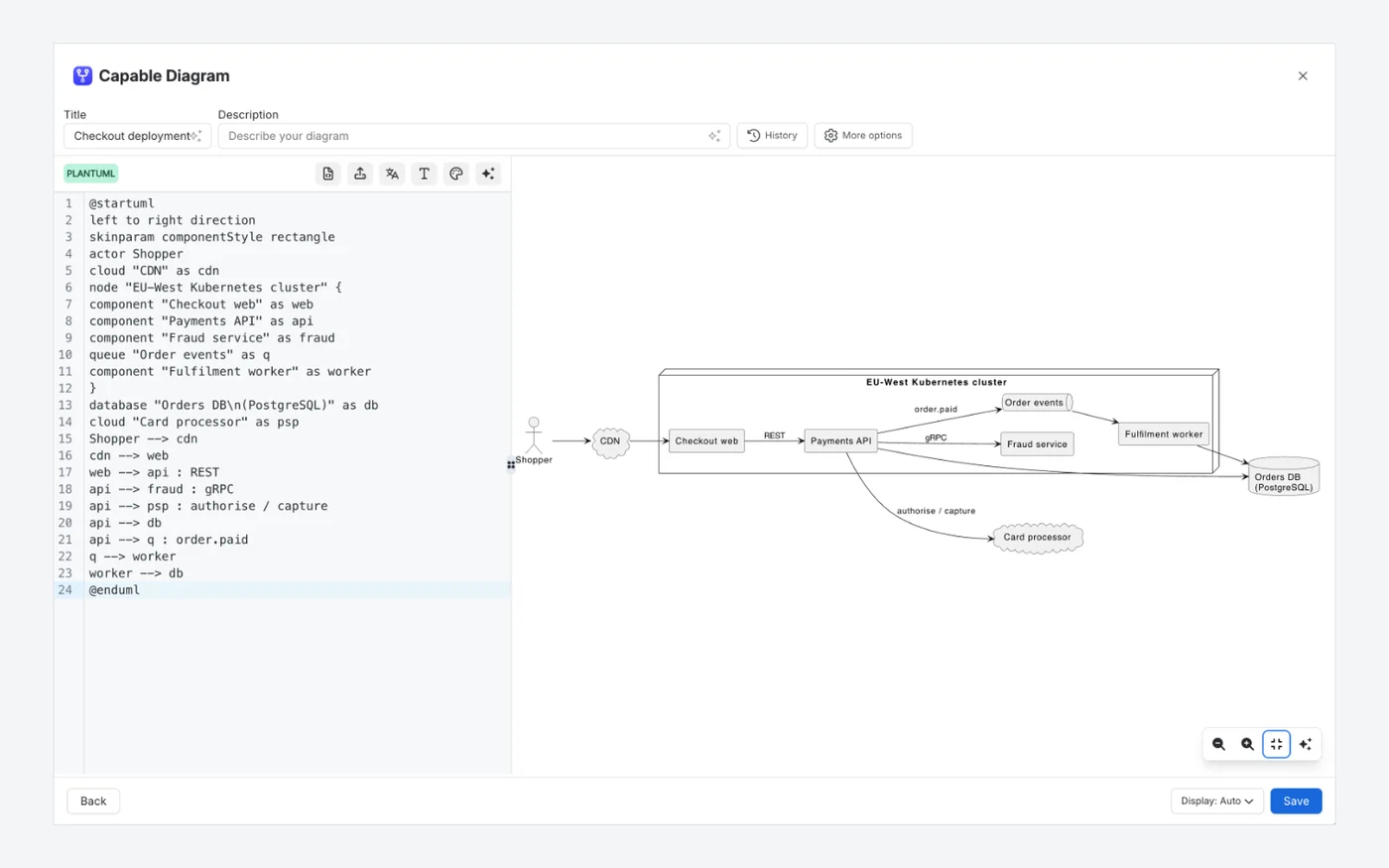
Editing PlantUML with a live preview

Source on the left, rendered diagram on the right, and the preview redraws as you type.

  • Syntax highlighting for PlantUML
  • Errors shown in place, naming the line
  • The preview has its own zoom controls
Capable for ConfluenceCapable for Confluence diagram editor with PlantUML deployment source and live preview
Capable for Confluence: the PlantUML source beside its live preview.2444

Why Capable

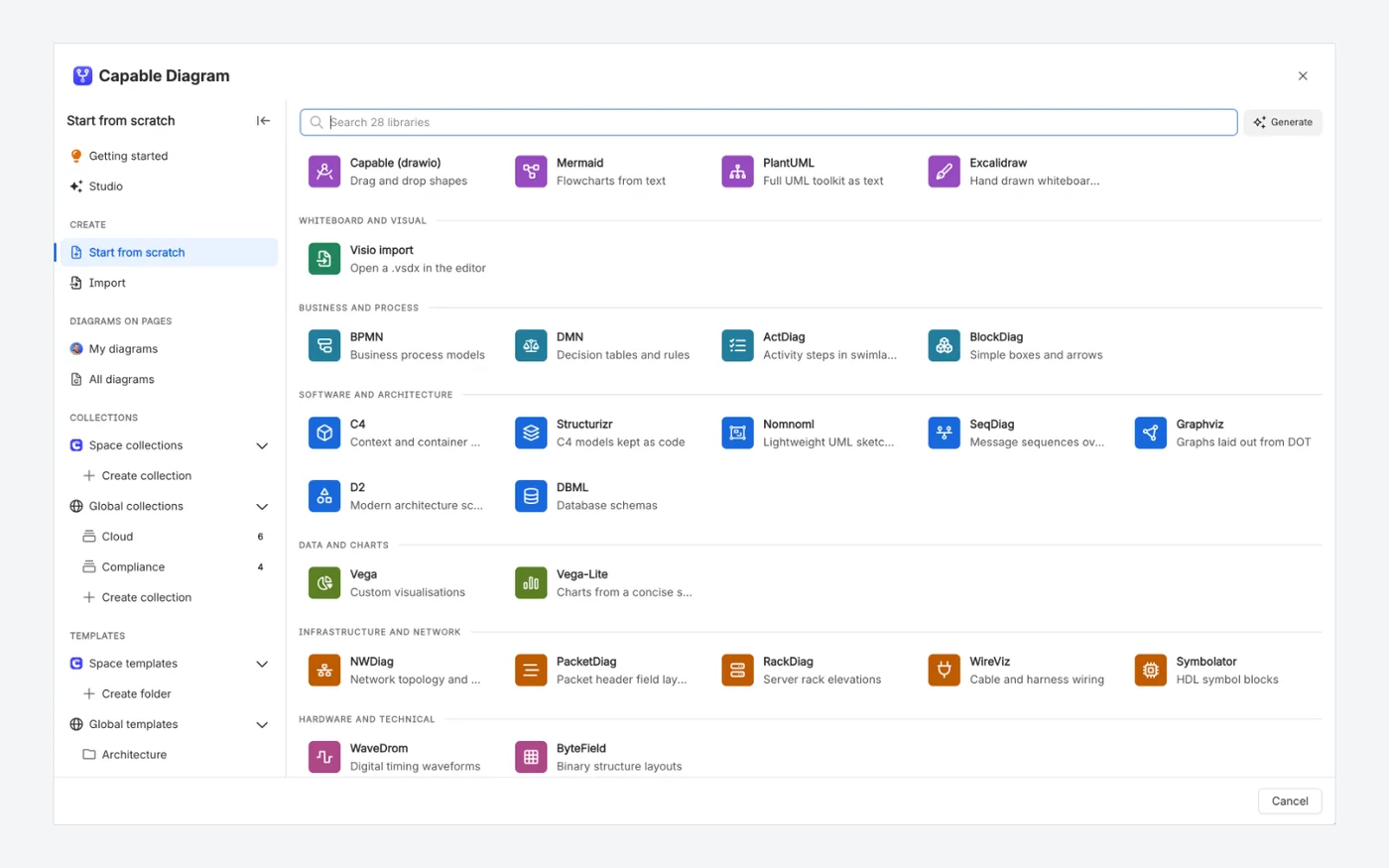
One picker for every diagram language

Capable for Confluence starts every diagram from one picker: PlantUML sits next to draw.io, Excalidraw, BPMN, C4, D2, Graphviz, Vega and more, with collections and templates in the sidebar.

  • Thirty-one diagram languages in one app
  • Space and global templates
  • Visio files import as editable draw.io diagrams
Capable for ConfluenceCapable for Confluence diagram picker listing diagram libraries grouped by category, with collections and templates in the sidebar
The Capable for Confluence diagram picker, grouped by category, with collections and templates in the sidebar.21282746

Why Capable

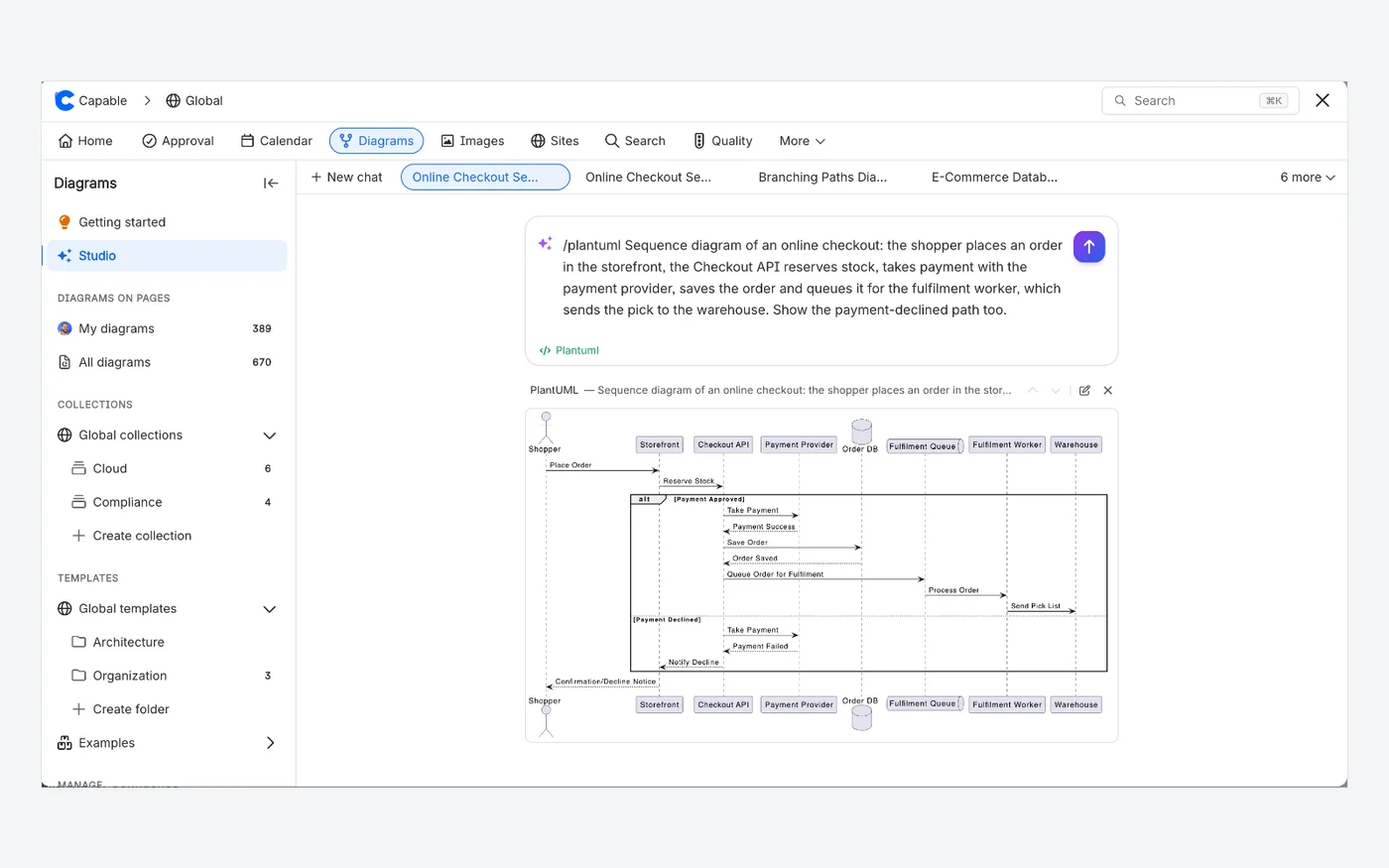
Describe it, get the diagram

Diagram Studio writes PlantUML source from a plain-language description and shows the result below the prompt, ready to open, edit or discard.

  • A plain-language description in
  • Real diagram source out, not an image
  • Refine by describing changes or editing the source
Capable for ConfluenceCapable for Confluence Diagram Studio with a prompt and the generated PlantUML diagram preview
Capable for Confluence: Diagram Studio drew this PlantUML sequence diagram from the prompt shown.31
PlantUML Diagrams for Confluence

PlantUML Diagrams for Confluence has no AI diagram generation.

Not in the PlantUML Diagrams for Confluence listing or documentation.16

Which one fits your team?

For most teams on Confluence Cloud, Capable for Confluence does more. Here is why, and the few cases where we would point you at PlantUML Diagrams for Confluence instead.

Choose Capable for Confluence if…

  • You need more than PlantUML. One Diagram macro covers about 30 languages, including Mermaid, C4, D2, GraphViz and DBML.21
  • Not everyone on your team writes diagram code. A draw.io-compatible canvas, Excalidraw and a visual Mermaid editor sit in the same app.2325
  • You want diagrams to be easy to find again. Each space gets a catalogue, and collections and templates work across spaces.262728
  • You want feedback to stay on the diagram, in comments with @mentions that the next reader will see.29
  • You want AI drafts you can edit, written as diagram source in Diagram Studio, or placed on a page by a Rovo agent.313217
  • You also want approvals, Markdown, calendars, search and published sites, which come with diagrams in Capable for Confluence.1918

Choose PlantUML Diagrams for Confluence if…

  • You run Confluence Data Center, or need the same PlantUML app on Data Center and Cloud.26
  • Your site is on Atlassian Isolated Cloud, where it offers a dedicated IC edition.15
  • Your diagrams are built from shared files in private GitHub or GitLab repositories, or from Confluence attachments, with !include, and imported through a repository browser. Repository integrations need its Advanced edition.9810
  • You also use Mermaid Diagrams for Confluence, which comes from the same vendor, and want both text-diagram apps from Stratus Add-ons.5

Feature by feature

Each cell cites its source: PlantUML Diagrams for Confluence's own listing or documentation, or Capable's. A cross against PlantUML Diagrams for Confluence means the feature is in neither its listing nor its documentation. Checked 11 November 2026.

  • Available
  • With limits
  • Not available
  • For context
  • Kept simple, on purpose
Writing PlantUML
FeaturePlantUML Diagrams for ConfluenceCapable for Confluence
PlantUML editorAvailable:Full-screen editor with syntax highlighting; published diagrams show as SVG you can zoom and pan.1712Available:Text editor with live preview, syntax highlighting and errors pointed at the line.24
UML diagram typesAvailable:Sequence, use case, class, activity, component, state, object and mind maps, among others.1Available:Sequence, class, activity, component, state, use case, deployment, object, timing and Gantt.22
Includes and the standard libraryAvailable:!include from public URLs, private GitHub or GitLab files and Confluence attachments.198With limits:The standard library behind C4, AWS, Azure and ArchiMate shapes works through !include. Includes from outside it need External diagram rendering, which is on by default. There is no include from private repositories or Confluence attachments.2238
Other diagram languagesWith limits:PlantUML and GraphViz, with Ascii Math and LaTeX Math formulas.18Available:About 30 languages in the same macro, including Mermaid, C4, D2, GraphViz, DBML and Structurizr.21
Drawing without codeNot available:Its vendor describes it as diagrams-as-code, not a drag-and-drop visual editor.116Available:draw.io-compatible canvas, Excalidraw, BPMN and DMN modellers, and a visual Mermaid editor.2325
AINot available:Not described in its listing or docs.18Available:Diagram Studio drafts editable diagram source to refine in place; a Rovo agent finds, drafts and places diagrams.313217
Finding and reusing diagrams
FeaturePlantUML Diagrams for ConfluenceCapable for Confluence
TemplatesAvailable:Built-in templates, plus custom templates kept as diagrams on child pages of a template root page.1211Available:Space templates for a team, global templates for every space, and built-in starters in every language.28
Browse every diagramNot available:Not described in its listing or docs.16Available:A catalogue in every space with your diagrams, all diagrams, collections, templates and examples, as a grid, list or table.26
CollectionsNot available:Not described in its listing or docs.16Available:Space and global collections gather diagrams from any page or space without moving them.27
Comments on a diagramNot available:Not described in its listing or docs.16Available:Comments stored on the diagram, with @mentions and page links, shown on the page and in the catalogue.29
Version historyAvailable:History button to review and restore earlier versions of a diagram.13Available:Every diagram keeps its own history, separate from page history. Restoring adds a version, so it can be undone.30
Working in Confluence
FeaturePlantUML Diagrams for ConfluenceCapable for Confluence
Diagrams from GitHub or GitLabAvailable:Advanced edition: import from GitHub or GitLab through a repository browser; the preview updates when the file changes.810With limits:The Github file macro draws .puml and other diagram files from GitHub, and shows changes the next time the page is viewed. There is no GitLab connection; the Diagram from URL/attachment macro draws a PlantUML file from a URL your site can reach. Both are read-only macros, separate from the diagram editor.342035
Page link mapsNot available:Its LinkGraph macro is not supported in the cloud app.14Available:Link graph and space graph macros map how pages connect and find orphaned pages.33
Where diagram content goesFor context:Stored in your Confluence site. In the cloud app, markup passes through secured servers, without storage, to draw preview images; the Isolated Cloud edition runs entirely on Atlassian infrastructure.1615For context:Stored in your Confluence site. By default, PlantUML source goes to Capable's rendering service in the United States, which stores nothing. Turn External diagram rendering off and PlantUML draws in the reader's browser, apart from includes outside the standard library.3738
Beyond diagramsFor context:PlantUML, GraphViz and maths formulas.1Available:The same app covers approvals, Markdown, search, calendars, forms, published sites and more.1918
Hosting
FeaturePlantUML Diagrams for ConfluenceCapable for Confluence
Confluence Data CenterAvailable:Data Center version on the Marketplace.2Kept simple, on purpose:Cloud only. Capable builds for Confluence Cloud and does not sell Data Center or Server apps.40

How pricing works

Both are bought through the Atlassian Marketplace and priced by your Confluence user tier. Capable for Confluence is one licence for much more than PlantUML. The savings calculator reads both prices live for the team size you set.

How much could you save?

Open the savings calculator with PlantUML Diagrams for Confluence already added, add any other apps you pay for, set your team size and compare the total with Capable.

Work out your saving
  1. Both are billed through Atlassian and priced by your Confluence user tier, not per diagram, and both were free for up to 10 users on Cloud in the Marketplace pricing data on 11 November 2026.34

  2. On the same day, an annual licence for 50 users listed at $350 for PlantUML Diagrams for Confluence and $500 for Capable for Confluence Standard.34

  3. PlantUML Diagrams for Confluence has Standard and Advanced editions. The GitHub and GitLab integrations are in Advanced, which its vendor says carries a small price premium.8

  4. In Capable for Confluence every diagram editor and language is in Standard. Advanced adds Sites, Quality and Variables, and every Forms input type.18

Moving from PlantUML Diagrams for Confluence

Capable's migrator converts PlantUML Diagrams for Confluence macros in place. Each one becomes a Capable diagram holding the same PlantUML source, so nothing is redrawn.

  1. Run Perform verification on a pilot space first. It reads the pages and writes nothing.

    Source 41: Capable Diagrams docs, Migrate from Stratus Mermaid and PlantUML
  2. Compressed and plain source both convert, including source in the macro body, which is how Data Center imports usually arrive. Missing @startuml and @enduml lines are added, and copies of the same macro on a page become references to the first migrated diagram.

    Source 41: Capable Diagrams docs, Migrate from Stratus Mermaid and PlantUML
  3. Only the current source moves. The diagram's earlier revisions are not carried into Capable's history, and custom templates do not become Capable templates, so save the ones you use as Capable templates.

    Source 41, 13, 11, 28: Capable Diagrams docs, Migrate from Stratus Mermaid and PlantUML
  4. Every changed page gets a new version, so the previous version with the original macro stays in page history, and a whole run can be rolled back from its log.

    Source 42, 43: Capable migration docs, Confluence migration FAQ

Questions people ask

About moving from PlantUML Diagrams for Confluence to Capable for Confluence.

Is Capable for Confluence an alternative to PlantUML Diagrams for Confluence?

For Confluence Cloud, yes. It writes ordinary PlantUML with the standard library, and the same macro covers about 30 other languages and visual editors. It is not available for Data Center.
Source: Capable Diagrams docs, PlantUML

Can I move my Stratus PlantUML diagrams to Capable?

Yes. The migrator converts each PlantUML Diagram macro into a Capable diagram with the same source, compressed or not. Earlier revisions and custom templates do not carry across.
Source: Capable Diagrams docs, Migrate from Stratus Mermaid and PlantUML

Do C4 and cloud icon diagrams still work?

Yes. The PlantUML standard library is included through !include, and those shapes are what make C4 and cloud diagrams work.
Source: Capable Diagrams docs, PlantUML

Does Capable keep a history of each diagram?

Yes. Every save keeps a full copy of the source with who saved it and when, separately from page history, and restoring a version adds a new one.
Source: Capable Diagrams docs, Diagram version history

Can Capable show a PlantUML file from GitHub?

Yes. The Github file macro in Capable for Confluence draws a .puml file from a GitHub repository and shows the new diagram the next time the page is viewed after the file changes. There is no GitLab connection, but the Diagram from URL/attachment macro can draw a PlantUML file from a URL your site can reach.
Source: Capable GitHub docs, Show a diagram from GitHub in Confluence

Do people who only read diagrams need a Capable licence?

There is no separate diagram seat. Capable for Confluence is licensed for the whole site by your Confluence user tier, and its macros keep rendering real content for viewers without a seat.
Source: Capable for Confluence docs, Licence states

Try PlantUML, and the rest, on your own pages

Capable for Confluence is free for up to 10 users, and every diagram editor, language, the catalogue and templates are in the Standard edition.

Sources

Last checked

Claims about PlantUML Diagrams for Confluence come from its vendor's own documentation and its Atlassian Marketplace listing. Claims about Capable come from our documentation at help.gocapable.com. Products change; if something here is out of date, tell us and we will correct it.

  1. PlantUML Diagrams for Confluence I UML, Flowchart, Git, Atlassian Marketplace listing (Cloud)Atlassian Marketplace · marketplace.atlassian.com/apps/1215115/plantuml-diagrams-for-confluence-i-uml-flowchart-git · checked 11 November 2026
  2. PlantUML Diagrams for Confluence, Atlassian Marketplace listing (Data Center)Atlassian Marketplace · marketplace.atlassian.com/apps/1215115/plantuml-diagrams-for-confluence-i-uml-flowchart-git · checked 11 November 2026
  3. PlantUML Diagrams for Confluence, Marketplace pricing (Cloud)Atlassian Marketplace · marketplace.atlassian.com/apps/1215115/plantuml-diagrams-for-confluence-i-uml-flowchart-git · checked 11 November 2026
  4. Capable for Confluence (All-in-One), Marketplace pricing (Cloud)Atlassian Marketplace · marketplace.atlassian.com/apps/1234376/capable-for-confluence-all-in-one · checked 11 November 2026
  5. Mermaid Diagrams for Confluence, Atlassian Marketplace listing (Cloud)Atlassian Marketplace · marketplace.atlassian.com/apps/1226567/mermaid-diagrams-for-confluence · checked 11 November 2026
  6. Stratus Add-ons docs, PlantUML Diagrams for ConfluenceVendor documentation · stratus-addons.atlassian.net/wiki/spaces/PDFC/overview · checked 11 November 2026
  7. Stratus Add-ons docs, Basic UsageVendor documentation · stratus-addons.atlassian.net/wiki/spaces/PDFC/pages/487424009/Basic+Usage · checked 11 November 2026
  8. Stratus Add-ons docs, Standard vs Advanced editionVendor documentation · stratus-addons.atlassian.net/wiki/spaces/PDFC/pages/3653795842/Standard+vs+Advanced+edition · checked 11 November 2026
  9. Stratus Add-ons docs, Importing files into diagramsVendor documentation · stratus-addons.atlassian.net/wiki/spaces/PDFC/pages/2656731144/Importing+files+into+diagrams · checked 11 November 2026
  10. Stratus Add-ons docs, Using GitHub DiagramsVendor documentation · stratus-addons.atlassian.net/wiki/spaces/PDFC/pages/1733787669/Using+GitHub+Diagrams · checked 11 November 2026
  11. Stratus Add-ons docs, Custom TemplatesVendor documentation · stratus-addons.atlassian.net/wiki/spaces/PDFC/pages/1836679169/Custom+Templates · checked 11 November 2026
  12. Stratus Add-ons docs, On-prem vs Cloud feature listVendor documentation · stratus-addons.atlassian.net/wiki/spaces/PDFC/pages/2903670787/On-prem+vs+Cloud+feature+list · checked 11 November 2026
  13. Stratus Add-ons docs, Diagram HistoryVendor documentation · stratus-addons.atlassian.net/wiki/spaces/PDFC/pages/1841987585/Diagram+History · checked 11 November 2026
  14. Stratus Add-ons docs, Known issuesVendor documentation · stratus-addons.atlassian.net/wiki/spaces/PDFC/pages/1935835153/Known+issues · checked 11 November 2026
  15. Stratus Add-ons docs, IC edition featuresVendor documentation · stratus-addons.atlassian.net/wiki/spaces/PDFC/pages/3737452545/IC+edition+features · checked 11 November 2026
  16. Stratus Add-ons docs, Partner battlecard for PlantUML Diagrams for ConfluenceVendor documentation · stratus-addons.atlassian.net/wiki/spaces/PDFC/pages/3627581442/Partner+-+PlantUML+Diagrams+for+Confluence+I+UML+Flowchart+Git+Battlecard · checked 11 November 2026
  17. Capable for Confluence docs, What Capable for Confluence isCapable · help.gocapable.com/capable/what-capable-for-confluence-is · checked 11 November 2026
  18. Capable for Confluence docs, EditionsCapable · help.gocapable.com/capable/editions · checked 11 November 2026
  19. Capable for Confluence docs, CapabilitiesCapable · help.gocapable.com/capable/capabilities · checked 11 November 2026
  20. Capable GitHub docs, What is not availableCapable · help.gocapable.com/git/what-is-not-available · checked 11 November 2026
  21. Capable Diagrams docs, Diagram languagesCapable · help.gocapable.com/diagrams/diagram-languages · checked 11 November 2026
  22. Capable Diagrams docs, PlantUMLCapable · help.gocapable.com/diagrams/plantuml · checked 11 November 2026
  23. Capable Diagrams docs, EditorsCapable · help.gocapable.com/diagrams/editors · checked 11 November 2026
  24. Capable Diagrams docs, Text editorCapable · help.gocapable.com/diagrams/text-editor · checked 11 November 2026
  25. Capable Diagrams docs, Mermaid visual editorCapable · help.gocapable.com/diagrams/mermaid-visual-editor · checked 11 November 2026
  26. Capable Diagrams docs, Find diagrams on your pagesCapable · help.gocapable.com/diagrams/find-diagrams-on-your-pages · checked 11 November 2026
  27. Capable Diagrams docs, Diagram collectionsCapable · help.gocapable.com/diagrams/diagram-collections · checked 11 November 2026
  28. Capable Diagrams docs, Diagram templatesCapable · help.gocapable.com/diagrams/diagram-templates · checked 11 November 2026
  29. Capable Diagrams docs, Comments on diagramsCapable · help.gocapable.com/diagrams/comments-on-diagrams · checked 11 November 2026
  30. Capable Diagrams docs, Diagram version historyCapable · help.gocapable.com/diagrams/diagram-version-history · checked 11 November 2026
  31. Capable Diagrams docs, Diagram StudioCapable · help.gocapable.com/diagrams/diagram-studio · checked 11 November 2026
  32. Capable Diagrams docs, Rovo agentCapable · help.gocapable.com/diagrams/rovo-agent · checked 11 November 2026
  33. Capable Diagrams docs, Page and space graphsCapable · help.gocapable.com/diagrams/page-and-space-graphs · checked 11 November 2026
  34. Capable GitHub docs, Show a diagram from GitHub in ConfluenceCapable · help.gocapable.com/git/show-a-diagram-from-github-in-confluence · checked 11 November 2026
  35. Capable Diagrams docs, Diagrams from a URL or attachmentCapable · help.gocapable.com/diagrams/diagrams-from-a-url-or-attachment · checked 11 November 2026
  36. Capable Diagrams docs, draw.ioCapable · help.gocapable.com/diagrams/draw-io · checked 11 November 2026
  37. Capable Diagrams docs, Security overviewCapable · help.gocapable.com/diagrams/security-overview · checked 11 November 2026
  38. Capable Diagrams docs, External diagram renderingCapable · help.gocapable.com/diagrams/external-diagram-rendering · checked 11 November 2026
  39. Capable for Confluence docs, Licence statesCapable · help.gocapable.com/capable/licence-states · checked 11 November 2026
  40. Capable, About us (FAQ on Cloud, Data Center and Server)Capable · gocapable.com/about/about-us · checked 11 November 2026
  41. Capable Diagrams docs, Migrate from Stratus Mermaid and PlantUMLCapable · help.gocapable.com/diagrams/migrate-from-stratus-mermaid-and-plantuml-to-capable-diagrams-in-confluence · checked 11 November 2026
  42. Capable migration docs, Confluence migration FAQCapable · help.gocapable.com/migration/frequently-asked-questions-about-migrating-to-capable · checked 11 November 2026
  43. Capable migration docs, Before you uninstall the old appCapable · help.gocapable.com/migration/before-you-uninstall-the-old-app · checked 11 November 2026
  44. Capable Diagrams docs, Code pane and live previewCapable · help.gocapable.com/diagrams/code-pane-and-live-preview · checked 11 November 2026
  45. Capable Diagrams docs, Insert a diagramCapable · help.gocapable.com/diagrams/insert-a-diagram · checked 11 November 2026
  46. Capable Diagrams docs, Import from VisioCapable · help.gocapable.com/diagrams/import-from-visio · checked 11 November 2026

Cookie Settings

We take good care of you and your data. You can read more about how we use cookies, the third parties who set cookies and update your cookie settings here.