How to Create a Form in Confluence (Without a Form Builder)
Confluence Cloud has no form builder, but it has four ways to collect structured answers. How each works, step by step, and which to choose.


Sooner or later every team wants a form in Confluence: a new starter checklist, a project request, an incident report. You go looking for a form macro and find nothing, because Confluence Cloud doesn't have one. You can still create a form in Confluence, though, using features that weren't designed as forms but do the job.
This guide covers the four native options, step by step, with what each is good for: page templates with variables, databases, Jira forms and embedded Google or Microsoft forms. Every step was checked against Atlassian's documentation and a Confluence Cloud site in October 2026.
Which native option to choose
| You want | Use | Where the answers go |
|---|---|---|
| One page per entry (new starter, project request) | A template with variables | Into the new page |
| A list of entries in one table | A database | Rows in the database |
| Requests that become tasks | A Jira form | Jira work items |
| A survey or sign-up, including outside people | An embedded Google or Microsoft form | Google or Microsoft |
How to create a form in Confluence with a template
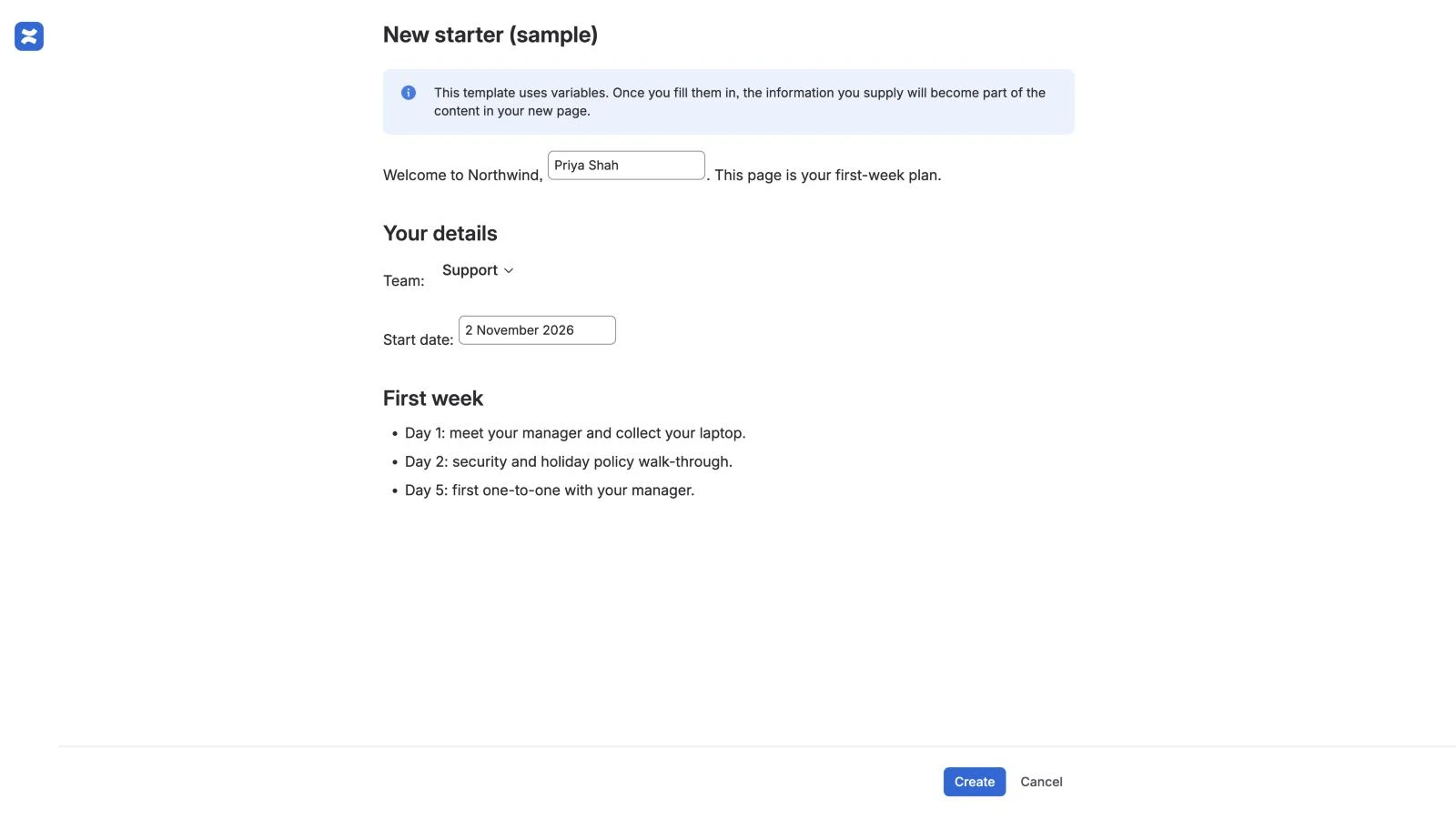
A template with variables is the closest Confluence gets to a fillable form. When someone creates a page from it, Confluence shows a form with a field for each variable, then builds the page with their answers in place. You need to be a space admin to create a space template.
- Next to the space name, select More actions (•••), then Space settings.
- Go to Look and feel, then Templates, and select Create a new template.
- Give the template a name, write the page as it should look, and wherever an answer should go, type
/variableand choose New variable. - Select the variable, select the edit icon, give it a name (such as "New hire") and choose its type: Text, Multi-line Text or List (a drop-down; type the choices separated by commas).
- Optionally, type
/placeholderto add instructions that show only while someone is editing. - Save the template.
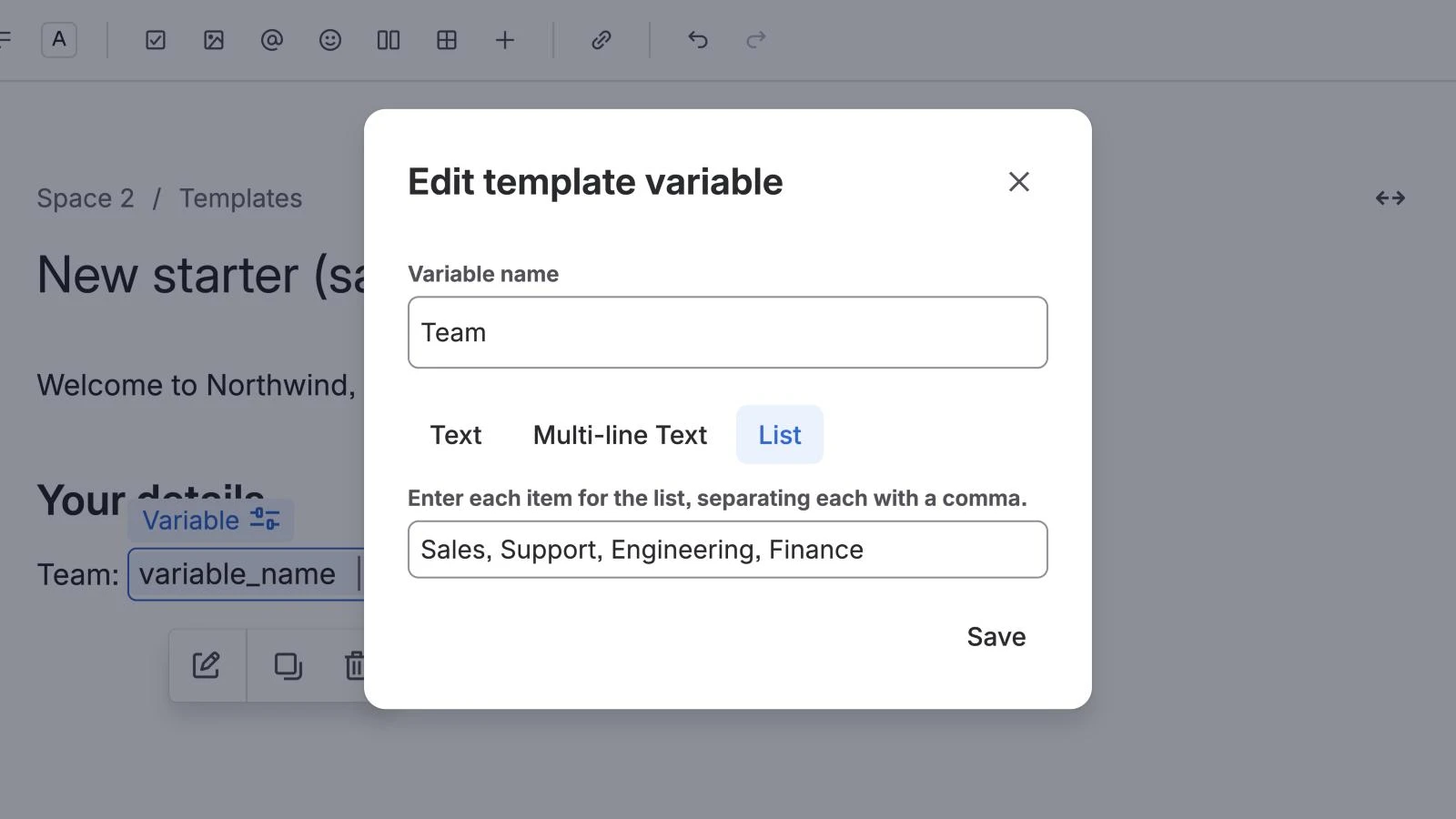
To use it, select Create, then Page, and open Templates at the bottom of the new page. Find your template and select it. Confluence shows the page with a field for each variable, and Create puts the answers in. Variables with the same name share one answer, so "New hire" can appear several times in the body but is typed once.
To see every answer in one table, put the key facts in a content properties table in the template, label the template, and add a content properties report to an index page. Our guide to the Confluence page properties report covers that set-up in full.
How to create a data entry form with a database
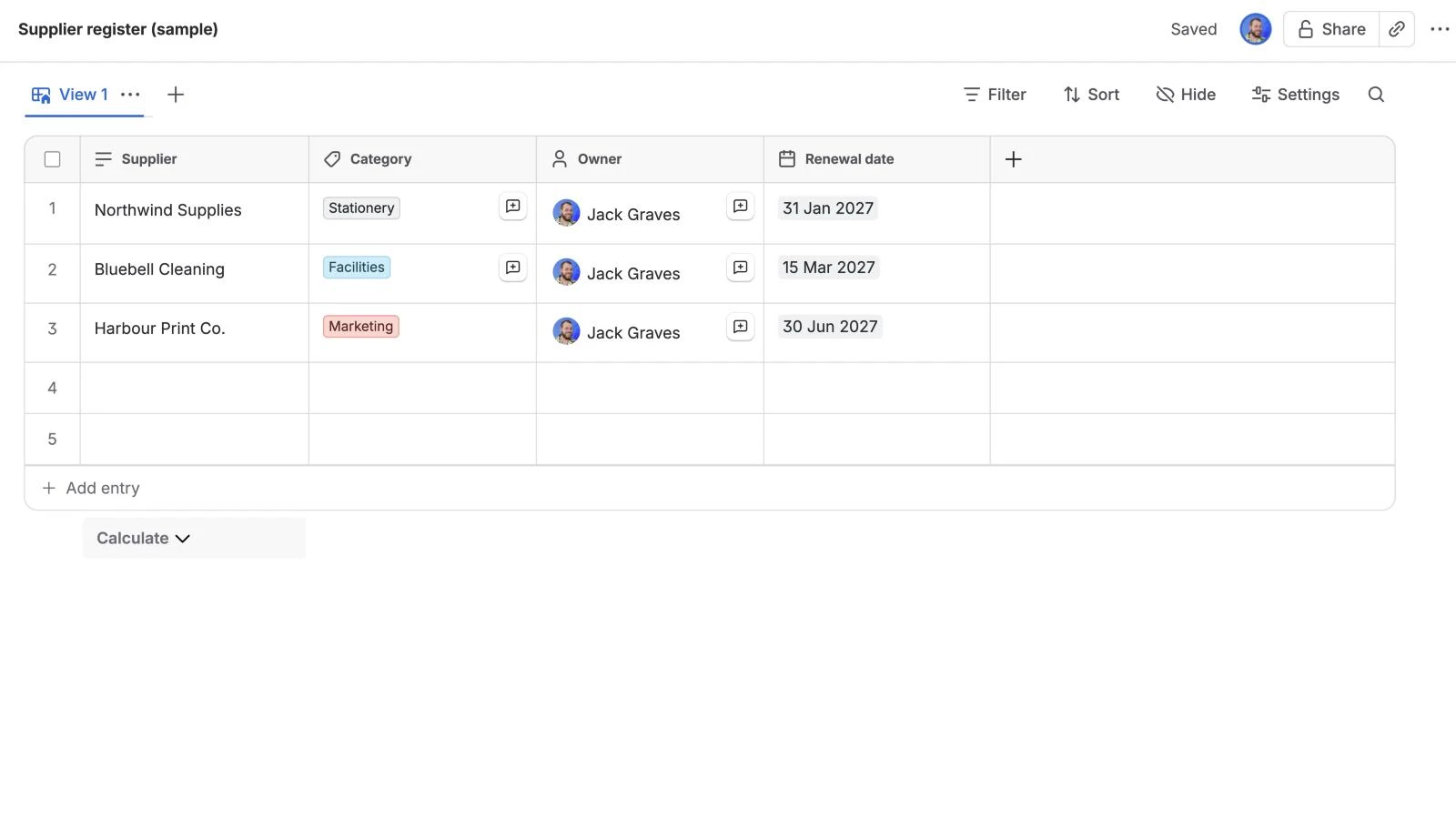
A Confluence database is a table where each row is an entry, and it suits a register of things: suppliers, assets, decisions.
- Select Create, then Database (or type
/databaseon a page). - In table layout, select + at the top right of the table to add a field, choose its type (Text, Number, Date, Tag, User, Link and others) and name it.
- Select + Add entry at the bottom to add a row. In card or board layout, + Add entry opens an entry form instead.
You can export a database to CSV, HTML or PDF from its ••• menu. See Atlassian's guide to databases for the field types.
How to use a Jira form or an embedded form
Jira forms. If the requests should become work, a Jira form turns each response into a Jira work item. Space admins open Forms in the Jira space's navigation, choose a template or a blank form, drag in fields and save. Access can be limited, open or public.
Google Forms or Microsoft Forms. For a survey, or anything outside people need to fill in, build the form in Google or Microsoft and embed it:
- Copy the form's embed code: in Google Forms, open the More menu and choose Embed HTML; in Microsoft Forms, select Collect responses, then Embed.
- The code is a snippet of HTML. Copy just the web address inside its
src="…"quotes. - Edit the Confluence page, type
/iframe, choose the iFrame macro, paste the address and set the height and width.
The answers stay in Google or Microsoft. Some sites refuse to be framed and show a blank box instead.
Where the native way runs out
Each option covers part of what people mean by a form:
- Templates only ask once. Variables prompt when the page is created. There's no form on an existing page to fill in later, no validation (required fields, number limits) and only three field types. Only space admins can create space templates, and templates can't hold images or attachments.
- Databases are a table, not a page. They don't support anonymous access, and they can't be used inside templates.
- Jira forms leave Confluence. Each response is a Jira work item, not part of the page.
- Embedded forms keep the data outside Confluence, with its own permissions and its own place to look.
The shorter way: put the form on the page with Capable Forms
Capable Forms adds the form macro Confluence doesn't have. You build the form on any page, readers fill it in on the page, and the answers are saved in the page itself, so they follow the page's permissions.
- Edit the page, type
/and choose Form (Capable). Give it a form ID (such asnew-starter) and a name. - Inside the form, type
/and choose Input (Capable). Set its label and input type. Repeat for each field. - Publish. Readers with edit permission fill in the fields and select Save.
What it adds over the native options:
- Ten input types: single-line text, long text, number, radio, checkbox, select, URL, user, space and page.
- Validation: required fields, character limits, and minimum and maximum numbers, checked when someone saves.
- One catalogue of every response: the site-wide forms catalogue shows one row per page and a column per field, with Export to CSV.
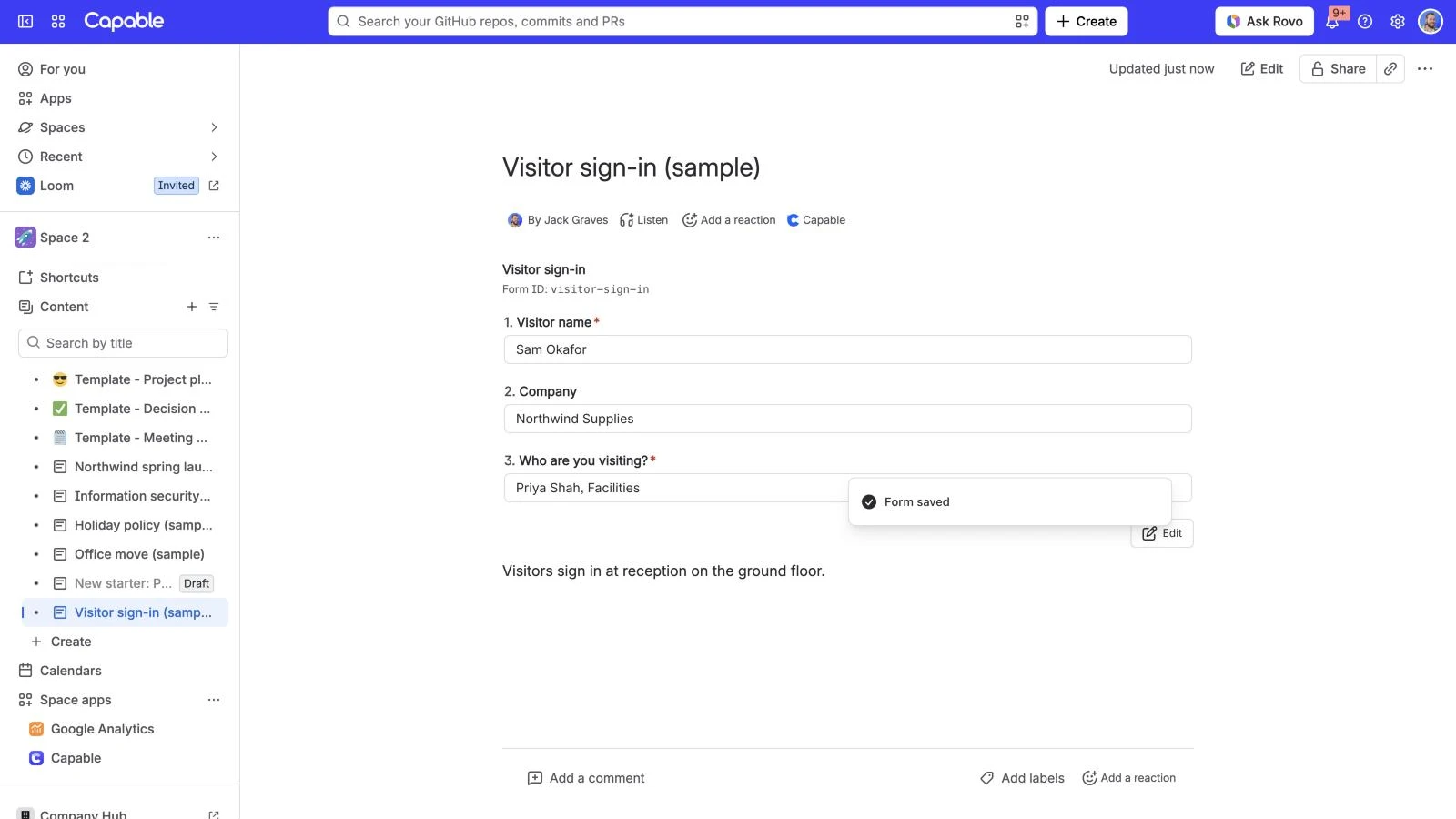
Be clear about what it isn't: each page holds one set of answers (it's a structured record, like a new starter page, rather than a survey), anyone who can view the page can read them, and there's no anonymous or external submission. The Standard edition has single-line text fields; the other nine input types need Advanced. Add a form to a Confluence page in the docs has the full walkthrough.
Capable Forms comes with Capable for Confluence, the All-in-One app.
Try Capable for Confluence free on the Atlassian Marketplace
See everything Capable Forms does
Frequently asked questions
Does Confluence have a built-in form builder?
No. Atlassian's macro list has no form macro. The native workarounds are a template with variables, a database, a Jira form (each response becomes a Jira work item) or an embedded Google or Microsoft form.
How do I create a data entry form in Confluence?
Create a database, add a field for each piece of information, then add rows with + Add entry. In card or board layout, + Add entry opens an entry form. For one page per entry, use a template with variables instead.
How do I create a fillable form in Confluence?
A space admin creates a template and adds variables with /variable (Text, Multi-line Text or List). When someone creates a page from the template, Confluence shows a form with a field for each variable and puts the answers into the page.
Can I embed Microsoft Forms or Google Forms in Confluence?
Yes. Copy the form's embed link, then add the iFrame macro to the page and paste it in. The answers stay in Google or Microsoft, not in Confluence, and readers need whatever access the form requires.
Is there a Confluence forms macro?
Not from Atlassian. Marketplace apps add one; Capable Forms adds Form (Capable) and Input (Capable) macros that put fillable fields on a page.
Atlassian, Confluence and Jira are trademarks of Atlassian Pty Ltd. Google Forms is a trademark of Google LLC; Microsoft Forms is a trademark of Microsoft Corporation. Capable Works Limited is not affiliated with Atlassian, Google or Microsoft.