Comparison

Refined Macro Toolkit vs Capable for Confluence

Capable for Confluence brings 38 formatting macros that share one brand, a migrator that turns Refined macros into native Confluence content or Capable macros, and diagrams, approvals, search and more under the same licence. Here it is beside Refined Macro Toolkit, every claim checked against each vendor's own documentation.

  • Last checked 11 November 2026
  • 38 cited sources

Works insideCloud

The short answer

Formatting in Capable for Confluence is 38 macros, from banners, cards, galleries and buttons to tabs, progress trackers, footnotes, tables, HTML and LaTeX. Every macro is set up through a form, the colour controls in twenty-two of them draw on one set of brand themes, and twenty can start from a preset your administrator saved. Diagrams, approvals, search, Markdown, calendars and more come in the same app.

Moving from Refined Macro Toolkit does not mean rebuilding pages. Capable's migrator converts Refined macros in place, and most of them become native Confluence content. Tabs, expands, steps and panels turn into native expands, numbered tables and panels, and news, page trees and activity streams turn into Confluence's own macros, which keep working with no app at all.

Refined Macro Toolkit is the better fit if you need Confluence Data Center, an app that runs entirely on Atlassian's infrastructure, live lists of Jira work items on your pages, or macros that work on a Refined Sites site. For formatting on Confluence Cloud, Capable for Confluence does a good deal more, and at 50 users it listed at US$500 a year on 11 November 2026, against US$825 for Refined Macro Toolkit.

More than a box of macros

Formatting is one part of Capable for Confluence, built so a page made from six different macros still looks like one page.

Set your brand once

An administrator sets five colour roles in a theme, and the colour control in twenty-two macro forms starts from your colours. Presets let a team start new macros from the house configuration, and freeform colours can be switched off so pages stay on brand.

  • 38 formatting macros
  • Five brand colour roles
  • Up to ten presets per macro

See the difference

Screens from real Confluence pages. Where both sides are shown, the same page was built once in Refined Macro Toolkit and once in Capable for Confluence, with the same text and links.

1 / 3

Why Capable

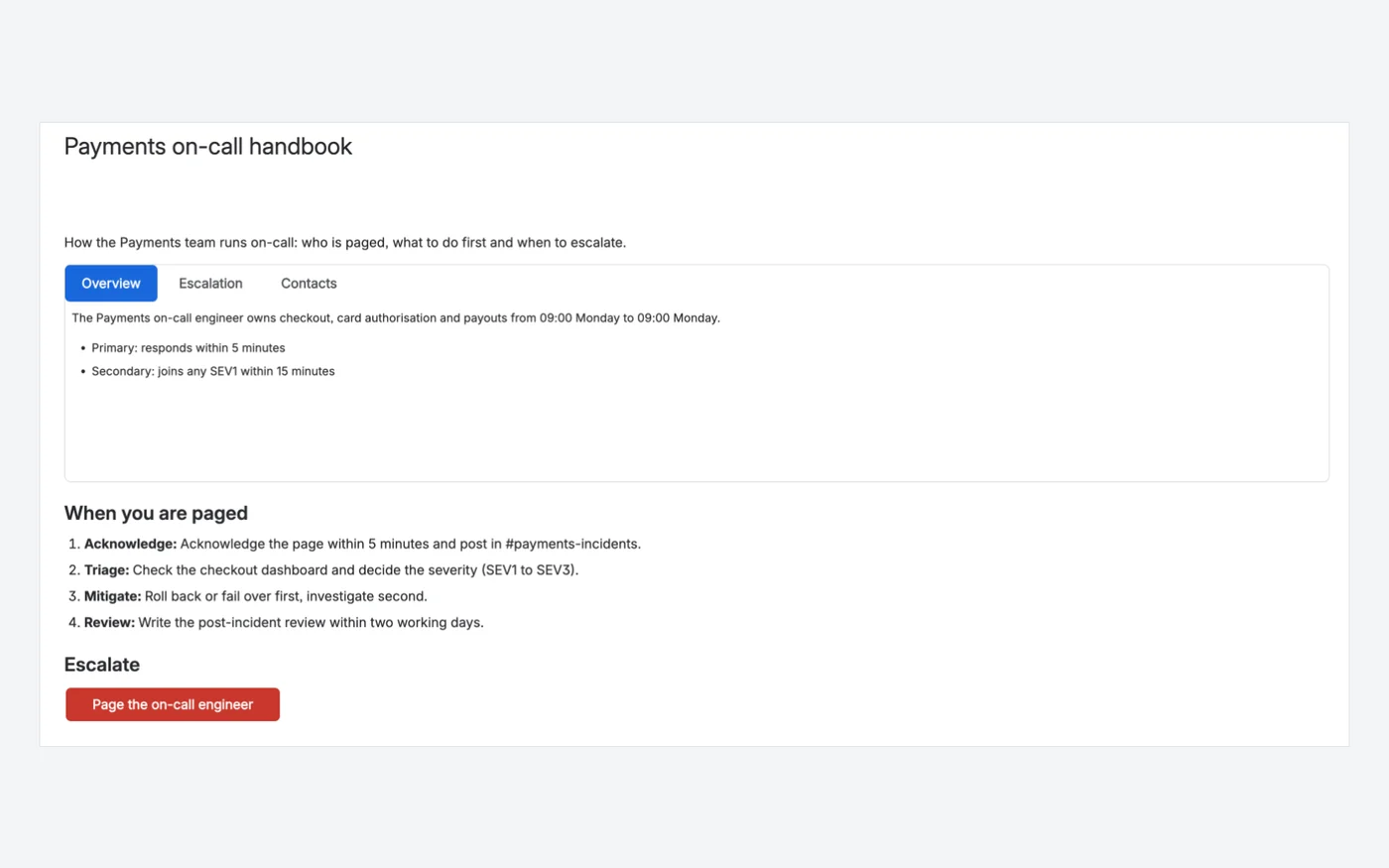
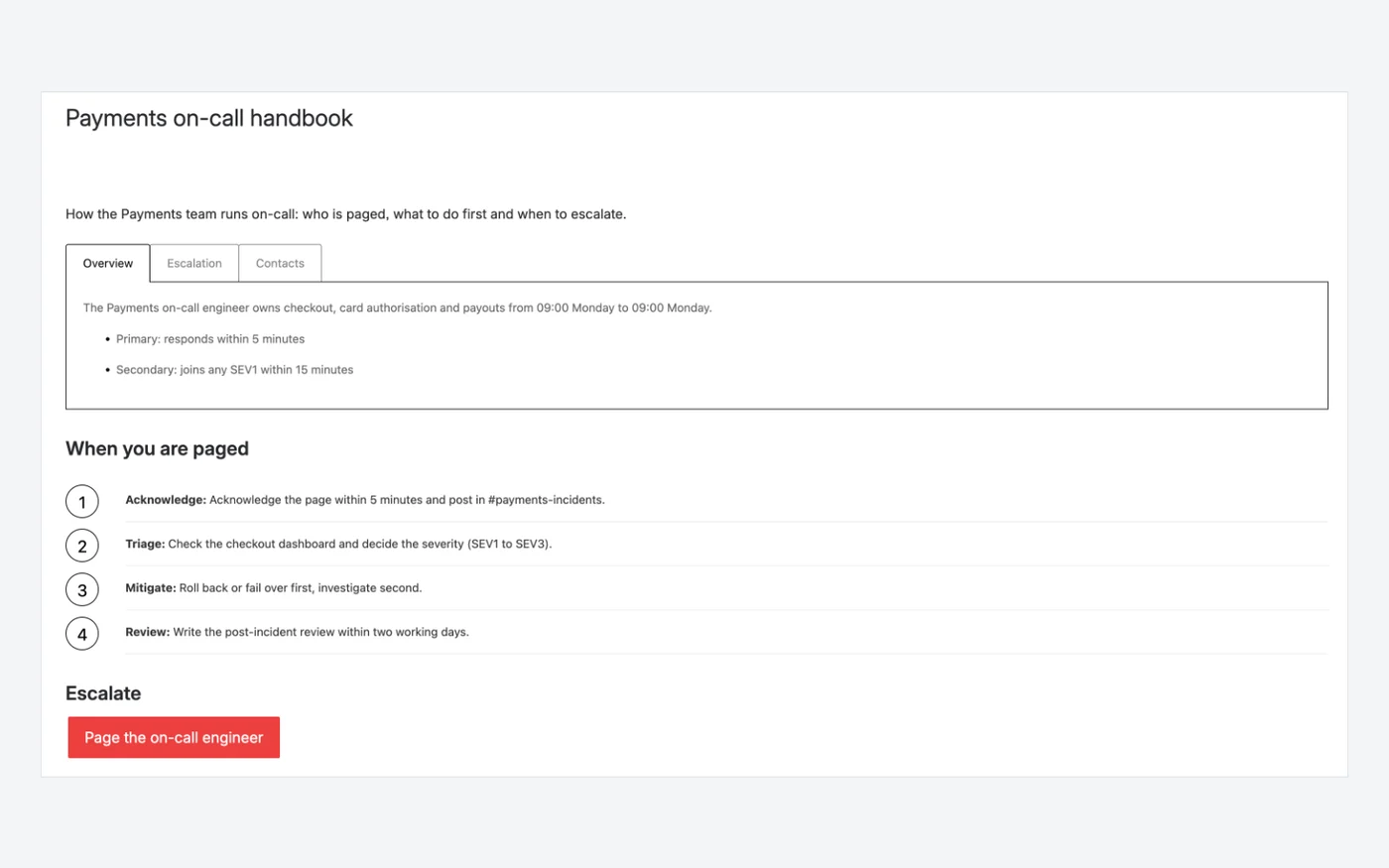
An on-call handbook, side by side

The same Payments on-call page: three tabs, the four steps to follow when paged and an escalation button.

  • Four tab styles, three sizes, brand colours
  • Text, tables, images and macros inside a tab
  • Button colours from your brand palette or custom
Capable for ConfluenceCapable for Confluence page with a solid-style tab group, a numbered list and a red button
Capable for Confluence: Tabs, a native Confluence numbered list and Buttons.1934
Refined Macro ToolkitRefined Macro Toolkit page with tabs, numbered steps and a red button
Refined Macro Toolkit: Tabs, Steps and Button macros.383736

Why Capable

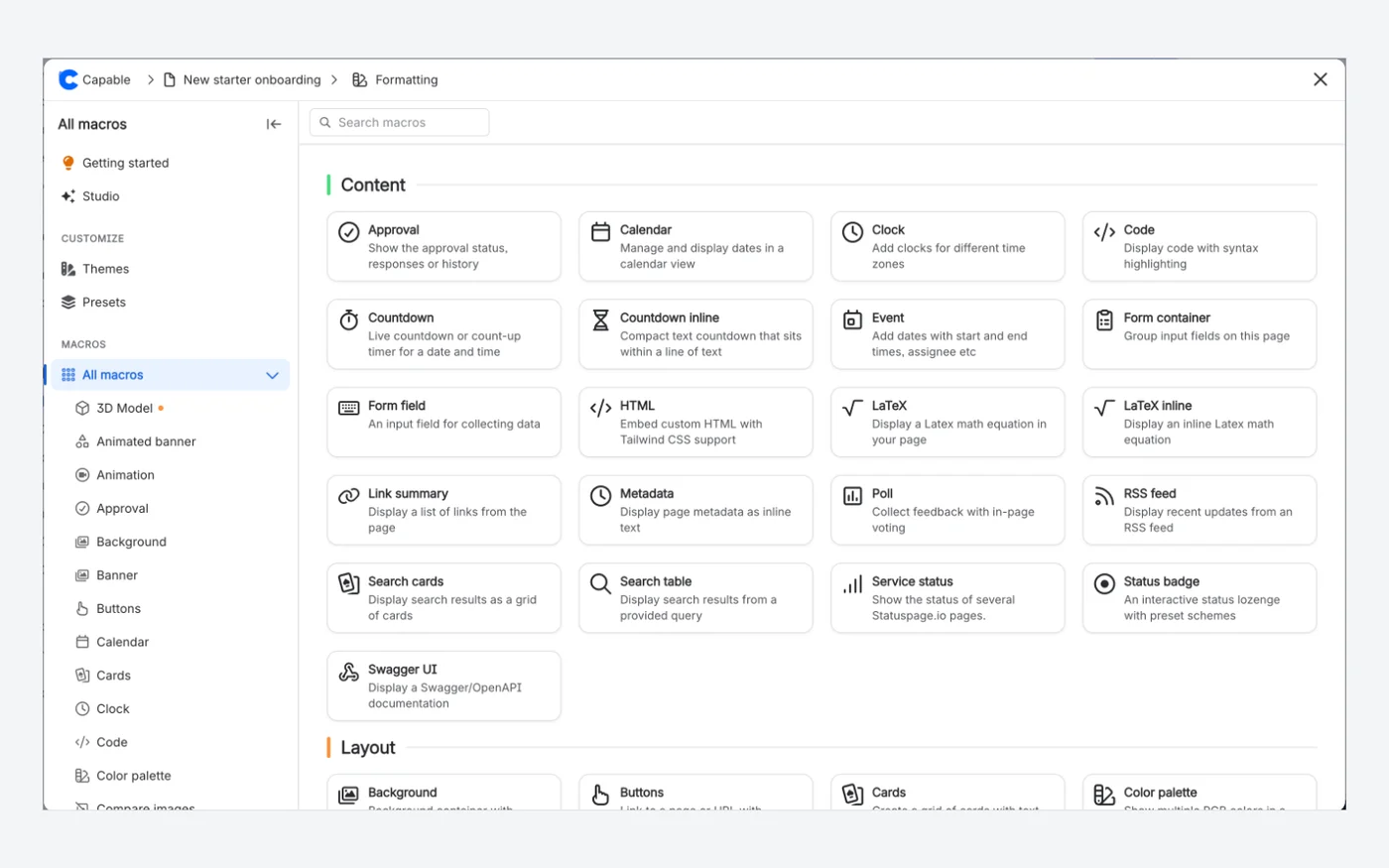
Every macro in one catalogue

Capable Studio opens the full Capable macro catalogue, grouped by category, with search, previews, templates and the configuration panel in the same window.

  • Search and browse every macro by category
  • Themes and Presets in the sidebar
  • Swapped for the real macro when you insert
Capable for ConfluenceCapable for Confluence macro catalogue listing Content and Layout macros with search, Themes and Presets
Capable for Confluence: the macro catalogue, with search, Themes and Presets.2435

Why Capable

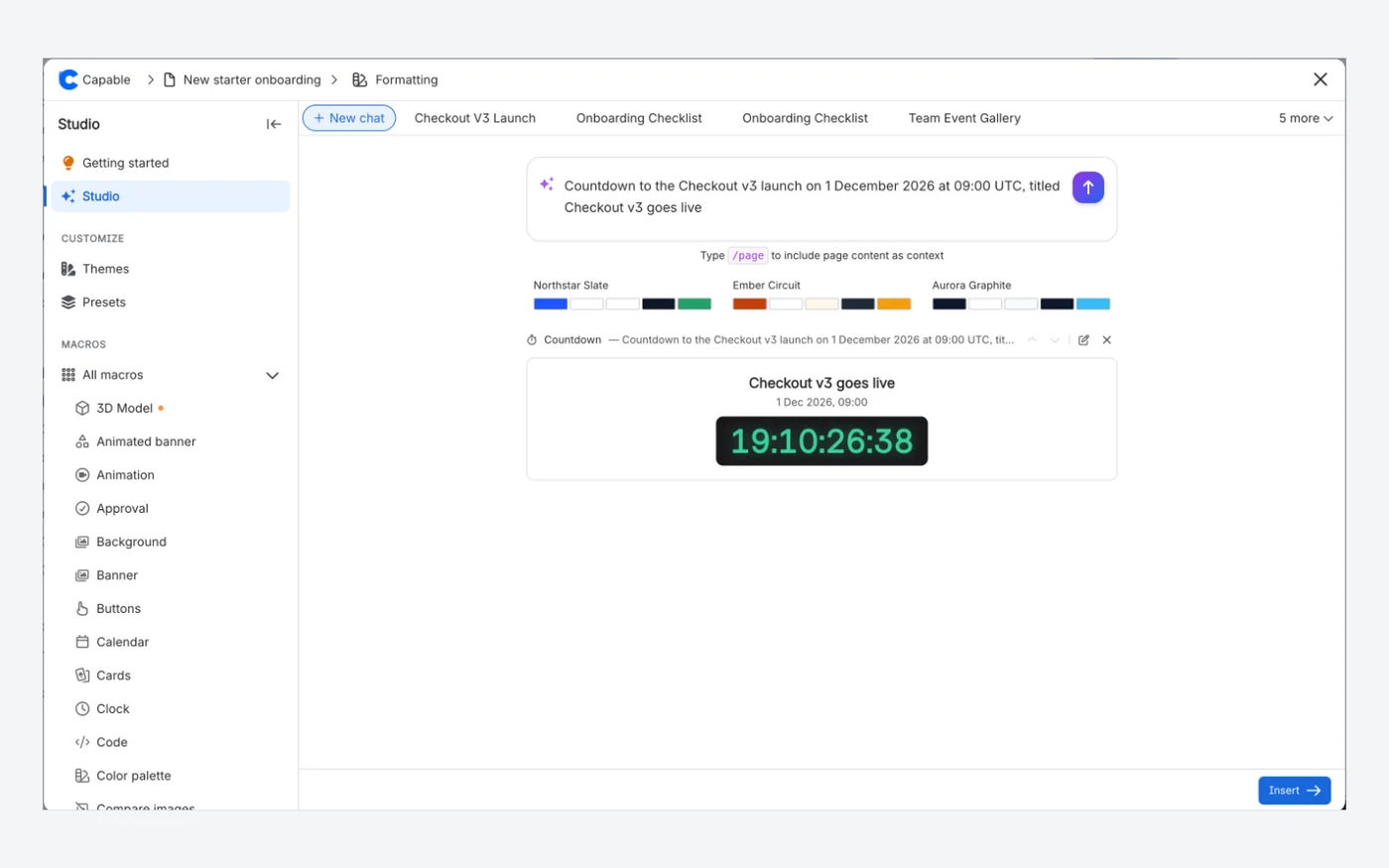
Describe a macro, get it configured

In Capable Studio, a prompt drafts macros you can preview before inserting. Here one prompt produced a launch countdown with the title, date and time already set.

  • One prompt can return several macros
  • Reorder, edit or remove each preview
  • Choose where they go, then insert them all
Capable for ConfluenceCapable Studio with the prompt "Countdown to the Checkout v3 launch on 1 December 2026 at 09:00 UTC, titled Checkout v3 goes live" and the generated countdown preview
Capable for Confluence: Capable Studio drafted this countdown from the prompt shown.24
Refined Macro Toolkit

Refined Macro Toolkit has no AI macro builder.

Not in the Refined Macro Toolkit listing or documentation.15

Which one fits your team?

For most teams on Confluence Cloud, Capable for Confluence does more. Here is why, and the few cases where we would point you at Refined Macro Toolkit instead.

Choose Capable for Confluence if…

  • You want migrated content that is not tied to any app. Refined tabs, expands, steps, panels, news, page trees and activity streams become native Confluence content.2830
  • You want more than the basics. Formatting in Capable for Confluence adds cards, galleries, interactive tables, footnotes, tooltips, Swagger and more.18
  • You want more for less. At 50 users Capable for Confluence listed at US$500 a year on 11 November 2026, against US$825 for Refined Macro Toolkit, and it includes far more than formatting.43
  • You also want diagrams, approvals, search, Markdown, calendars and more, in one app with one licence.1213
  • You want to switch without rebuilding pages, with a dry run first and every earlier page version kept in history.3132

Choose Refined Macro Toolkit if…

  • You run Confluence Data Center, or are moving from Refined Toolkit on Data Center and want the same vendor on both.12
  • Your security review requires an app that runs entirely on Atlassian's infrastructure. Refined lists Macro Toolkit as Forge Native, Runs on Atlassian.81
  • You publish Confluence content with Refined Sites. The listing calls Refined Sites a sister app, and Refined Sites lists Macro Toolkit among the Marketplace apps its sites support.111
  • You want a live list of Jira work items inside your Confluence pages. Capable has no Jira query macro, so its migrator reports these without converting them.928

Feature by feature

Each cell cites its source: Refined Macro Toolkit's own listing or documentation, or Capable's. A cross against Refined Macro Toolkit means the feature is in neither its listing nor its documentation. Checked 11 November 2026.

  • Available
  • Not available
  • For context
  • Kept simple, on purpose
Macros
FeatureRefined Macro ToolkitCapable for Confluence
Tabs and expandsAvailable:Tabs and Expand Panel Group macros.15Available:Tabs macro with four header styles, three sizes, horizontal or vertical layout and brand colours; expands use Confluence's own.1930
Panels and backgroundsAvailable:Panel macro. Background is documented as view-only, kept for Data Center compatibility.17Available:Background macro for coloured or photo-backed sections; plain panels use Confluence's own.1830
Buttons and bannersAvailable:Button and Banner macros.16Available:Buttons, Banner and Animated banner macros.18
Steps and progressAvailable:Steps macro.1Available:Progress tracker for numbered, optionally linked steps, plus Progress bar.18
CountdownAvailable:Countdown macro.15Available:Countdown in four styles, and Countdown inline.18
LaTeXAvailable:LaTeX macro.1Available:LaTeX math and LaTeX math inline macros, with a visual Live editing mode.1820
Numbered headingsAvailable:Numbered Headings and Numbered List.1Available:Numbered headings capability with built-in numbering templates and optional automatic re-sync.15
Cards, galleries, tables and footnotesNot available:Not among the macros in its listing or documentation.15Available:Cards, Gallery, interactive Table, Table from CSV, Footnote and Tooltip macros.18
Page lists and Jira
FeatureRefined Macro ToolkitCapable for Confluence
News, page tree and activityAvailable:News, Page tree, Child pages and Activity Stream macros.15Available:Saved searches go on a page as a table or as cards; migrated news, page trees and activity streams use Confluence's own macros.1628
Jira work itemsAvailable:Jira Work Items macro shows a live list from a project or JQL filter; Macro Toolkit must also be installed on the Jira site.9Not available:No Jira query macro.28
Consistency and authoring
FeatureRefined Macro ToolkitCapable for Confluence
BrandingAvailable:Macro theming sets main and supporting colours and corner rounding, and can allow or block custom colours.10Available:Brand themes with five colour roles, used by the colour control in twenty-two macro forms, with dark-mode colours derived; admins can switch off freeform colours.21
Saved configurationsFor context:A preset theme applies to the macros users insert.10Available:Admin presets on twenty macros, up to ten per macro with a default, plus starter templates for sixteen macros.2217
Buying and hosting
FeatureRefined Macro ToolkitCapable for Confluence
Beyond formattingFor context:Formatting macros; page building and navigation are in the separate Refined UI Toolkit, and sites in Refined Sites.1Available:Around twenty capabilities in one app: diagrams, approvals, search, Markdown, calendars, publishing and more.1213
PlatformAvailable:Forge Native, Runs on Atlassian: processes and stores data within Atlassian's environment.81For context:Built on Atlassian Forge with content stored in your Confluence site; some capabilities, such as diagram rendering, send content outside it.26
Confluence Data CenterAvailable:Data Center version on the Marketplace.2Kept simple, on purpose:Cloud only. Capable builds for Confluence Cloud and does not sell Data Center or Server apps.27

How pricing works

Both apps are bought through the Atlassian Marketplace and priced by your Confluence user tier. List prices change, so the savings calculator reads them live from each listing for the team size you set.

How much could you save?

Open the savings calculator with Refined Macro Toolkit already added, add any other apps you pay for, set your team size and compare the total with Capable.

Work out your saving

Annual price by team size

At 50 users, Capable for Confluence (All-in-One) costs US$325 a year less than Refined Macro Toolkit.

UsersRefined Macro ToolkitCapable for Confluence (All-in-One)Difference
10US$0US$0Same price
50US$825US$500US$325 less
100US$1,650US$1,000US$650 less
250US$3,150US$2,300US$850 less

Difference: Capable for Confluence (All-in-One) against Refined Macro Toolkit. At 10 users both are free. Atlassian Marketplace list prices for Cloud, annual licences in US dollars, checked 18 November 2026. Prices change; the listings have the current ones.

Price your own team in the savings calculator
  1. Both are billed through Atlassian and priced by your Confluence user tier.34

  2. On 11 November 2026 the Marketplace pricing data showed both free for up to 10 users on Cloud, and at 50 users an annual Cloud licence listed at US$825 for Refined Macro Toolkit and US$500 for Capable for Confluence on the Standard edition.34

  3. Formatting is in both editions of Capable for Confluence. Sites, Quality and Variables need Advanced. Forms is on Standard with only the plain text input.14

Moving from Refined Macro Toolkit

Capable's migrator recognises Refined's macros on Confluence Cloud, from the current app and older ones, and converts most of them in place. Where Confluence has its own element it uses that, so those parts of your pages no longer depend on any app.

  1. Tabs and expands become native expands, steps become numbered native tables, and panels, including the older XHTML text box, become native panels. Tabs turn into a stack of expandable sections rather than tabs, so tell authors before the run.

    Source 28, 30: Capable migration docs, Refined Toolkit for Confluence (Formatting)
  2. News becomes Confluence's blog posts list, Page Tree its page tree and Activity Stream its Recently Updated macro.

    Source 28: Capable migration docs, Refined Toolkit for Confluence (Formatting)
  3. Buttons, banners, countdowns, LaTeX and backgrounds become Capable macros, except the oldest Cloud version of Background, which becomes a grey native panel. Button labels, links, sizes and colours carry across, with colours mapped to the closest Capable style; tooltips do not, and a banner becomes a one-slide Capable Banner.

    Source 28: Capable migration docs, Refined Toolkit for Confluence (Formatting)
  4. Child Pages become Capable Search macros, which Capable for Confluence includes. Custom Code and Jira Work Items are found and counted, but left exactly as they are.

    Source 29, 28: Capable migration docs, Refined Toolkit for Confluence (Search)
  5. Start with a dry run on one space, which writes nothing. A real run writes a new page version, so earlier versions with the Refined macros stay in page history. Keep Refined installed until you have reviewed the results.

    Source 32, 33: Capable migration docs, Test a Confluence migration with a dry run

Questions people ask

About moving from Refined Macro Toolkit to Capable for Confluence.

Is Capable for Confluence a Refined Macro Toolkit alternative?

For formatting on Confluence Cloud, yes. It has 38 formatting macros, including tabs, buttons, banners, backgrounds, countdowns, progress trackers and LaTeX, plus cards, galleries, tables, footnotes and HTML, with colours from one set of brand themes, with diagrams, approvals and search in the same app. It is not available for Data Center and has no Jira work items macro.
Source: Capable Formatting docs, What Capable Formatting is

Can I move my Refined pages to Capable without rebuilding them?

For most macros, yes. The migrator converts tabs, expands, steps, panels, buttons, news, page trees, activity streams, banners, countdowns, backgrounds, LaTeX and the XHTML text box in place, and reports Custom Code and Jira Work Items without changing them.
Source: Capable migration docs, Refined Toolkit for Confluence (Formatting)

Will my pages still work if we uninstall Capable later?

The parts that became native Confluence content keep working with no app. Capable macros stay on the page but do not render while Capable is uninstalled.
Source: Capable for Confluence docs, Uninstalling, what is kept and what is deleted

What happens to Refined tabs?

They become native Confluence expands, one per tab, so the content stays readable, searchable and exportable without any app. Capable also has its own Tabs macro if you want tabs on new pages.
Source: Capable migration docs, Why we migrate to native Confluence where we can

Do Refined Child Pages macros come across?

Yes, as Capable Search macros. Search is part of Capable for Confluence, so nothing else needs installing.
Source: Capable migration docs, Refined Toolkit for Confluence (Search)

Try it on your own pages

Installing Capable for Confluence starts a free trial with every macro, brand themes, presets and the migrator, ready to run a dry run on your Refined pages.

Sources

Last checked

Claims about Refined Macro Toolkit come from its vendor's own documentation and its Atlassian Marketplace listing. Claims about Capable come from our documentation at help.gocapable.com. Products change; if something here is out of date, tell us and we will correct it.

  1. Refined Macro Toolkit (Content Formatting Macros), Atlassian Marketplace listing (Cloud)Atlassian Marketplace · marketplace.atlassian.com/apps/1211136/refined-macro-toolkit-content-formatting-macros · checked 11 November 2026
  2. Refined Macro Toolkit, Atlassian Marketplace listing (Data Center)Atlassian Marketplace · marketplace.atlassian.com/apps/1211136/refined-macro-toolkit-content-formatting-macros · checked 11 November 2026
  3. Refined Macro Toolkit, Marketplace pricing (Cloud)Atlassian Marketplace · marketplace.atlassian.com/apps/1211136/refined-macro-toolkit-content-formatting-macros · checked 11 November 2026
  4. Capable for Confluence (All-in-One), Marketplace pricing (Cloud)Atlassian Marketplace · marketplace.atlassian.com/apps/1234376/capable-for-confluence-all-in-one · checked 11 November 2026
  5. Refined Macro Toolkit docsVendor documentation · help.refined.com/space/MACROTOOLKIT · checked 11 November 2026
  6. Refined docs, Banner macroVendor documentation · help.refined.com/space/MACROTOOLKIT/5958139915 · checked 11 November 2026
  7. Refined docs, Background macroVendor documentation · help.refined.com/space/MACROTOOLKIT/6034391052 · checked 11 November 2026
  8. Refined docs, Macro Toolkit: Forge Native/Runs on AtlassianVendor documentation · help.refined.com/space/MACROTOOLKIT/6828064785 · checked 11 November 2026
  9. Refined docs, Jira Work Items macroVendor documentation · help.refined.com/space/MACROTOOLKIT/7414382594 · checked 11 November 2026
  10. Refined docs, Macro themingVendor documentation · help.refined.com/space/MACROTOOLKIT/6193479786 · checked 11 November 2026
  11. Refined Sites docs, Supported Atlassian Marketplace appsVendor documentation · help.refined.com/space/CLOUDDOCS/5661753386/Supported+Atlassian+Marketplace+apps · checked 11 November 2026
  12. Capable for Confluence docs, What Capable for Confluence isCapable · help.gocapable.com/capable/what-capable-for-confluence-is · checked 11 November 2026
  13. Capable for Confluence docs, CapabilitiesCapable · help.gocapable.com/capable/capabilities · checked 11 November 2026
  14. Capable for Confluence docs, EditionsCapable · help.gocapable.com/capable/editions · checked 11 November 2026
  15. Capable for Confluence docs, Numbered headingsCapable · help.gocapable.com/capable/numbered-headings · checked 11 November 2026
  16. Capable Search docsCapable · help.gocapable.com/search/ · checked 11 November 2026
  17. Capable Formatting docs, What Capable Formatting isCapable · help.gocapable.com/macros/what-capable-formatting-is · checked 11 November 2026
  18. Capable Formatting docs, All macrosCapable · help.gocapable.com/macros/all-macros · checked 11 November 2026
  19. Capable Formatting docs, TabsCapable · help.gocapable.com/macros/tabs · checked 11 November 2026
  20. Capable Formatting docs, LaTeX mathCapable · help.gocapable.com/macros/latex-math · checked 11 November 2026
  21. Capable Formatting docs, Brand and colourCapable · help.gocapable.com/macros/brand-and-colour · checked 11 November 2026
  22. Capable Formatting docs, Macro presetsCapable · help.gocapable.com/macros/macro-presets · checked 11 November 2026
  23. Capable Formatting docs, Generating macro content with AICapable · help.gocapable.com/macros/generating-macro-content-with-ai · checked 11 November 2026
  24. Capable Formatting docs, Capable StudioCapable · help.gocapable.com/macros/capable-studio · checked 11 November 2026
  25. Capable for Confluence docs, Uninstalling, what is kept and what is deletedCapable · help.gocapable.com/capable/uninstalling-what-is-kept-and-what-is-deleted · checked 11 November 2026
  26. Capable trust docs, How Capable apps are builtCapable · help.gocapable.com/trust/how-capable-apps-are-built · checked 11 November 2026
  27. Capable, About us (FAQ on Cloud, Data Center and Server)Capable · gocapable.com/about/about-us · checked 11 November 2026
  28. Capable migration docs, Refined Toolkit for Confluence (Formatting)Capable · help.gocapable.com/migration/refined-toolkit-for-confluence-formatting · checked 11 November 2026
  29. Capable migration docs, Refined Toolkit for Confluence (Search)Capable · help.gocapable.com/migration/refined-toolkit-for-confluence-search · checked 11 November 2026
  30. Capable migration docs, Why we migrate to native Confluence where we canCapable · help.gocapable.com/migration/why-we-migrate-to-native-confluence-where-we-can · checked 11 November 2026
  31. Capable Formatting docs, Migrating from another vendor's macrosCapable · help.gocapable.com/macros/migrating-from-another-vendor-s-macros · checked 11 November 2026
  32. Capable migration docs, Test a Confluence migration with a dry runCapable · help.gocapable.com/migration/test-a-confluence-migration-with-a-dry-run · checked 11 November 2026
  33. Capable migration docs, Before you uninstall the old appCapable · help.gocapable.com/migration/before-you-uninstall-the-old-app · checked 11 November 2026
  34. Capable Formatting docs, ButtonsCapable · help.gocapable.com/macros/buttons · checked 11 November 2026
  35. Capable for Confluence docs, Inserting macrosCapable · help.gocapable.com/capable/inserting-macros · checked 11 November 2026
  36. Refined Macro Toolkit docs, Button macroVendor documentation · help.refined.com/space/MACROTOOLKIT/5628723290 · checked 11 November 2026
  37. Refined Macro Toolkit docs, Steps macroVendor documentation · help.refined.com/space/MACROTOOLKIT/5999067140 · checked 11 November 2026
  38. Refined Macro Toolkit docs, Tabs macroVendor documentation · help.refined.com/space/MACROTOOLKIT/5628723838 · checked 11 November 2026

Cookie Settings

We take good care of you and your data. You can read more about how we use cookies, the third parties who set cookies and update your cookie settings here.