Comparison

Comala Document Management vs Capable for Confluence

Comala Document Management runs full document workflows with states, transitions and triggers. Capable for Confluence includes simpler page sign-off for Confluence Cloud, alongside diagrams, search and the rest of the suite. Here they are side by side, every claim checked against each vendor's own listing or documentation.

  • Last checked 11 November 2026
  • 33 cited sources

Works insideCloud

The short answer

Comala Document Management is a document control product. You build workflows with as many states as your process needs, move pages between them with transitions and triggers, and apply the same global workflow across spaces. If you run regulated, multi-stage document control, it does more than approvals in Capable for Confluence, and it runs on Data Center as well as Cloud.

Approvals in Capable for Confluence do one job, page sign-off, with nothing to design first. You pick reviewers or a team, set how many approvals pass a page and how many rejections block it, and send. Requests reach reviewers by email, and in Slack or Microsoft Teams with Approve and Reject buttons. Spaces can raise approvals automatically and route them by label, responses can be signed with an authenticator code, and an approved page can publish itself.

At 50 users Capable for Confluence listed at US$500 a year on 11 November 2026, against US$1,185 for Comala Document Management, and the same licence also covers diagrams, Markdown, search and calendars. Capable's migrator counts the pages that use Comala but does not convert its workflows, so sign-off is set up again in Capable.

See it in Capable for Confluence

Screens from a real Confluence page running Capable for Confluence approvals.

1 / 3

Why Capable

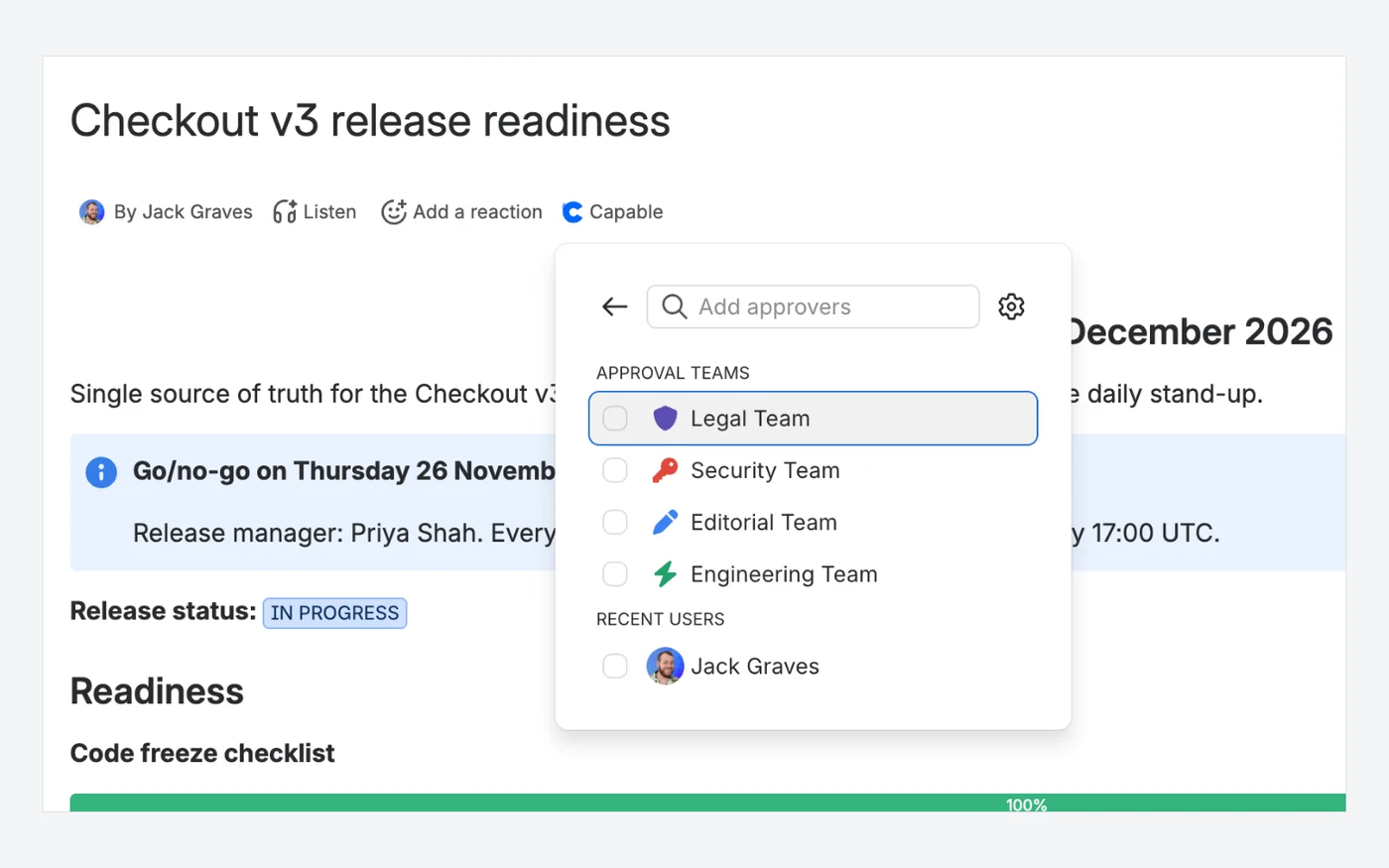
Ask the right people, from the page

Approval starts from the Capable row under the page title: pick a saved approval team or individual people, then send the request.

  • Teams bring their own quorum and expiry
  • Tick recent users or search for anyone
  • Ask five, need only two
Capable for ConfluenceCapable for Confluence approver picker listing approval teams (Legal, Security, Editorial, Engineering) and a recent user
Capable for Confluence: the approver picker, with approval teams and recent users.3215

Why Capable

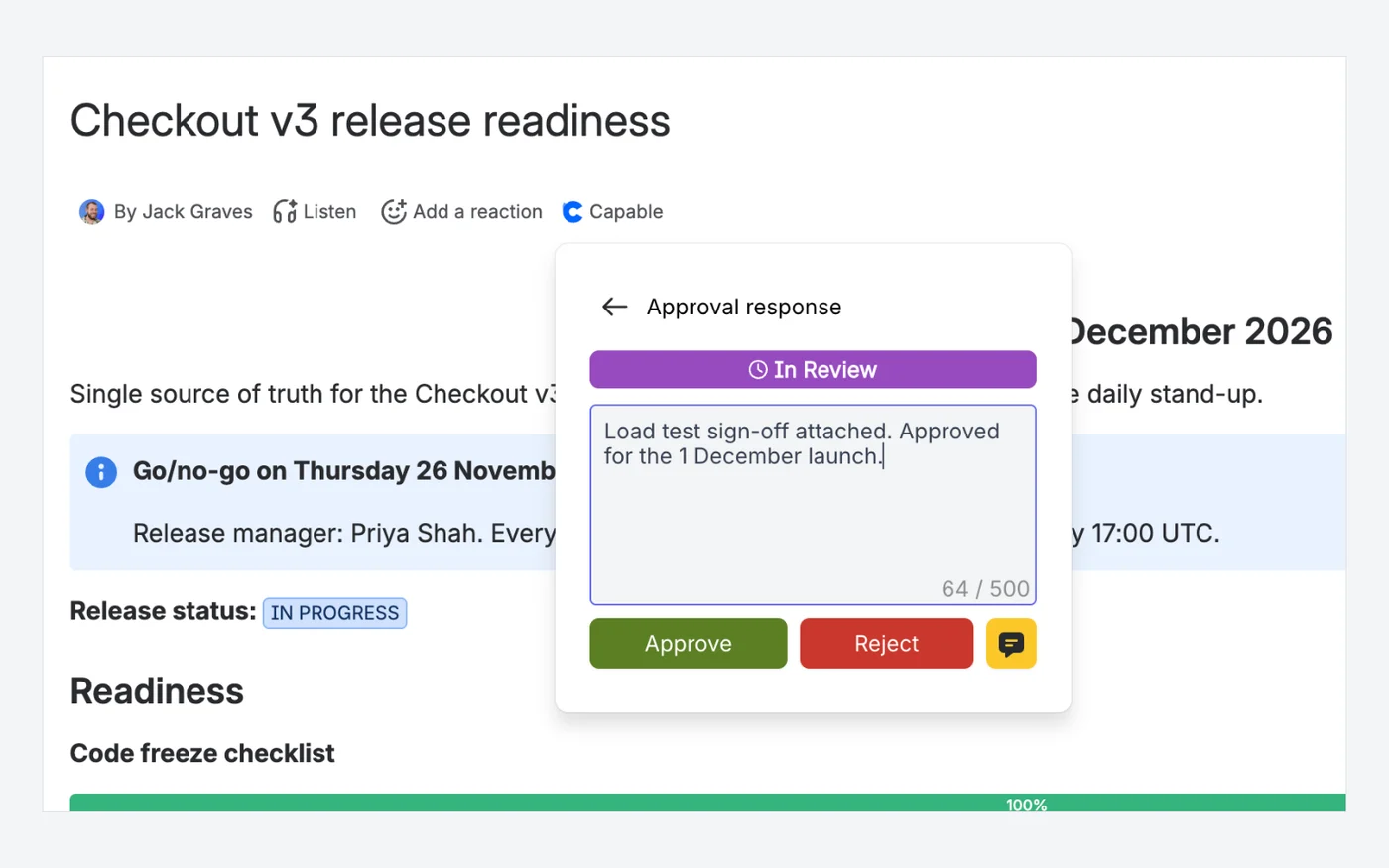
Approve or reject with a note

The approver opens the panel under the page title, adds a note if they like, and approves or rejects.

  • Approve, reject or just comment
  • Notes kept permanently in the history
  • Change your answer at any time
Capable for ConfluenceCapable for Confluence approval response panel showing In Review, a comment and Approve and Reject buttons
Capable for Confluence: the approval response panel, In Review, with a note and Approve and Reject.33

Why Capable

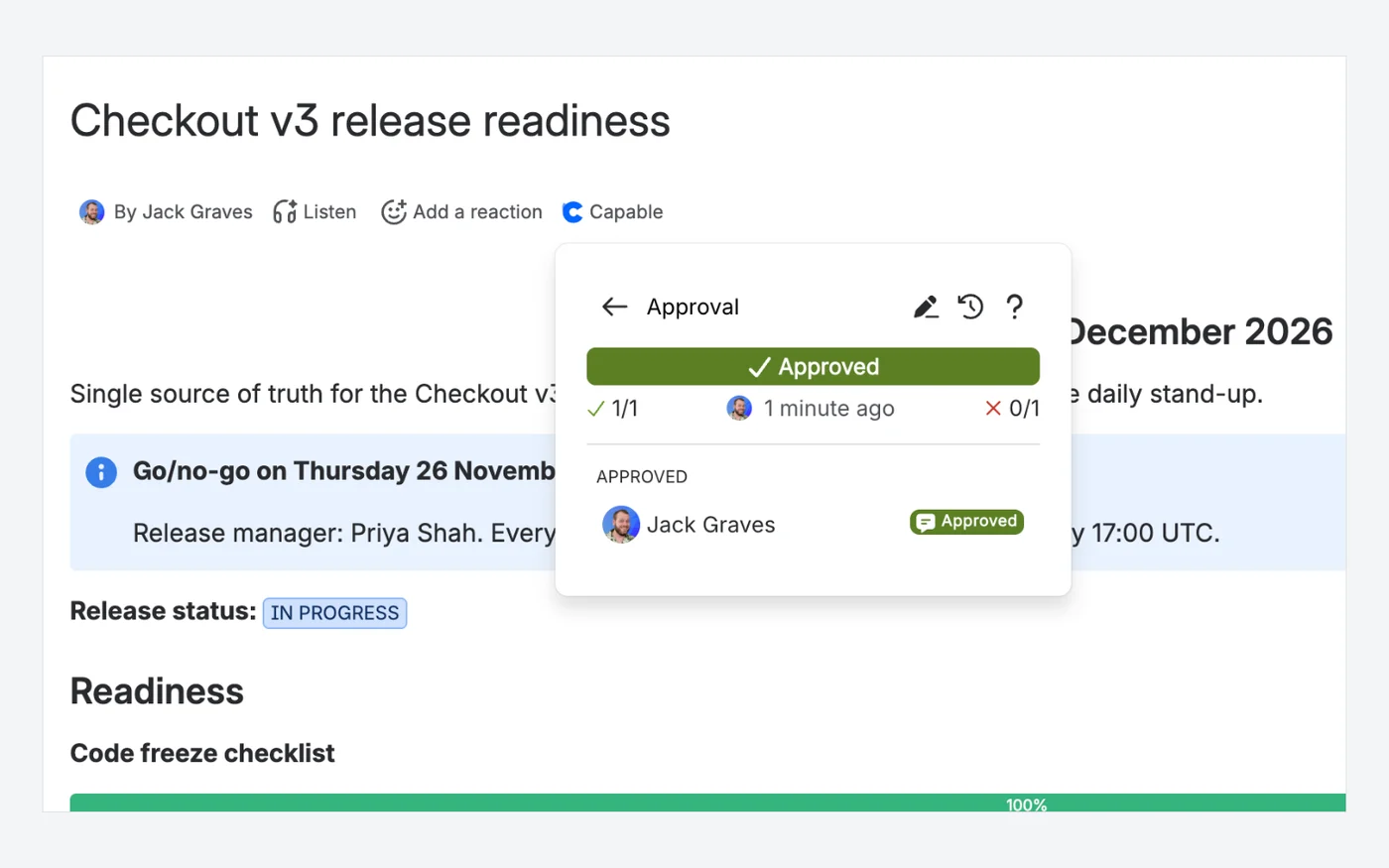
Approval status at a glance

Once approved, the panel shows the result, the approval and rejection counts and who approved, with the history one click away.

  • Approvals and rejections counted against the minimums
  • Each person has their own status
  • Every answer ever given kept in the history
Capable for ConfluenceCapable for Confluence approval panel showing Approved, 1 of 1 approvals and 0 of 1 rejections, with one approver listed
Capable for Confluence: an approved page, 1 of 1 approvals, with the approver listed.1433

Which one fits your team?

For most teams on Confluence Cloud, Capable for Confluence does more. Here is why, and the few cases where we would point you at Comala Document Management instead.

Choose Capable for Confluence if…

  • You want page sign-off without designing a workflow first. One request, one set of reviewers, a minimum number of approvals and rejections.13
  • Reviewers live in Slack or Microsoft Teams; requests arrive as messages with Approve and Reject buttons.2021
  • You want approvals raised automatically on new or updated pages, and routed to the right team by label.1617
  • A regulated process needs each response signed with a six-digit authenticator code, at no extra charge.23
  • You want an approved page published to another space the moment it passes, from the same app.2627
  • You also want diagrams, Markdown, search, calendars and more under the same licence, with approval reporting in search.3025

Choose Comala Document Management if…

  • You run regulated, multi-stage document control. Comala workflows have their own states, transitions between them and a final state, with one or more reviews in each state.45
  • You want one workflow defined centrally and kept in sync across many spaces. Linked global workflows cannot be edited at space level and pick up every update.6
  • You need triggers that act on workflow events, such as locking a page during review or setting an expiry date on approval.3
  • You run Confluence Data Center, or need the same app on Data Center and Cloud.19
  • You already use, or plan to use, Comala Publishing. Appfire documents it working with Comala Document Management to publish pages automatically when their workflow reaches its final state.10

Feature by feature

Each cell cites its source: Comala Document Management's own listing or documentation, or Capable's. A cross against Comala Document Management means the feature is in neither its listing nor its documentation. Checked 11 November 2026.

  • Available
  • With limits
  • Not available
  • Kept simple, on purpose
How the process is defined
FeatureComala Document ManagementCapable for Confluence
Workflow shapeAvailable:Custom workflows with multiple states, transitions and a final state, built in a visual editor.49Kept simple, on purpose:Single stage: one request, one set of reviewers, nothing to design.13
Reviews per stageAvailable:One or more approvals in each workflow state.5Kept simple, on purpose:One approval per page version, so the record is simple to read and audit.13
Same process across spacesAvailable:Global workflows applied to many spaces; linked copies sync every update.6With limits:Global approval teams can be used in every space, but each space enables them and sets its own rules. There is no shared workflow to sync.15
Workflow triggersAvailable:Triggers act on workflow events, such as emailing a reviewer or locking a page.3Kept simple, on purpose:No trigger language. Approvals are raised from space settings, not a workflow engine.1618
Asking for sign-off
FeatureComala Document ManagementCapable for Confluence
ReviewersAvailable:Users, Confluence groups and Confluence teams, with eligible and excluded reviewer lists.5Available:People, approval teams, or a team that follows a Confluence group.15
Minimum approvals and rejectionsAvailable:Unanimity, majority, or explicit minimum approvals and rejections.5Available:Set the minimum approvals and the minimum rejections on each request.13
Approval on new or updated pagesAvailable:Apply a workflow to a page or enable it for a whole space.3Available:Space settings raise an approval on every new page, on updates to pages that have never had one, or both. Edits to pages already in review or approved restart the review.16
Route reviewers by labelAvailable:Label-scoped global workflows apply a workflow to every page with a given label.6Available:Label rules send pages to different approval teams.17
Notifications
FeatureComala Document ManagementCapable for Confluence
EmailWith limits:Built-in email when content under the Content Expiry workflow expires; emails on assignment or approval are set up with send-email triggers.8Available:Emails to reviewers, requesters and watchers.19
Slack and Microsoft TeamsNot available:Not described in its Marketplace listing or Cloud documentation, which cover email and on-screen notifications.18Available:Direct messages with Approve and Reject buttons in Slack and in Microsoft Teams.2021
Keeping content current
FeatureComala Document ManagementCapable for Confluence
Re-review after editsAvailable:An update transition can send the page back to review, or approvals can reset after an update.45Available:The approval resets on every edit.12
Scheduled re-reviewAvailable:Due dates, and a Content Expiry workflow that notifies on the expiry date.38Available:Expiry brings pages back for review on an interval or an exact date.22
Evidence and publishing
FeatureComala Document ManagementCapable for Confluence
Signed responsesAvailable:E-signatures with a one-time code from an authenticator app (Cloud).79Available:Optional six-digit authenticator code on every response, at no extra charge.23
Audit and reportingAvailable:Audit trail, Document Report and Document Activity report, exportable to CSV.13Available:Append-only history tied to page versions; approval columns and CSV export in Capable Search.2425
Publish on approvalWith limits:Publishes on approval with the separate Comala Publishing app installed.110Available:The approved version is published to your target space.26
Hosting
FeatureComala Document ManagementCapable for Confluence
Confluence Data CenterAvailable:Data Center version on the Marketplace, as well as Cloud.1Kept simple, on purpose:Cloud only. Capable builds for Confluence Cloud and does not sell Data Center or Server apps.28

How pricing works

Both apps are bought through the Atlassian Marketplace and priced by your Confluence user tier. List prices change, so the savings calculator reads them live from each listing for the team size you set.

How much could you save?

Open the savings calculator with Comala Document Management already added, add any other apps you pay for, set your team size and compare the total with Capable.

Work out your saving

Annual price by team size

At 50 users, Capable for Confluence (All-in-One) costs US$685 a year less than Comala Document Management.

UsersComala Document ManagementCapable for Confluence (All-in-One)Difference
10US$0US$0Same price
50US$1,185US$500US$685 less
100US$2,370US$1,000US$1,370 less
250US$4,890US$2,300US$2,590 less

Difference: Capable for Confluence (All-in-One) against Comala Document Management. At 10 users both are free. Atlassian Marketplace list prices for Cloud, annual licences in US dollars, checked 18 November 2026. Prices change; the listings have the current ones.

Price your own team in the savings calculator
  1. Both are billed through Atlassian and priced by your Confluence user tier, not per approval or per reviewer.227

  2. On 11 November 2026 the Marketplace listed Comala Document Management at US$1,185 a year for 50 users on Cloud, and Capable for Confluence Standard at US$500. Both were free for up to 10 users.211

  3. Approvals are in both editions of Capable for Confluence, with eSignatures, Slack and Microsoft Teams approvals, publish on approval and approval reporting in search. Publishing in Comala needs the separate Comala Publishing app.27312110

Moving from Comala Document Management

Capable does not convert Comala workflows. Its migrator finds and counts the pages that have a Comala workflow so you can see how much you have, and leaves them exactly as they are.

  1. Comala is detected and reported only. Nothing on the page is rewritten, and no workflow state, approvals or history move to Capable.

    Source 29: Capable migration docs, Comala Document Management (Appfire)
  2. Multi-stage workflows have no Capable equivalent. If you move, you set up single-stage sign-off in Capable for Confluence and start new approvals there.

    Source 29, 13: Capable migration docs, Comala Document Management (Appfire)

Questions people ask

About moving from Comala Document Management to Capable for Confluence.

Is Capable for Confluence an alternative to Comala Document Management?

For page sign-off on Confluence Cloud, yes. For multi-stage document control with states, transitions and triggers, no. Approvals in Capable are a single stage, with one request and one set of reviewers.
Source: Capable Approval docs, How approvals work

Can I migrate my Comala workflows to Capable?

No. Capable's migrator counts the pages that use a Comala workflow and reports them, but it does not convert workflows, states, approvals or history.
Source: Capable migration docs, Comala Document Management (Appfire)

Can reviewers approve from Slack or Microsoft Teams?

Yes, once a Confluence administrator turns on approval actions. Requests arrive with Approve and Reject buttons. In a space that requires a signing code, the buttons are not offered and reviewers answer on the page.
Source: Capable Approval docs, Microsoft Teams

Can approvals be signed?

Yes. A space can require a six-digit code from an authenticator app on every response, at no extra charge.
Source: Capable Approval docs, Sign approvals with a code

Do reviewers need a separate licence?

They need a Confluence licence, exactly as they do to read the page. Licensing follows your Confluence user tier.
Source: Capable Approval docs, Plans and pricing

Try approvals in Capable for Confluence on your own pages

Installing starts a free trial, with approvals fully available, including eSignatures and automation.

Sources

Last checked

Claims about Comala Document Management come from its vendor's own documentation and its Atlassian Marketplace listing. Claims about Capable come from our documentation at help.gocapable.com. Products change; if something here is out of date, tell us and we will correct it.

  1. Comala Document Management, Atlassian Marketplace listingAtlassian Marketplace · marketplace.atlassian.com/apps/142/comala-document-management · checked 11 November 2026
  2. Comala Document Management, Marketplace pricing (Cloud)Atlassian Marketplace · marketplace.atlassian.com/apps/142/comala-document-management · checked 11 November 2026
  3. Appfire documentation, Comala Document Management Cloud, "Get started"Vendor documentation · support.appfire.com/space/CDMC/2192838067/Get+started · checked 11 November 2026
  4. Appfire documentation, Comala Document Management Cloud, "States"Vendor documentation · support.appfire.com/space/CDMC/2193066115 · checked 11 November 2026
  5. Appfire documentation, Comala Document Management Cloud, "Approvals"Vendor documentation · support.appfire.com/space/CDMC/2193195490/Approvals · checked 11 November 2026
  6. Appfire documentation, Comala Document Management Cloud, "Global workflows"Vendor documentation · support.appfire.com/space/CDMC/2276786309/Global+workflows · checked 11 November 2026
  7. Appfire documentation, Comala Document Management Cloud, "E-signatures (credentials)"Vendor documentation · support.appfire.com/space/CDMC/2192903044 · checked 11 November 2026
  8. Appfire documentation, Comala Document Management Cloud, "Notifications"Vendor documentation · support.appfire.com/space/CDMC/2193001238 · checked 11 November 2026
  9. Appfire documentation, Comala Document Management, "Product comparison" (Data Center and Cloud)Vendor documentation · support.appfire.com/space/CDMC/2192677102 · checked 11 November 2026
  10. Appfire documentation, Comala Document Management Cloud, "Automatically publish documents on approval to a public space - Comala Publishing"Vendor documentation · appfire.atlassian.net/wiki/spaces/CDMC/pages/2193196115 · checked 11 November 2026
  11. Capable for Confluence (All-in-One), Marketplace pricing (Cloud)Atlassian Marketplace · marketplace.atlassian.com/apps/1234376/capable-for-confluence-all-in-one · checked 11 November 2026
  12. Capable Approval docs, OverviewCapable · help.gocapable.com/approval/overview · checked 11 November 2026
  13. Capable Approval docs, How approvals workCapable · help.gocapable.com/approval/how-approvals-work · checked 11 November 2026
  14. Capable Approval docs, Approval statuses explainedCapable · help.gocapable.com/approval/approval-statuses-explained · checked 11 November 2026
  15. Capable Approval docs, Teams and assignmentCapable · help.gocapable.com/approval/teams-and-assignment · checked 11 November 2026
  16. Capable Approval docs, Automatic approvalsCapable · help.gocapable.com/approval/automatic-approvals · checked 11 November 2026
  17. Capable Approval docs, Route Confluence approvals to different reviewers by labelCapable · help.gocapable.com/approval/route-confluence-approvals-to-different-reviewers-by-label · checked 11 November 2026
  18. Capable Approval docs, Known limitationsCapable · help.gocapable.com/approval/known-limitations · checked 11 November 2026
  19. Capable Approval docs, NotificationsCapable · help.gocapable.com/approval/notifications · checked 11 November 2026
  20. Capable Approval docs, SlackCapable · help.gocapable.com/approval/slack · checked 11 November 2026
  21. Capable Approval docs, Microsoft TeamsCapable · help.gocapable.com/approval/microsoft-teams · checked 11 November 2026
  22. Capable Approval docs, Expiry and re-approvalCapable · help.gocapable.com/approval/expiry-and-re-approval · checked 11 November 2026
  23. Capable Approval docs, Sign approvals with a codeCapable · help.gocapable.com/approval/sign-approvals-with-a-code · checked 11 November 2026
  24. Capable Approval docs, What is recordedCapable · help.gocapable.com/approval/what-is-recorded · checked 11 November 2026
  25. Capable Approval docs, Search and reportingCapable · help.gocapable.com/approval/search-and-reporting · checked 11 November 2026
  26. Capable Approval docs, PublishingCapable · help.gocapable.com/approval/publishing · checked 11 November 2026
  27. Capable Approval docs, Plans and pricingCapable · help.gocapable.com/approval/plans-and-pricing · checked 11 November 2026
  28. Capable, About us (FAQ on Cloud, Data Center and Server)Capable · gocapable.com/about/about-us · checked 11 November 2026
  29. Capable migration docs, Comala Document Management (Appfire)Capable · help.gocapable.com/migration/comala-document-management-appfire · checked 11 November 2026
  30. Capable for Confluence docs, What Capable for Confluence isCapable · help.gocapable.com/capable/what-capable-for-confluence-is · checked 11 November 2026
  31. Capable for Confluence docs, EditionsCapable · help.gocapable.com/capable/editions · checked 11 November 2026
  32. Capable Approval docs, Request an approvalCapable · help.gocapable.com/approval/request-an-approval · checked 11 November 2026
  33. Capable Approval docs, Respond to a requestCapable · help.gocapable.com/approval/respond-to-a-request · checked 11 November 2026

Cookie Settings

We take good care of you and your data. You can read more about how we use cookies, the third parties who set cookies and update your cookie settings here.